Problem with basic search
-
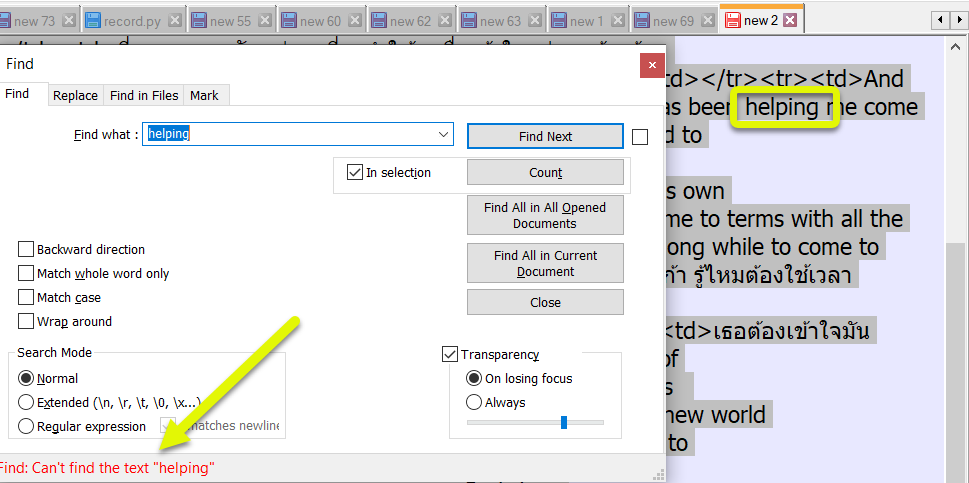
I must be doing something wrong, but I’m not sure what. Often, when I search for a term, no results are returned, despite that the term is present in the document. It seems to be something to do with having multiple tabs open. If I search in all opened documents, it will find the term. In the attached screenshot, I am expecting it to search in the currently selected tab, “new 2”, but it doesn’t find the term.
-
This post is deleted! -
@Keith-Leng try check the “Wrap around” checkbox
-
@Keith-Leng said in Problem with basic search:
but it doesn’t find the term.
I see the “in selection” button is ticked. Whilst it looks like the text in the background is selected, is it? If wanting to search an entire document untick the “in selection” button, just in case you do have only a portion selected which does NOT contain the term you are looking for.
Terry
-
So for your case it appears that you are pressing the Find Next button when this search fails? Is that correct?
If so, you should note that when you have a selection active (like we can see in the righthand part of your screenshot, that a downward search (like you’ve set) will start looking at and beyond the highest position of the selection in the direction of the end of the file. (Interestingly, a backward search – with Backward direction ticked – behaves differently!)
That’s why you don’t find
helpingin this example.The fact that In selection is ticked has no bearing on this search. If you’ll notice the group box around In selection and Count means that In Selection only applies to Count. So, for Find Next or Find All in Current Document…it is meaningless to have In selection ticked.
-
@Terry-R said in Problem with basic search:
I see the “in selection” button is ticked. Whilst it looks like the text in the background is selected, is it? If wanting to search an entire document untick the “in selection” button
@Alan-Kilborn said in Problem with basic search:
So for your case it appears that you are pressing the Find Next button when this search fails? Is that correct?
If so, you should note that when you have a selection active (like we can see in the righthand part of your screenshot, that a downward search (like you’ve set) will start looking at and beyond the highest position of the selection in the direction of the end of the file. (Interestingly, a backward search – with Backward direction ticked – behaves differently!)
That’s why you don’t find
helpingin this example.The fact that In selection is ticked has no bearing on this search. If you’ll notice the group box around In selection and Count means that In Selection only applies to Count. So, for Find Next or Find All in Current Document…it is meaningless to have In selection ticked.
Thanks for the replies. That was the problem. Sorry for my late reply. I didn’t get a notification.



Hello! It looks like you're interested in this conversation, but you don't have an account yet.
Getting fed up of having to scroll through the same posts each visit? When you register for an account, you'll always come back to exactly where you were before, and choose to be notified of new replies (either via email, or push notification). You'll also be able to save bookmarks and upvote posts to show your appreciation to other community members.
With your input, this post could be even better 💗
Register Login