DSpellChecker Keyboard Shortcuts
-
Hi there,
Are there any keyboard shortcuts for “Find next misspelling” to stop you having to open the window again and again.
The main problem is that when you ask the plugin to show you all the spelling errors it only does it for the visible lines, not the whole of the document (ie. you cannot scroll down 3 or 4 pages) or am I doing something wrong.
Comments please.
Thanks,
David -
You can assign a shortcut. Goto Settings->Shortcut Mapper->Plugins
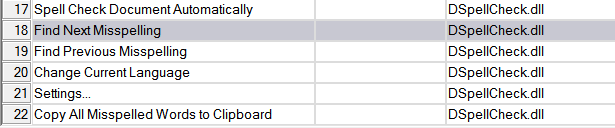
Or you can select Spell Check Document Automatically from DSpellChecks plugins menu


Hello! It looks like you're interested in this conversation, but you don't have an account yet.
Getting fed up of having to scroll through the same posts each visit? When you register for an account, you'll always come back to exactly where you were before, and choose to be notified of new replies (either via email, or push notification). You'll also be able to save bookmarks and upvote posts to show your appreciation to other community members.
With your input, this post could be even better 💗
Register Login