NPP cannot see etc\hosts file
-
I have the same problem of
https://community.notepad-plus-plus.org/topic/15974/file-open-dialog-not-showing-all-files-folders
but I use a 64-bits NPP. If I go to c:\Windows\System32\drivers I cannot see etc folder and few others.
That should be fixed in my opinion. NPP should work as Notetab in this case. -
It works for me with Notepad++ v7.9.1 64-bit.
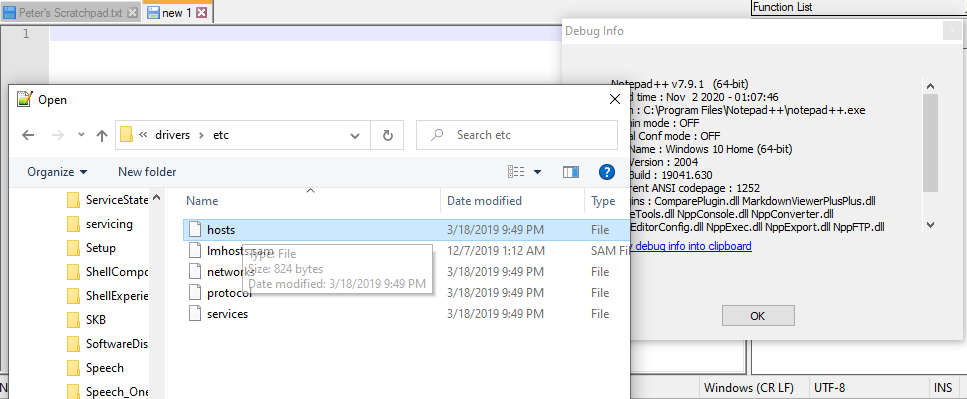
You might have a permissions issue (ie, maybe you cannot see the files that are owned by Administrator), or maybe you have Windows set up to hide protected or hidden files or folders (Windows Explorer > View > Options > Change Options > View, and look through those settings, seeing if any of those influence the behavior).
But there is nothing in Notepad++ itself that prevents you from seeing that folder or accessing those files. There is nothing to “fix” on the Notepad++ side.
-
Maybe you should have reiterated the “system redirector” point from THIS POST.
-
Good point. But since OP claims to be on 64-bit NPP, then the open dialog should be showing OP the real c:\windows\system32\drivers folder, because that is the official 64-bit path name.



Hello! It looks like you're interested in this conversation, but you don't have an account yet.
Getting fed up of having to scroll through the same posts each visit? When you register for an account, you'll always come back to exactly where you were before, and choose to be notified of new replies (either via email, or push notification). You'll also be able to save bookmarks and upvote posts to show your appreciation to other community members.
With your input, this post could be even better 💗
Register Login