Urls/hiperlinks
-
I can’t open my links with double click (i used to) in this new version (v.7.9.2).
And i can’t configure how people teach because the option doesn’t appear to me.
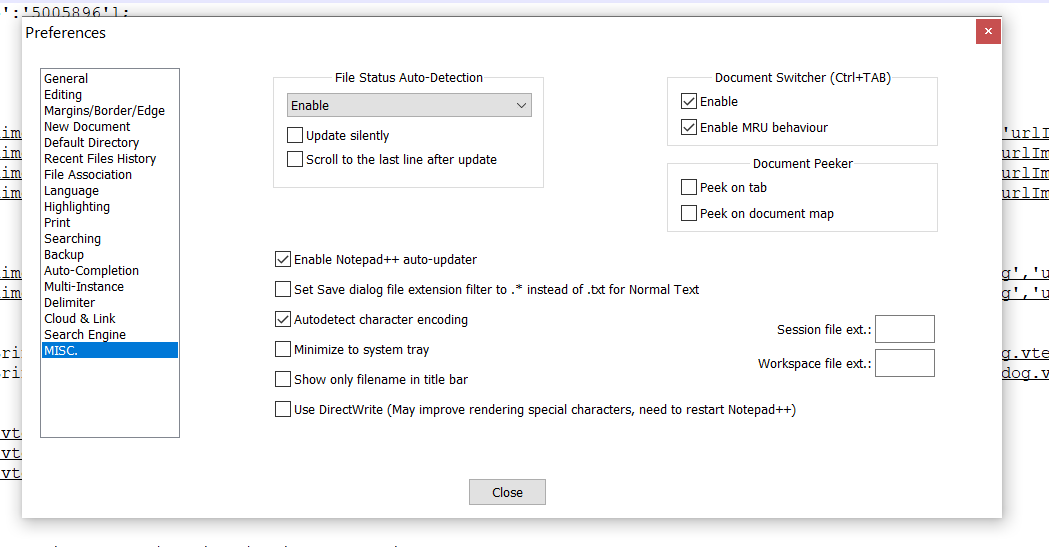
this is the instruction i found: Settings > Preferences > MISC., the Clickable Link Settings box, ☑ Enable and ☐ No Underline. When you hover over a URL with those settings, it will change color to indicate it’s a link, and double-clicking the link will follow the link in your default browser.
-
it is under
Cloud & Link. -
Perhaps it would help if you would fully show the text behind your Preferences window? As from what I can see of it, EVERYTHING is underlined and that is not right.
Links should be enabled by default, without you having to change any settings.



Hello! It looks like you're interested in this conversation, but you don't have an account yet.
Getting fed up of having to scroll through the same posts each visit? When you register for an account, you'll always come back to exactly where you were before, and choose to be notified of new replies (either via email, or push notification). You'll also be able to save bookmarks and upvote posts to show your appreciation to other community members.
With your input, this post could be even better 💗
Register Login