Community
    • Login

    backtick key on keyboard doing weird things when writing JS

    Scheduled Pinned Locked Moved Help wanted · · · – – – · · ·
    8 Posts 2 Posters 855 Views 1 Watching
    Loading More Posts
    • Oldest to Newest
    • Newest to Oldest
    • Most Votes
    Reply
    • Reply as topic
    Log in to reply
    This topic has been deleted. Only users with topic management privileges can see it.
    • rbjassoc66R Offline
      rbjassoc66
      last edited by

      I have an issue with the backtick key being somehow programmed to highlight ?? when I am writing a JS file ?? If I make a new file with a *.txt extension it works fine ?? Just when I have a file with a *.js extension ??

      EkopalypseE 1 Reply Last reply Reply Quote 1
      • EkopalypseE Offline
        Ekopalypse @rbjassoc66
        last edited by

        @rbjassoc66

        Backticks denote a raw string in java script hence the different coloring.

        rbjassoc66R 2 Replies Last reply Reply Quote 1
        • rbjassoc66R Offline
          rbjassoc66 @Ekopalypse
          last edited by

          @Ekopalypse oh I see because I only started with one of them it highlighted the next rows of code ! but placing the second one helped me understand :-) thankyou !!

          1 Reply Last reply Reply Quote 0
          • rbjassoc66R Offline
            rbjassoc66 @Ekopalypse
            last edited by

            @Ekopalypse where would I change the color of the highlighting ??

            EkopalypseE 1 Reply Last reply Reply Quote 1
            • EkopalypseE Offline
              Ekopalypse @rbjassoc66
              last edited by

              @rbjassoc66

              Use the Style Configurator to select your language and then select the appropriate entry in the Style column.

              Like
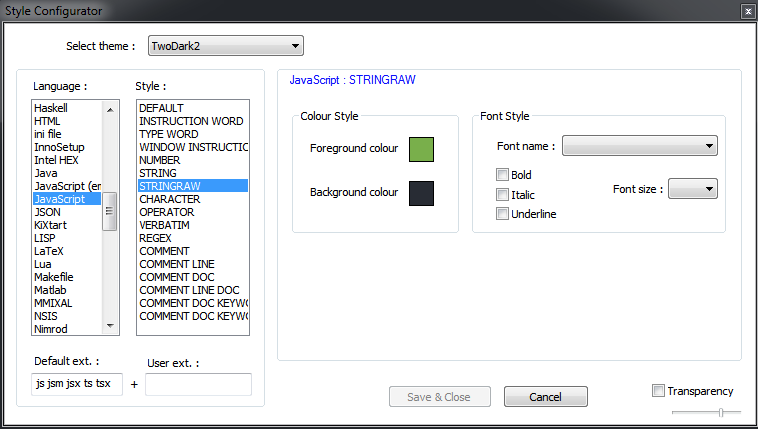
              5dc182fb-2797-4079-a51e-0339874d3f1f-image.png

              rbjassoc66R 1 Reply Last reply Reply Quote 2
              • rbjassoc66R Offline
                rbjassoc66 @Ekopalypse
                last edited by

                @Ekopalypse yep thankyou I stumbled onto that :-) I’m enjoying "Plastic code Wrap " :-)

                EkopalypseE 1 Reply Last reply Reply Quote 0
                • EkopalypseE Offline
                  Ekopalypse @rbjassoc66
                  last edited by

                  @rbjassoc66

                  Was a pleasure to help :-)
                  A word of warning: don’t expect a full list of supported
                  languages in a theme compared to the default theme.
                  Themes are community driven and not always up to date.

                  rbjassoc66R 1 Reply Last reply Reply Quote 0
                  • rbjassoc66R Offline
                    rbjassoc66 @Ekopalypse
                    last edited by

                    @Ekopalypse Ok thank you :-)

                    1 Reply Last reply Reply Quote 0

                    Hello! It looks like you're interested in this conversation, but you don't have an account yet.

                    Getting fed up of having to scroll through the same posts each visit? When you register for an account, you'll always come back to exactly where you were before, and choose to be notified of new replies (either via email, or push notification). You'll also be able to save bookmarks and upvote posts to show your appreciation to other community members.

                    With your input, this post could be even better 💗

                    Register Login
                    • First post
                      Last post
                    The Community of users of the Notepad++ text editor.
                    Powered by NodeBB | Contributors
