Community
    • Login

    How to integrate external lexer with NPP?

    Scheduled Pinned Locked Moved Notepad++ & Plugin Development
    14 Posts 4 Posters 2.5k Views 2 Watching
    Loading More Posts
    • Oldest to Newest
    • Newest to Oldest
    • Most Votes
    Reply
    • Reply as topic
    Log in to reply
    This topic has been deleted. Only users with topic management privileges can see it.
    • EkopalypseE Offline
      Ekopalypse
      last edited by

      Putting it into the menu isn’t the problem.
      I assume it is calling InsertMenu(A/W) at some point and is hooking
      the message queue to receive the click event.

      The problem starts when you want to appear it in the settings dialog and want npp to interact with it.

      All in all, you can make it work if you start subclassing everything npp offers.

      1 Reply Last reply Reply Quote 0
      • EkopalypseE Offline
        Ekopalypse @moon6969
        last edited by Ekopalypse

        @moon6969

        looks like I’m wrong, there is a way, npp knows something about external lexers.

        Edit: and this.

        1 Reply Last reply Reply Quote 0
        • EkopalypseE Offline
          Ekopalypse @moon6969
          last edited by Ekopalypse

          @moon6969

          looks like this is added when your plugin is identified
          as an lexer plugin. See here.

          Edit: you need to provide an xml file which describes your lexer.

          1 Reply Last reply Reply Quote 1
          • moon6969M Offline
            moon6969
            last edited by

            Thanks again - will be able to try some more based on highlighted NPP source.

            The issue is probably my imperfect understanding of C++ - especially exports etc!

            EkopalypseE 1 Reply Last reply Reply Quote 0
            • EkopalypseE Offline
              Ekopalypse @moon6969
              last edited by Ekopalypse

              @moon6969

              I don’t know if you are using PS, probably not but in case you do,
              here a little script which would check if your plugin has the exports
              and do act correctly.

              import ctypes
              from ctypes import wintypes
              
              external_lexer = ctypes.WinDLL(r'D:\temp\GedcomLexer\GedcomLexer.dll')
              
              GetLexerCount = external_lexer.GetLexerCount
              GetLexerName = external_lexer.GetLexerName
              GetLexerName.argtypes = [wintypes.UINT, 
                                       wintypes.LPCSTR,
                                       wintypes.INT]
              GetLexerStatusText = external_lexer.GetLexerStatusText
              GetLexerStatusText.argtypes = [wintypes.UINT,
                                             wintypes.LPCWSTR,
                                             wintypes.INT]
              
              GetLexerFactory = external_lexer.GetLexerFactory  # ??
              
              MAX_EXTERNAL_LEXER_NAME_LEN = 16 #+1
              MAX_EXTERNAL_LEXER_DESC_LEN = 32 #+1
              
              numLexers = GetLexerCount()
              print('Lexers:{}'.format(numLexers))
              lexName = ctypes.create_string_buffer(MAX_EXTERNAL_LEXER_NAME_LEN)
              lexDesc = ctypes.create_unicode_buffer(MAX_EXTERNAL_LEXER_DESC_LEN)
              
              for x in range(numLexers):
                  GetLexerName(x, lexName, MAX_EXTERNAL_LEXER_NAME_LEN)
                  print(lexName.value)
                  GetLexerStatusText(x, lexDesc, MAX_EXTERNAL_LEXER_DESC_LEN)
                  print(lexDesc.value)
              

              Testing with Gedcom lexer returns

              Lexers:1
              GEDCOM
              GEDCOM file
              

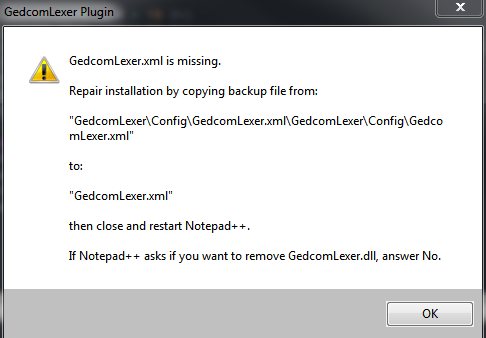
              and a Npp pop saying that the GedcomLexer.xml is missing.
              a3898e13-d916-4ebe-b276-3855455c5267-image.png

              Not a surprise as I just loaded the dll but did not install the plugin at all.

              Note, the GetLexerFactory is missing in the script.

              moon6969M 1 Reply Last reply Reply Quote 3
              • moon6969M Offline
                moon6969 @Ekopalypse
                last edited by

                @Ekopalypse Cool! It gave me expected count, but no name - I will investigate further tomorrow.

                EkopalypseE 1 Reply Last reply Reply Quote 1
                • EkopalypseE Offline
                  Ekopalypse @moon6969
                  last edited by Ekopalypse

                  Hello @moon6969 ,

                  how are you, I hope good.
                  One question, did you follow up on your lexer plugin?
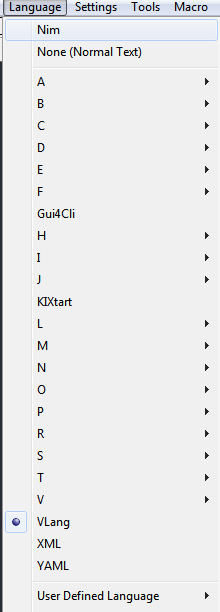
                  If so, one question, where does your lexer appear in the language menu?

                  What I see so far is that external lexers appear since 7.?? above the builtin lexers.
                  7df1548d-3031-4224-a813-5c2ea7b962cb-image.png

                  Like here the nim lexer.
                  What is strange is that my VLang lexer does not do this.
                  I just can’t figure out what I’m missing. Do you have any ideas?

                  1 Reply Last reply Reply Quote 1
                  • EkopalypseE Offline
                    Ekopalypse
                    last edited by

                    @moon6969
                    I think I have found it. It is a “feature”.
                    When the name of the lexer comes before the “normal text” lexer, from the alphabetical point of view, it appears before “normal text”, but when it comes after that, it appears below it, but inside the Builtin lexers. Hmm.

                    PeterJonesP 1 Reply Last reply Reply Quote 3
                    • PeterJonesP Offline
                      PeterJones @Ekopalypse
                      last edited by

                      @Ekopalypse said in How to integrate external lexer with NPP?:

                      @moon6969
                      I think I have found it. It is a “feature”.
                      When the name of the lexer comes before the “normal text” lexer, from the alphabetical point of view, it appears before “normal text”, but when it comes after that, it appears below it, but inside the Builtin lexers. Hmm.

                      I’d recommend pointing that out as a bug. I don’t know if they’ll fix it, but it should be officially documented.

                      Alan KilbornA 1 Reply Last reply Reply Quote 3
                      • Alan KilbornA Offline
                        Alan Kilborn @PeterJones
                        last edited by

                        It probably became a bug recently when None (Normal Text) was moved out of the N 's and up to the top.

                        Wasn’t I the one that said that change shouldn’t negatively impact anything (to @guy038)? :-)

                        @Ekopalypse Yea, it seems like you should put a bug report in on it.

                        1 Reply Last reply Reply Quote 3
                        • EkopalypseE Offline
                          Ekopalypse
                          last edited by

                          Issue 9516 opened

                          1 Reply Last reply Reply Quote 2

                          Hello! It looks like you're interested in this conversation, but you don't have an account yet.

                          Getting fed up of having to scroll through the same posts each visit? When you register for an account, you'll always come back to exactly where you were before, and choose to be notified of new replies (either via email, or push notification). You'll also be able to save bookmarks and upvote posts to show your appreciation to other community members.

                          With your input, this post could be even better 💗

                          Register Login
                          • First post
                            Last post
                          The Community of users of the Notepad++ text editor.
                          Powered by NodeBB | Contributors