Community
    • Login

    Notepad++ v7.9.3 Released

    Scheduled Pinned Locked Moved Announcements
    61 Posts 25 Posters 41.1k Views 6 Watching
    Loading More Posts
    • Oldest to Newest
    • Newest to Oldest
    • Most Votes
    Reply
    • Reply as topic
    Log in to reply
    This topic has been deleted. Only users with topic management privileges can see it.
    • geertsjG Offline
      geertsj @Alan Kilborn
      last edited by

      @Alan-Kilborn Yes, it exist: npp.jpg

      geertsjG 1 Reply Last reply Reply Quote 1
      • geertsjG Offline
        geertsj @geertsj
        last edited by

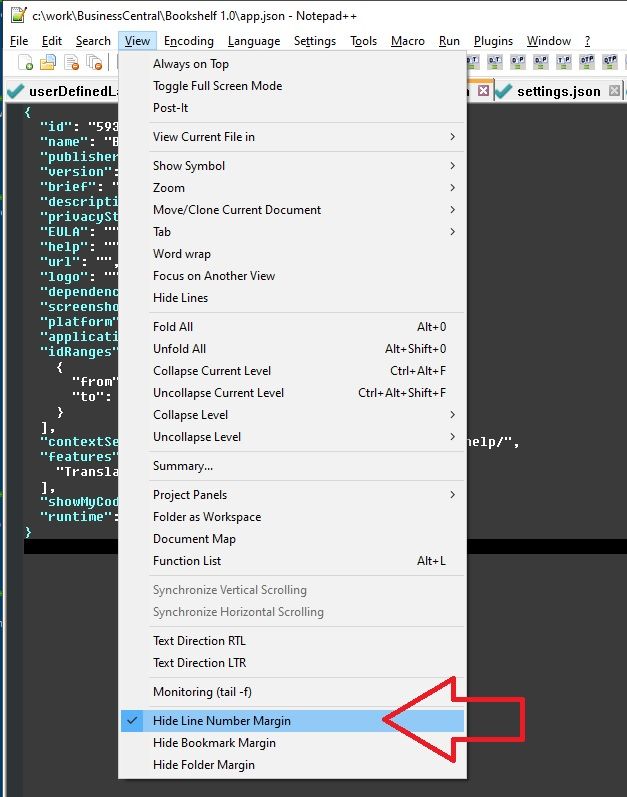
        It doesn’t work also in 7.3.2. See picture. I see the Line Numbers while I have selected View --> Hide Line Number Margin. In version 7.3.1. it works. It seems to be related to the new Line Number changes since 7.3.2.npp.jpg

        1 Reply Last reply Reply Quote 1
        • EkopalypseE Offline
          Ekopalypse
          last edited by

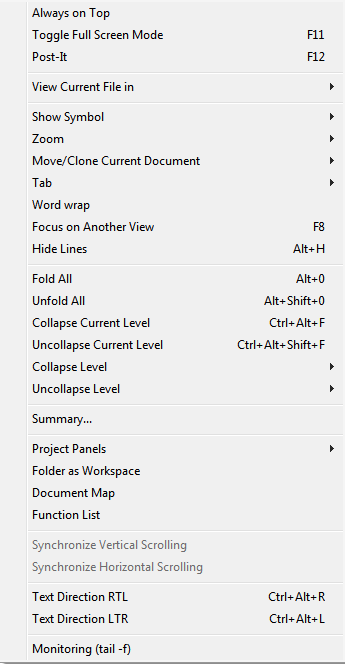
          There is no such menu entry in Npp

          f8f2573d-e6f0-4418-a048-24bacdb3b891-image.png

          It must be part of a plugin. Can you post your debug info which
          is available from the ? menu?

          geertsjG 1 Reply Last reply Reply Quote 1
          • guy038G Online
            guy038
            last edited by guy038

            Hello, @geertsj, @alan-kilborn and All,

            @geertsj, first, you said :

            It doesn’t work also in 7.3.2. See picture. I see the Line Numbers while I have selected View --> Hide Line Number Margin. In version 7.3.1. it works. It seems to be related to the new Line Number changes since 7.3.2.
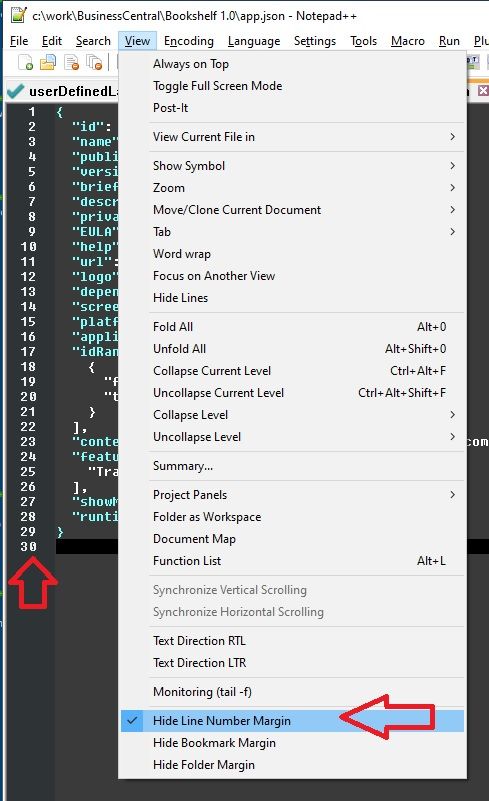
            I suppose that you wanted to say :

            It doesn’t work also in 7.9.2. See picture. I see the Line Numbers while I have selected View --> Hide Line Number Margin. In version 7.9.1. it works. It seems to be related to the new Line Number changes since 7.9.2.


            Now, it’s definitively not an Notepad++'s issue

            I think that, in each new release, you re-installed the CustomizeToolbar plugin. This is that plugin which adds the commands, below, inside the View menu !

            • Hide Line Numbers Margin

            • Hide Bookmark Margin

            • Hide Folder Margin

            And probably, you added these three commands to your context menu !


            And, as a new Margins/Border/Edge panel has been added to the Preferences dialog, since N++ v7.9.2, I suppose that you should contact the developer dave-user or create an issue here

            Best Regards,

            guy038

            geertsjG 1 Reply Last reply Reply Quote 2
            • geertsjG Offline
              geertsj @Ekopalypse
              last edited by

              @Ekopalypse The Debug-Info is:

              Notepad++ v7.9.3 (32-bit)
              Build time : Feb 14 2021 - 03:12:31
              Path : C:\tols\npp\notepad++.exe
              Admin mode : ON
              Local Conf mode : ON
              OS Name : Windows 7 Home Premium (64-bit)
              OS Build : 7601.0
              Current ANSI codepage : 1252
              Plugins : FingerText.dll HexEditor.dll NppExec.dll NppHorizontalRuler.dll _CustomizeToolbar.dll

              PeterJonesP Alan KilbornA 2 Replies Last reply Reply Quote 0
              • PeterJonesP Offline
                PeterJones @geertsj
                last edited by

                @geertsj said in Notepad++ v7.9.3 Released:

                @Ekopalypse The Debug-Info is:
                …
                Plugins : FingerText.dll HexEditor.dll NppExec.dll NppHorizontalRuler.dll _CustomizeToolbar.dll*

                As @guy038 explained, the Customize Toolbar plugin is what is providing those three menu options. If they don’t work with the newest Notepad++ version, you will have to take it up with the Customize Toolbar author, as the fix needs to be in the plugin, not in Notepad++

                1 Reply Last reply Reply Quote 0
                • Alan KilbornA Offline
                  Alan Kilborn @geertsj
                  last edited by

                  Does anybody else think that it is really dumb for a plugin called “Customize Toolbar” to modify the View menu in such a way?

                  1 Reply Last reply Reply Quote 2
                  • cesarmarcanoveC Offline
                    cesarmarcanove
                    last edited by

                    @Michael-Shulist said in Notepad++ v7.9.3 Released:

                    Hello. I’ve in Windows 8.1 Update 1. The app does not able opening application, may be error. I installed the v7.93 and opened app are failed and doesn’t show the app but if are a error silently. I decided to install the previous version v7.92 and also works!.

                    Alan KilbornA 1 Reply Last reply Reply Quote 0
                    • Alan KilbornA Offline
                      Alan Kilborn @cesarmarcanove
                      last edited by

                      @cesarmarcanove

                      Do you have SaveAsAdmin plugin?
                      For running 7.9.3 you need to remove it.

                      cesarmarcanoveC 2 Replies Last reply Reply Quote 1
                      • cesarmarcanoveC Offline
                        cesarmarcanove @Alan Kilborn
                        last edited by cesarmarcanove

                        This post is deleted!
                        1 Reply Last reply Reply Quote 0
                        • cesarmarcanoveC Offline
                          cesarmarcanove @Alan Kilborn
                          last edited by

                          @Alan-Kilborn Just released the version 1.0.211 from https://github.com/Hsilgos/nppsaveasadmin/releases

                          Removed “Save As…” feature and fixed crash.

                          Try compile it and voila!.

                          1 Reply Last reply Reply Quote 0
                          • Jean JonethalJ Offline
                            Jean Jonethal
                            last edited by

                            open file from network shar with UNC notation failed : \server\share\path\file.txt.

                            leading backslash is removed by file open dialog

                            Alan KilbornA Michael VincentM 2 Replies Last reply Reply Quote 0
                            • Alan KilbornA Offline
                              Alan Kilborn @Jean Jonethal
                              last edited by

                              @Jean-Jonethal

                              See point number 6 HERE.

                              1 Reply Last reply Reply Quote 0
                              • Michael VincentM Offline
                                Michael Vincent @Jean Jonethal
                                last edited by

                                This post is deleted!
                                Alan KilbornA 1 Reply Last reply Reply Quote 0
                                • Alan KilbornA Offline
                                  Alan Kilborn @Michael Vincent
                                  last edited by

                                  @Michael-Vincent said in Notepad++ v7.9.3 Released:

                                  That’s not UNC notation, you need 2 leading backslashes, not one.

                                  No. OP put the two leading backslashes in, and the error box that comes up says can’t-open and only shows one leading backslash there.

                                  Michael VincentM 1 Reply Last reply Reply Quote 2
                                  • Michael VincentM Offline
                                    Michael Vincent @Alan Kilborn
                                    last edited by

                                    @Alan-Kilborn said in Notepad++ v7.9.3 Released:

                                    No.

                                    Sorry, you’re right, I mis-read. Deleted my post - not sure that works though?

                                    Alan KilbornA 1 Reply Last reply Reply Quote 0
                                    • Alan KilbornA Offline
                                      Alan Kilborn @Michael Vincent
                                      last edited by Alan Kilborn

                                      @Michael-Vincent said in Notepad++ v7.9.3 Released:

                                      Deleted my post - not sure that works though?

                                      It works but sometimes it makes things more confusing as there is now a “hole” and potentially people responding to that hole. :-)

                                      1 Reply Last reply Reply Quote 1
                                      • geertsjG Offline
                                        geertsj @guy038
                                        last edited by

                                        @guy038 said in Notepad++ v7.9.3 Released:

                                        Margins/Border/Edge

                                        Alright, I have added a new ticket in Customize Toolbar forum.

                                        1 Reply Last reply Reply Quote 1
                                        • Alan KilbornA Alan Kilborn referenced this topic on
                                        • PeterJonesP PeterJones locked this topic on

                                        Hello! It looks like you're interested in this conversation, but you don't have an account yet.

                                        Getting fed up of having to scroll through the same posts each visit? When you register for an account, you'll always come back to exactly where you were before, and choose to be notified of new replies (either via email, or push notification). You'll also be able to save bookmarks and upvote posts to show your appreciation to other community members.

                                        With your input, this post could be even better 💗

                                        Register Login
                                        • First post
                                          Last post
                                        The Community of users of the Notepad++ text editor.
                                        Powered by NodeBB | Contributors