Lines containing the Unicode Word-Joiner U+2060 display oddly
-
Any line that contains the Unicode Word-Joiner
U+2060displays with a different font appearance for the whole line!Is this a quirk of the Scintilla engine?
-
My guess would be a quirk of the chosen font, rather than the Scintilla engine. You might want to try another font.
Hmm, actually, if I take
xy xy xy(where the second line has WJ between x and y)
With DejaVu Sans Mono:

Even MS notepad with Consolas has a bit of oddity (different line width, as seen by edge of selection):
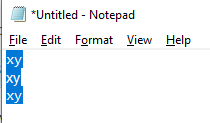
According to this U+2060 compatible font list, neither of those fonts supports that codepoint. Switching to DejaVu Sans, which that page says does support it,
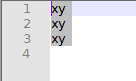
… it’s much more regular. (Though I wouldn’t use a non-monospace font in Notepad++, myself.)So finding a monospace font from that list, or from elsewhere, that truly supports the U+2060 might help your display issue.
-
If you’re going to experiment like that, probably should do it with DirectWrite both on and off. So many choices. :-)
-
@Alan-Kilborn said in Lines containing the Unicode Word-Joiner U+2060 display oddly:
If you’re going to experiment like that, probably should do it with DirectWrite both on and off. So many choices. :-)
Good idea. DejaVu Sans Mono looks good when DirectWrite is turned on.
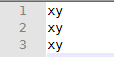
So, the options are enabling DirectWrite, changing font, or both. :-)



Hello! It looks like you're interested in this conversation, but you don't have an account yet.
Getting fed up of having to scroll through the same posts each visit? When you register for an account, you'll always come back to exactly where you were before, and choose to be notified of new replies (either via email, or push notification). You'll also be able to save bookmarks and upvote posts to show your appreciation to other community members.
With your input, this post could be even better 💗
Register Login