Completion of HTML tags
-
Since I have changed my computer I do not remember how to have the closure of html tags that is if I typeset <P …> Notepad++ adds </p>.
-
-
@Ekopalypse I have done it but nothing appends.
-
What exactly did you do?
Since I don’t do html programming, it could be possible
that you can use additional plugins, but I have no experience with that.
Maybe someone else who knows html programming can step in and make suggestions. -
There are two requirements for the HTML/XML auto-insert/autocomplete to work:
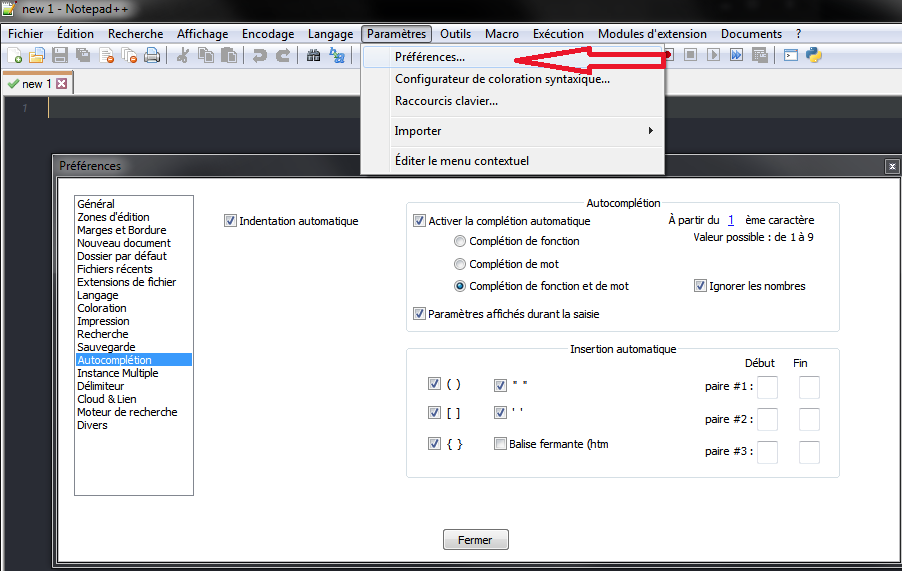
- It must be turned on. In the dialog that @Ekopalypse showed, it is turned off. In English, you have to enable
☑ html/xml close tag. In the localization @Ekopalypse showed, that would beBalise fermante (htm(which gets cut off because the localization is longer than the dialog has room for – I presume the localization string is actually meant to beBalise fermante (html/xml). - The document must be set as HTML or XML using the Language menu
See this animation for how those settings work together.

- It must be turned on. In the dialog that @Ekopalypse showed, it is turned off. In English, you have to enable
-
@PeterJones thanks
-
@Cyrille-Piatecki I just have discovered that under H there is only Haskell language nothing about html.
-
@Cyrille-Piatecki said in Completion of HTML tags:
@Cyrille-Piatecki I just have discovered that under H there is only Haskell language nothing about html.
My first reaction was “pics or it didn’t happen” ;-)
As you saw in my animation, there is definitely an HTML entry there. If there isn’t in yours, something you have done has eliminated/hidden that entry. You can prove this to yourself by downloading a fresh portable zipfile from https://notepad-plus-plus.org/downloads/ and verifying that by default, the Language menu has HTML.
Possible reasons I can think of for HTML not being listed:
- Settings > Preferences > Language 🛈 has a
Disabled Itemssection. Maybe at some point, you accidentally or intentionally moved HTML over to there – in which case, HTML wouldn’t show up in the Language menu - One or more of your config files were corrupted and/or intentionally edited to remove HTML (or you somehow started from a Notepad++ old enough to predate HTML as a Language entry… but I cannot imagine that there was a version like that.)
- A plugin has taken over HTML display, and has hidden that Language-menu entry. I don’t know of any plugins that do this, but it might be possible. Showing us your ? menu’s Debug Info would tell us about your version and what plugins are installed
The first is the one I find most likely.
- Settings > Preferences > Language 🛈 has a
-
@PeterJones I take a long time to thank you for your help because I have a lot of problem with Jsxgraph … Nevertheless I have followed your advices and it seems to work correctly.



Hello! It looks like you're interested in this conversation, but you don't have an account yet.
Getting fed up of having to scroll through the same posts each visit? When you register for an account, you'll always come back to exactly where you were before, and choose to be notified of new replies (either via email, or push notification). You'll also be able to save bookmarks and upvote posts to show your appreciation to other community members.
With your input, this post could be even better 💗
Register Login