Save of automatic opened files shows wrong path
-
7.9.5 opens last opened files, but pressing save npp has forgotten the path of the opended files.
It says default path C:\Program Files\Notepad++ for saving.If I close npp, my files are saved with correct path.
br
Hans -
If I’m remembering correctly, that may be a bug.
I would suggest trying version 8.0 or 8.1 because I believe the bug is fixed in those versions. -
I tried update in npp, but I could not update to Version 8.0. Then I did it manually. Error persists. But I have found out, what happened. I have closed npp always by x. In this case files are saved automatically wo plugin.
But it must be a different location.
I have found out, that I had changed the location of my file. So in the end I always looked at a different somewhereelse stored version.Opened file
renamed directory during open file.
Answered “Keep this file in editor.” with y.
Closed npp and saved file all the time by x.Open containing folder --> Explorer is grey. That´s the only sign showing you that you have got an internal stored version.
In case of first saving by button save / function save, I recognized change of folder.
thx for help.
-
I’m glad you clarified, because there is no way that anyone would have derived the info in your second post from the info in your first post.
The bug I was thinking of (and mentioned earlier) doesn’t apply to this situation.So I duplicated (mostly) your scenario and I do understand that things go “wrong” here.
I tend to think of it as a problem-between-keyboard-and-chair.
Should you really rename a directory when you have files open in that directory?Some programs protect you nicely from this kind of thing (shown here for a folder, not a file):
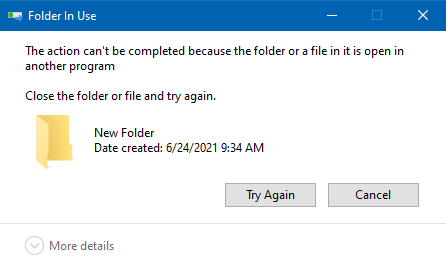
I suppose Notepad++ could do a better job of protecting you from the exact problem you noticed…
But I’d probably advise you to just NOT change the name of a containing folder when you have files open in that folder.

Hello! It looks like you're interested in this conversation, but you don't have an account yet.
Getting fed up of having to scroll through the same posts each visit? When you register for an account, you'll always come back to exactly where you were before, and choose to be notified of new replies (either via email, or push notification). You'll also be able to save bookmarks and upvote posts to show your appreciation to other community members.
With your input, this post could be even better 💗
Register Login