V8 always using 14% CPU even with one empty tab
-
My notepad++ v8.1 is always using around 14% CPU on a i7 CPU, Windows 10 Pro 64 bit. No matter what is open. it can be a new empty tab only or a bunch of tabs full of stuff and it just sits there using around 14% CPU.
I tried reinstalling a different version (v8.0), tried portable version as well, and the problem persists :(
I checked the running process, that it actually is notepad++ running, I ran antivirus and nothing. I’m using a brand new installation, no plugins, no nothing.Am I the only with this issue? How can I diagnose it and try to find the root cause, please?
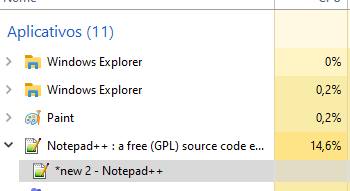
-
One way to find out what a particular process does is to use
a tool like ProcessMonitor and no, I don’t see your reported behavior on my side. -
@Ekopalypse Thanks for the info! I did see a bunch of things related to notepad++ with this monitor tool, but nothing out of the ordinary, then again, I don’t really know how to use it.
The solution I’ve found so far was to install the latest 32 bit version. It simply works without the funny CPU behavior.


Hello! It looks like you're interested in this conversation, but you don't have an account yet.
Getting fed up of having to scroll through the same posts each visit? When you register for an account, you'll always come back to exactly where you were before, and choose to be notified of new replies (either via email, or push notification). You'll also be able to save bookmarks and upvote posts to show your appreciation to other community members.
With your input, this post could be even better 💗
Register Login