How to make comments in code stand out
-
Hi -
I am new to Notepad++ and am using it to edit scripts in Python, which I am also new to.
I know I can place comments pretty much anywhere bracketed by ##'s
Is there a way to make them a different color so that they stand out from the code?
Thank You,
Cyndi -
The key is to make your file a Python file and then things (comments included) will “stand out”, example:
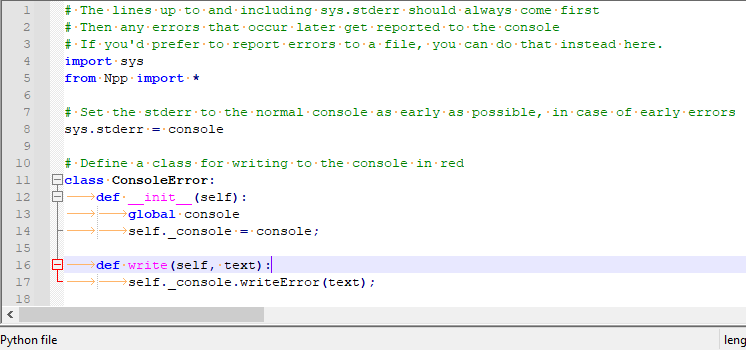
See where it says “Python file” on the status bar?
You can make this appear by saving your file with a name that ends in
.py, or by choosing “Python” on the Language menu.Also, a Python comment involves no “bracketing”. A
#appearing on a line will cause anything following that character (and still on that same line) to be a comment.

Hello! It looks like you're interested in this conversation, but you don't have an account yet.
Getting fed up of having to scroll through the same posts each visit? When you register for an account, you'll always come back to exactly where you were before, and choose to be notified of new replies (either via email, or push notification). You'll also be able to save bookmarks and upvote posts to show your appreciation to other community members.
With your input, this post could be even better 💗
Register Login