How to know what documents change?
-
I replaze a word in 200 documents in a carpet and 10 changed.
how can i know what documents change? -
I’m not sure what you mean by “in a carpet”… maybe there’s a translation problem, or maybe it has some specialty meaning I am not aware of.
But I believe you’re asking “I did Find in Files and replaced a word, and it made replacements in 20 of the 200 documents searched; how can I know which files changed?” If not, please correct me. Otherwise, my answer is as follows:
As far as I know, Notepad++ does not have a way of showing which files were changed in a Find in Files replacement. However, if you do the Find in Files and do a Find All first, which will list all the matching files in the Search Results window; then you can do the Replace in Files, and it will replace all those instances. And even after you do the Replace in Files, if you double-click in the rows in the Search Results window, it will take you to the right row of whichever file the replacement occurred in.
For example, I created
a.src,b.src, andc.srcwithword hiin two files andward hiin the third, then did the Find All forword, then did the Replace in Files to changewordintovocab=>
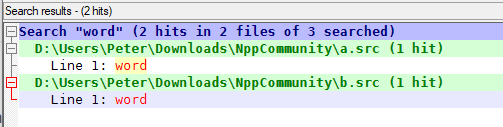
double clicking on the lower instance (thewordin b.src), it took me to the b.src with the line that now says “vocab”
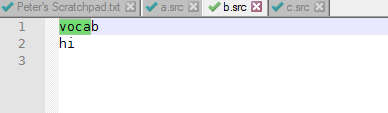
Not perfect, but hopefully works for you.
-
@PeterJones said in How to know what documents change?:
I’m not sure what you mean by “in a carpet”… maybe there’s a translation problem, or maybe it has some specialty meaning I am not aware of.
I think you got it. Seems a false cognate. Carpeta, in Spanish, means folder. If this is correct, OP modified 10 documents out of 200 contained in a folder, and wants to know which ones they are.
HTH
-
Another approach might be to save a copy of all of the candidate files in another place. Then, after N++'s replace-in-files, use a file compare utility to compare the top-level folder of the changed files and the originals.



Hello! It looks like you're interested in this conversation, but you don't have an account yet.
Getting fed up of having to scroll through the same posts each visit? When you register for an account, you'll always come back to exactly where you were before, and choose to be notified of new replies (either via email, or push notification). You'll also be able to save bookmarks and upvote posts to show your appreciation to other community members.
With your input, this post could be even better 💗
Register Login