zoom indicator
-
Hello, dear Notepad++ Community!
Notepad++ has zooming function under “View/Zoom”. And this is very good.
I would like to have an indicator of the zoom state that could be seen in status bar.
Something like this: in points if zooming in “zoom: +1” or in percent “zoom: 110%”
and if zooming out too.
This function is needed as a reliable orientation mark for keeping zoom setting constant. -
If this is a feature request, please note that we cannot implement feature requests here, as explained in the “Feature Request or Bug Report” FAQ entry. But note that a similar feature was requested and rejected years ago: issue#4566
Further, there have been many similar conversations previously, where PythonScript solutions were suggested:
- https://community.notepad-plus-plus.org/topic/19743/zoom-feedback
- https://community.notepad-plus-plus.org/topic/17321/feature-request-current-zoom-to-status-bar
- https://community.notepad-plus-plus.org/topic/15679/seeing-the-zoom-level-with-pythonscript
… so you can see if any of those scripting workarounds will work for you.
Good luck.
-
Follow the issue: https://github.com/notepad-plus-plus/notepad-plus-plus/issues/8301
-
If not a zoom indicator in status bar, may be an indicator directly in the “View/Zoom” menu?
So as it is in XnView - see picture.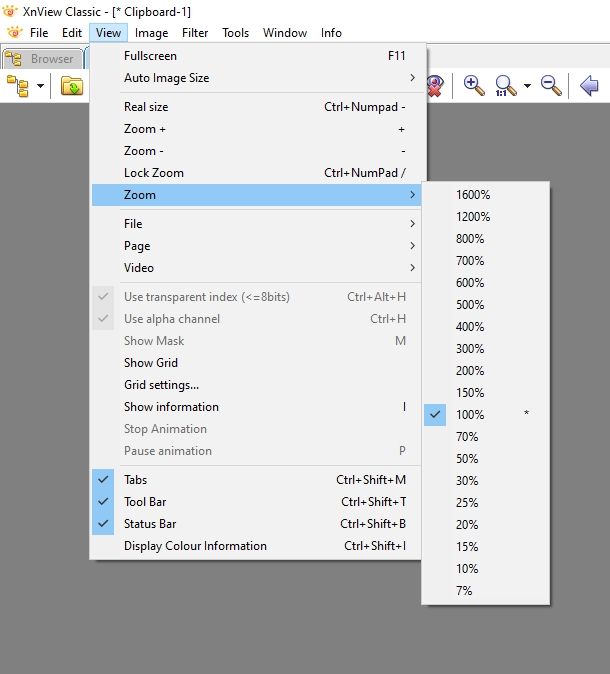
-
P PeterJones referenced this topic on
-


Hello! It looks like you're interested in this conversation, but you don't have an account yet.
Getting fed up of having to scroll through the same posts each visit? When you register for an account, you'll always come back to exactly where you were before, and choose to be notified of new replies (either via email, or push notification). You'll also be able to save bookmarks and upvote posts to show your appreciation to other community members.
With your input, this post could be even better 💗
Register Login