8.1.9.2 release how did I break it?
-
Hey team!
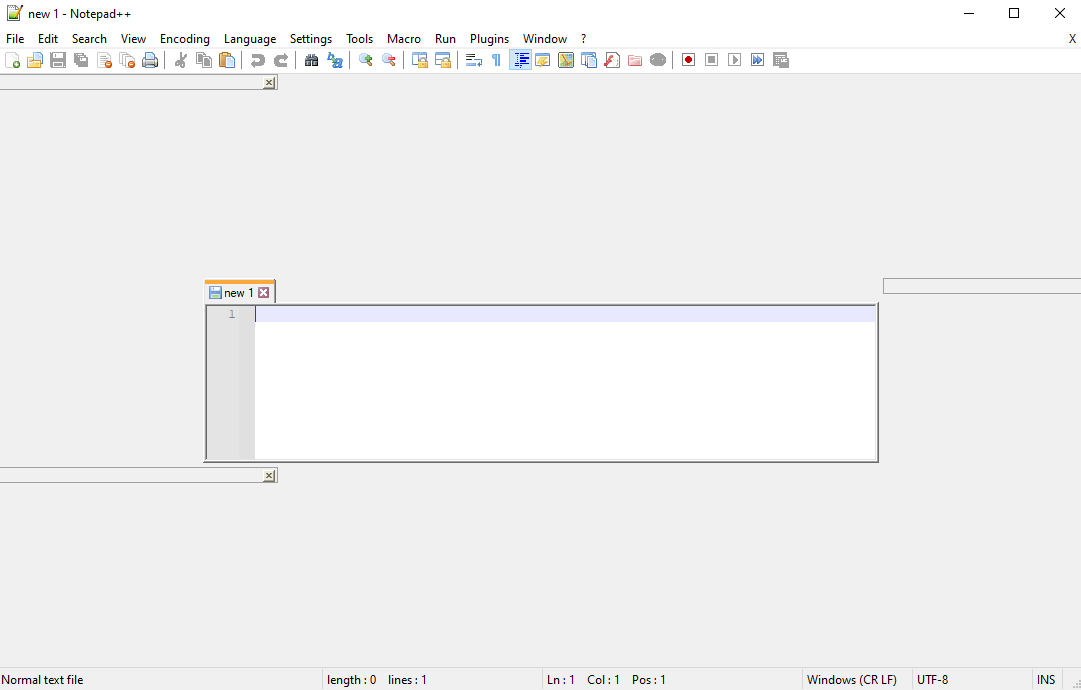
i seem to have broken the UI and I don’t know how to reset it. I did a full uninstall/re-install and deleted my app data.I’m using windows 10, and it used to work a couple of days ago. I’m sure I have done something, I just don’t know how to hard reset?
-
Do you have Slack?
see the FAQ: https://community.notepad-plus-plus.org/topic/21895/faq-desk-huge-gaps-blank-areas-in-the-ui-borders
-
@peterjones
I have this issue as well. Do you this this is an issue that will be fixed in a future release? I love notpad++ but I am required to use slack for my job, so I can’t shut it down. -
As the linked FAQ shows, there is an issue; however, the Notepad++ Developer is convinced that the bug lies in Slack, and believes there’s nothing he can do with it. Since some of the reports have indicated that other applications are being affected (not just Notepad++), the best place for the bug to be fixed is in Slack, not in the multiple other applications (including Notepad++) that are being corrupted by Slack’s design decisions.
-
@peterjones
Ahhh… Gotcha! Thank you for the clarification. Makes sense.


Hello! It looks like you're interested in this conversation, but you don't have an account yet.
Getting fed up of having to scroll through the same posts each visit? When you register for an account, you'll always come back to exactly where you were before, and choose to be notified of new replies (either via email, or push notification). You'll also be able to save bookmarks and upvote posts to show your appreciation to other community members.
With your input, this post could be even better 💗
Register Login