Replace unknown character
-
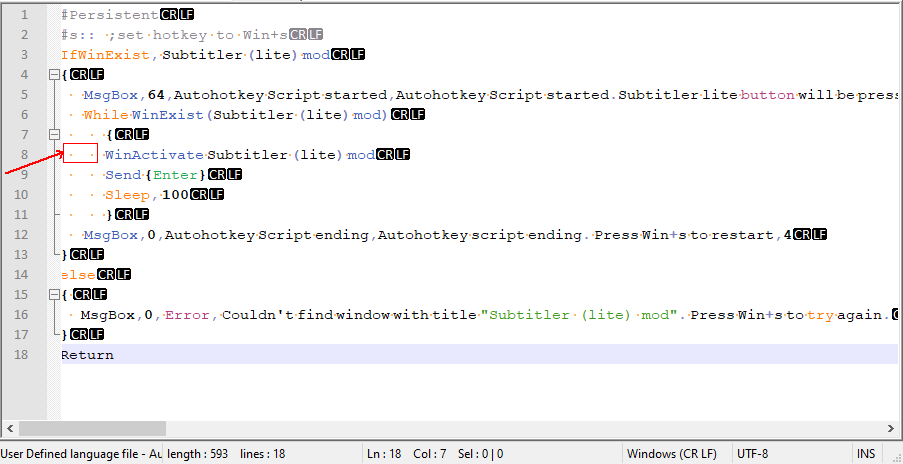
Hi, does anyone know how to replace/remove this double-spaced-dot character?
A single dot is a space, but this one is a double-spaced-one. Does someone know what this character is?
Thx
-
@focuscar-a ,
Are you sure there’s really only two characters (space and weird)? I would think there are three: space, weird, and another normal space. (Might be as simple as a non-breaking space between; might be one of the more complicated invisible characters.)
But either way, you can just select and copy the character(s) and paste them into the FIND/REPLACE dialog.
Or maybe you’ve got a plugin that’s doing unexpected thing to the visuals of spaces. Or maybe your font is not a monospace font, so it’s not giving equal width to every character.
There are also PythonScript-based scripts that have been published on the forum that can give a “representation” (similar to the CR and LF boxes) to the invisible characters – searching for zwnj should get you those; or my GetUniChar.py which will use the statusbar to show you the unicode codepoint for the char to the right of the cursor.
-
Shooting from the hip, isn’t that tab marks?
The “tab” code jumps the cursor forward to the next pre-set column alignment position. So if you type:
a tab b
cde tab fghtab makes a space between a and b, and between e and f, but f is directly below b.
Although in my plain text, tab looks like: —> (in red)
You can search and replace tab, but the keyboard tab key actually moves the cursor to the next field in the search dialog box, so instead of typing it in - I think - you can copy a tab code to clipboard, and paste it in to one or another field. For instance, to replace two tabs with one tab.
-
@robert-carnegie said in Replace unknown character:
Shooting from the hip, isn’t that tab marks?
No, it isn’t. If View > Show Symbol > Show Whitespace and TAB or > Show All Characters is enabled (the latter is what it must be, because of the orange dots for the spaces that @Focuscar-A showed, along with the black CR and LF boxes at the end of line), then tabs use stretchy arrows in their display, as shown below.
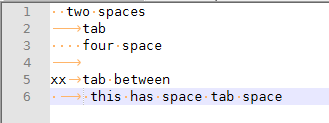
The dots in my screenshot are spaces, the arrows in my screenshot are tabs, and the long blank between the dots that @Focuscar-A showed is either another character or some weird spacing issue, not a tab.



Hello! It looks like you're interested in this conversation, but you don't have an account yet.
Getting fed up of having to scroll through the same posts each visit? When you register for an account, you'll always come back to exactly where you were before, and choose to be notified of new replies (either via email, or push notification). You'll also be able to save bookmarks and upvote posts to show your appreciation to other community members.
With your input, this post could be even better 💗
Register Login