New window behaviour like other popular applications?
-
Chrome, Sublime Text, and other popular applications behave in the same way in terms of tabs and windows. One could drag a tab out of the window and the tab becomes a new window.
I have enabled “always multi-instance” mode, but dragging a tab out of the window did not work. It seems that I have to manually start a new instance (window) and then drag a tab into that window. And even then, the tab must be a saved file. This is enormously inconvenient compared to aforementioned applications.
Did I miss something or is this how Notepad++ works in terms of tabs and windows?
-
Right click on the tab, and “Move to New Instance”
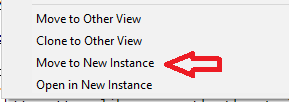
… though it’s true that such an option is only available for a saved file, not an unnamed / new tab.
-
… Further, if what you really want to do is “create a new file in a new instance”, that could be done with Run > Run… >
$(NPP_FULL_FILE_PATH) -multiInst -nosession– and you can even Save that run command into your Run menu and give it a keyboard shortcut of your choosing, and that keyboard shortcut can then be used for running that from then on.

Hello! It looks like you're interested in this conversation, but you don't have an account yet.
Getting fed up of having to scroll through the same posts each visit? When you register for an account, you'll always come back to exactly where you were before, and choose to be notified of new replies (either via email, or push notification). You'll also be able to save bookmarks and upvote posts to show your appreciation to other community members.
With your input, this post could be even better 💗
Register Login