Replace strings with specific lines content
-
Hello!
I have the following file
45415
7684
124
6845
3210
16
785
8651
245
8521
<?xml version="1.0" encoding="UTF-8" standalone="yes"?>
	<RuleList>
		<Rule enabled="true">
			<Action type="Proxy">100</Action>
			<Applications>pid=4323</Applications>
			<Name>Nox0</Name>
		</Rule>
		<Rule enabled="true">
			<Action type="Proxy">101</Action>
			<Applications>pid=12</Applications>
			<Name>Nox1</Name>
		</Rule>
		<Rule enabled="true">
			<Action type="Proxy">102</Action>
			<Applications>pid=87654</Applications>
			<Name>Nox2</Name>
		</Rule>
		<Rule enabled="true">
			<Action type="Proxy">103</Action>
			<Applications>pid=345</Applications>
			<Name>Nox3</Name>
		</Rule>
		<Rule enabled="true">
			<Action type="Proxy">104</Action>
			<Applications>pid=936</Applications>
			<Name>Nox4</Name>
		</Rule>
		<Rule enabled="true">
			<Action type="Proxy">105</Action>
			<Applications>pid=54734</Applications>
			<Name>Nox5</Name>
		</Rule>
		<Rule enabled="true">
			<Action type="Proxy">106</Action>
			<Applications>pid=6435</Applications>
			<Name>Nox6</Name>
		</Rule>
		<Rule enabled="true">
			<Action type="Proxy">107</Action>
			<Applications>pid=95325</Applications>
			<Name>Nox7</Name>
		</Rule>
		<Rule enabled="true">
			<Action type="Proxy">108</Action>
			<Applications>pid=10</Applications>
			<Name>Nox8</Name>
		</Rule>
		<Rule enabled="true">
			<Action type="Proxy">109</Action>
			<Applications>pid=000992</Applications>
			<Name>Nox9</Name>
		</Rule>
	</RuleList>
There are multiple pid=xxxx in the file. I need to replace each xxxx with the numbers on the first 10 lines (each line would replace a xxxx). How can I achieve this? Can it be done with Find and replace?
I have absolutely no idea about regex (first time I heard about that) but investigating I managed to produce (?<=>pid=).+?(?=</A) to match what I need to replace in “Find What”, but I don’t know what to put in “Replace with” to capture the numbers in the beginning of the file.
Any help would be greatly appreciated.
-
Hello, @andres-garzon and All,
Here is a solution using regexes, of course !
Just follow this road map. It may appear a bit complicated but it doesn’t take much time to get the correct results !
So :
-
First, copy your
XMLtext in a new tab -
Add a line of, at least, five
=signs -
Append your list of numbers, one per line
You should obtain this layout :
<?xml version="1.0" encoding="UTF-8" standalone="yes"?>
	<RuleList>
		<Rule enabled="true">
			<Action type="Proxy">100</Action>
			<Applications>pid=4323</Applications>
			<Name>Nox0</Name>
		</Rule>
		<Rule enabled="true">
			<Action type="Proxy">101</Action>
			<Applications>pid=12</Applications>
			<Name>Nox1</Name>
		</Rule>
		<Rule enabled="true">
			<Action type="Proxy">102</Action>
			<Applications>pid=87654</Applications>
			<Name>Nox2</Name>
		</Rule>
		<Rule enabled="true">
			<Action type="Proxy">103</Action>
			<Applications>pid=345</Applications>
			<Name>Nox3</Name>
		</Rule>
		<Rule enabled="true">
			<Action type="Proxy">104</Action>
			<Applications>pid=936</Applications>
			<Name>Nox4</Name>
		</Rule>
		<Rule enabled="true">
			<Action type="Proxy">105</Action>
			<Applications>pid=54734</Applications>
			<Name>Nox5</Name>
		</Rule>
		<Rule enabled="true">
			<Action type="Proxy">106</Action>
			<Applications>pid=6435</Applications>
			<Name>Nox6</Name>
		</Rule>
		<Rule enabled="true">
			<Action type="Proxy">107</Action>
			<Applications>pid=95325</Applications>
			<Name>Nox7</Name>
		</Rule>
		<Rule enabled="true">
			<Action type="Proxy">108</Action>
			<Applications>pid=10</Applications>
			<Name>Nox8</Name>
		</Rule>
		<Rule enabled="true">
			<Action type="Proxy">109</Action>
			<Applications>pid=000992</Applications>
			<Name>Nox9</Name>
		</Rule>
	</RuleList>
=====
45415
7684
124
6845
3210
16
785
8651
245
8521
-
Open the Mark dialog (
Ctrl + M) -
MARK
(?<=pid=)\d+|^\d+$|^===== -
Untick all options
-
Tick the
Wrap aroundoption -
Select the
Regular expressionsearch mode -
Click on the
Mark Allbutton -
Click on the
Copy Marked Textbutton -
Select your list of numbers, after the line of equal signs
-
Replace by the result of marking (
Ctrl + V)
Giving the following text :
<?xml version="1.0" encoding="UTF-8" standalone="yes"?>
	<RuleList>
		<Rule enabled="true">
			<Action type="Proxy">100</Action>
			<Applications>pid=4323</Applications>
			<Name>Nox0</Name>
		</Rule>
		<Rule enabled="true">
			<Action type="Proxy">101</Action>
			<Applications>pid=12</Applications>
			<Name>Nox1</Name>
		</Rule>
		<Rule enabled="true">
			<Action type="Proxy">102</Action>
			<Applications>pid=87654</Applications>
			<Name>Nox2</Name>
		</Rule>
		<Rule enabled="true">
			<Action type="Proxy">103</Action>
			<Applications>pid=345</Applications>
			<Name>Nox3</Name>
		</Rule>
		<Rule enabled="true">
			<Action type="Proxy">104</Action>
			<Applications>pid=936</Applications>
			<Name>Nox4</Name>
		</Rule>
		<Rule enabled="true">
			<Action type="Proxy">105</Action>
			<Applications>pid=54734</Applications>
			<Name>Nox5</Name>
		</Rule>
		<Rule enabled="true">
			<Action type="Proxy">106</Action>
			<Applications>pid=6435</Applications>
			<Name>Nox6</Name>
		</Rule>
		<Rule enabled="true">
			<Action type="Proxy">107</Action>
			<Applications>pid=95325</Applications>
			<Name>Nox7</Name>
		</Rule>
		<Rule enabled="true">
			<Action type="Proxy">108</Action>
			<Applications>pid=10</Applications>
			<Name>Nox8</Name>
		</Rule>
		<Rule enabled="true">
			<Action type="Proxy">109</Action>
			<Applications>pid=000992</Applications>
			<Name>Nox9</Name>
		</Rule>
	</RuleList>
=====
4323
12
87654
345
936
54734
6435
95325
10
000992
=====
45415
7684
124
6845
3210
16
785
8651
245
8521
-
Now, place the caret right before the first number of your list (
45415) -
Do a rectangular selection (
10 × 5), taking all your list of numbers -
Hit the
Ctrl + Cshortcut -
Move backward and place the caret right after the first present number (
4323) -
Add
4space characters -
Hit the
Ctrl + Vshortcut
Now, our text becomes :
<?xml version="1.0" encoding="UTF-8" standalone="yes"?>
	<RuleList>
		<Rule enabled="true">
			<Action type="Proxy">100</Action>
			<Applications>pid=4323</Applications>
			<Name>Nox0</Name>
		</Rule>
		<Rule enabled="true">
			<Action type="Proxy">101</Action>
			<Applications>pid=12</Applications>
			<Name>Nox1</Name>
		</Rule>
		<Rule enabled="true">
			<Action type="Proxy">102</Action>
			<Applications>pid=87654</Applications>
			<Name>Nox2</Name>
		</Rule>
		<Rule enabled="true">
			<Action type="Proxy">103</Action>
			<Applications>pid=345</Applications>
			<Name>Nox3</Name>
		</Rule>
		<Rule enabled="true">
			<Action type="Proxy">104</Action>
			<Applications>pid=936</Applications>
			<Name>Nox4</Name>
		</Rule>
		<Rule enabled="true">
			<Action type="Proxy">105</Action>
			<Applications>pid=54734</Applications>
			<Name>Nox5</Name>
		</Rule>
		<Rule enabled="true">
			<Action type="Proxy">106</Action>
			<Applications>pid=6435</Applications>
			<Name>Nox6</Name>
		</Rule>
		<Rule enabled="true">
			<Action type="Proxy">107</Action>
			<Applications>pid=95325</Applications>
			<Name>Nox7</Name>
		</Rule>
		<Rule enabled="true">
			<Action type="Proxy">108</Action>
			<Applications>pid=10</Applications>
			<Name>Nox8</Name>
		</Rule>
		<Rule enabled="true">
			<Action type="Proxy">109</Action>
			<Applications>pid=000992</Applications>
			<Name>Nox9</Name>
		</Rule>
	</RuleList>
=====
4323    45415
12      7684
87654   124
345     6845
936     3210
54734   16
6435    785
95325   8651
10      245
000992  8521
=====
45415
7684
124
6845
3210
16
785
8651
245
8521
-
Open the Replace diialog (
Ctrl + H) -
SEARCH
(?s)pid=(\d+)(?=<)(?=.+?^\1\x20+(\d+)$)|^=====.+ -
REPLACE
?1pid=\2 -
Untick All options
-
Tick the
Wrap aroundoption -
Select the
Regular expressionsearch mode -
Click once only on the
Replace Allbutton ( or several times on theReplacebutton till the end of the process ! )
And you’re left with the expected results ;-))
<?xml version="1.0" encoding="UTF-8" standalone="yes"?>
	<RuleList>
		<Rule enabled="true">
			<Action type="Proxy">100</Action>
			<Applications>pid=45415</Applications>
			<Name>Nox0</Name>
		</Rule>
		<Rule enabled="true">
			<Action type="Proxy">101</Action>
			<Applications>pid=7684</Applications>
			<Name>Nox1</Name>
		</Rule>
		<Rule enabled="true">
			<Action type="Proxy">102</Action>
			<Applications>pid=124</Applications>
			<Name>Nox2</Name>
		</Rule>
		<Rule enabled="true">
			<Action type="Proxy">103</Action>
			<Applications>pid=6845</Applications>
			<Name>Nox3</Name>
		</Rule>
		<Rule enabled="true">
			<Action type="Proxy">104</Action>
			<Applications>pid=3210</Applications>
			<Name>Nox4</Name>
		</Rule>
		<Rule enabled="true">
			<Action type="Proxy">105</Action>
			<Applications>pid=16</Applications>
			<Name>Nox5</Name>
		</Rule>
		<Rule enabled="true">
			<Action type="Proxy">106</Action>
			<Applications>pid=785</Applications>
			<Name>Nox6</Name>
		</Rule>
		<Rule enabled="true">
			<Action type="Proxy">107</Action>
			<Applications>pid=8651</Applications>
			<Name>Nox7</Name>
		</Rule>
		<Rule enabled="true">
			<Action type="Proxy">108</Action>
			<Applications>pid=245</Applications>
			<Name>Nox8</Name>
		</Rule>
		<Rule enabled="true">
			<Action type="Proxy">109</Action>
			<Applications>pid=8521</Applications>
			<Name>Nox9</Name>
		</Rule>
	</RuleList>
Best Regards,
guy038
-
-
Wonderful, worked like a charm!
Now, is there any way to put all these steps into a macro? I tried doing all the steps while recording macro but when I run it, it doesn’t work;
Thank you
-
@andres-garzon said in Replace strings with specific lines content:
is there any way to put all these steps into a macro?
IMO it would be insane to try to record that as a macro, or to even hand-edit a macro to try to do it.
I wouldn’t have written to just say that though. I wanted to point out a specific thing as I look over the list of what Guy gave you.
I see:
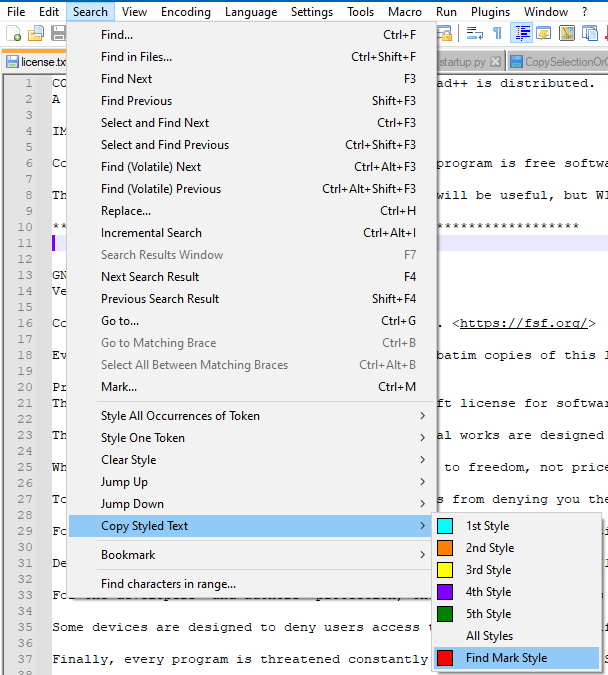
- Click on the Copy Marked Text button
I’ve noticed that this button on the Mark window isn’t macro-recordable. :-(
But… happily, this is the equivalent command and it IS macro-recordable:
As to the rest…good luck with the macroizing!



Hello! It looks like you're interested in this conversation, but you don't have an account yet.
Getting fed up of having to scroll through the same posts each visit? When you register for an account, you'll always come back to exactly where you were before, and choose to be notified of new replies (either via email, or push notification). You'll also be able to save bookmarks and upvote posts to show your appreciation to other community members.
With your input, this post could be even better 💗
Register Login