How to disable txt syntax automatic checking?
-
I updated the notepad++, but after updating, notepad++ will automatically check the syntax.
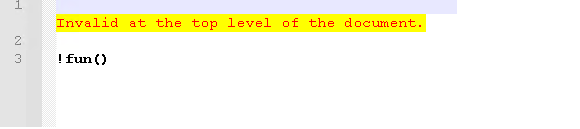
For example, it will give a highlighted warning
“a name is started with an invalid charater”but this is just a txt file, I don’t know why notepad++ check its syntax
-
Can you paste a screenshot of what you’re talking about?
-
Thanks for looking into it, here is the screenshot, I don’t know where does the hightlight came from
-
@oa-klk said in How to disable txt syntax automatic checking?:
but this is just a txt file,
I don’t think this is just a txt file; what does it say on the left side of the Notepad++ status bar?
Telling us is OK, another screenshot is better.
-
@oa-klk said in How to disable txt syntax automatic checking?:
here is the screenshot, I don’t know where does the hightlight came from
Please show us from your menu: ? => Debug Info…
I suspect you may have XML Tools installed with some options checked that probably shouldn’t be.
If so, you probably want to DISABLE :
- Plugins => XML Tools => Apply to all open files
- Plugins => XML Tools => Enable Auto-validation
Cheers.
-
@michael-vincent @alan-kilborn
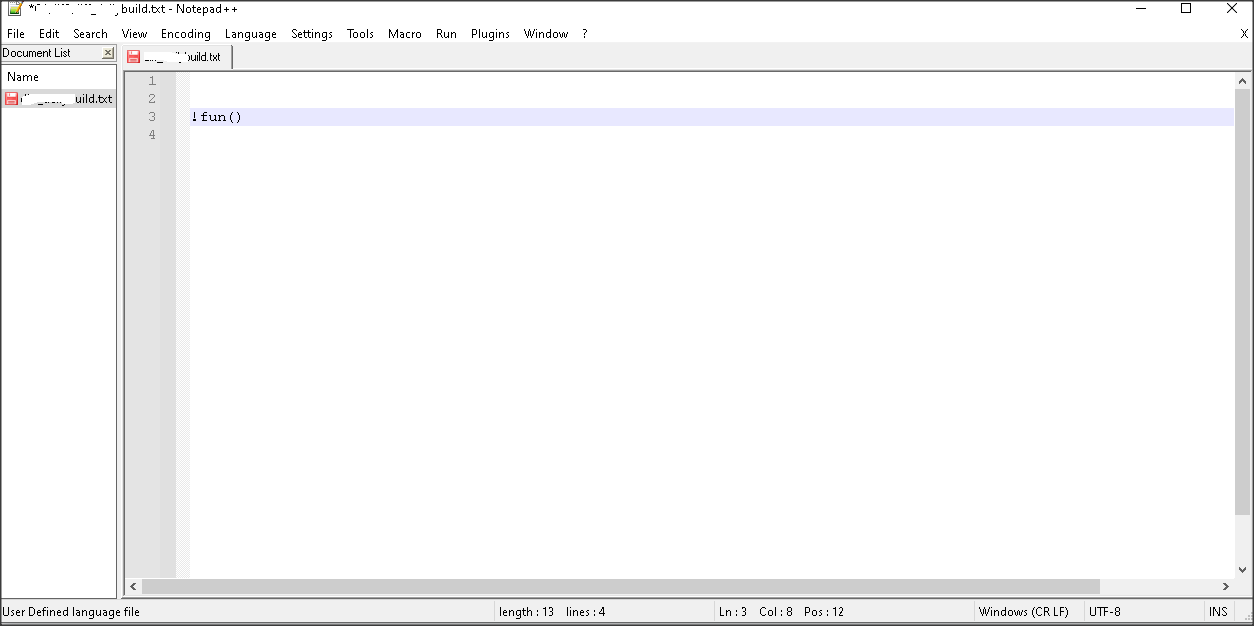
I close the txt file and reopen it, now I cannot reproduce the issue.
But before that, if I just close notepad++ and reopen notepad++(not close txt file and reopen txt file), I got the issue every time.
In the bottom, it shows that it is a user defined language file, I don’t know why.
Notepad++ v8.2.1 (32-bit)
Build time : Jan 19 2022 - 18:38:49
Path : C:\Program Files (x86)\Notepad++\notepad++.exe
Command Line :
Admin mode : OFF
Local Conf mode : OFF
Cloud Config : OFF
OS Name : Windows 10 Enterprise (64-bit)
OS Version : 2009
OS Build : 19042.1466
Current ANSI codepage : 1252
Plugins : DarkTheme.dll mimeTools.dll NppConverter.dll NppExport.dll XMLTools.dll



Hello! It looks like you're interested in this conversation, but you don't have an account yet.
Getting fed up of having to scroll through the same posts each visit? When you register for an account, you'll always come back to exactly where you were before, and choose to be notified of new replies (either via email, or push notification). You'll also be able to save bookmarks and upvote posts to show your appreciation to other community members.
With your input, this post could be even better 💗
Register Login