Community
    • Login

    Notepad++ v8.3.1 release

    Scheduled Pinned Locked Moved Announcements
    33 Posts 16 Posters 19.3k Views 4 Watching
    Loading More Posts
    • Oldest to Newest
    • Newest to Oldest
    • Most Votes
    Reply
    • Reply as topic
    Log in to reply
    This topic has been deleted. Only users with topic management privileges can see it.
    • Romain BocquiauR Offline
      Romain Bocquiau @donho
      last edited by

      This post is deleted!
      1 Reply Last reply Reply Quote 0
      • donhoD Offline
        donho @Yaron
        last edited by

        @yaron

        Fixed: https://github.com/notepad-plus-plus/notepad-plus-plus/commit/51b1c9377c7f053b763d9c68ca9110342c1e868e

        Thank you for your help!

        1 Reply Last reply Reply Quote 5
        • john56099089J Offline
          john56099089
          last edited by john56099089

          Starting with 8.3 and 8.3.1 when I try to create a new file with different character set the software does not allow me to save directly. I need to click Save As in order save file.

          To replicate:

          • Open new tab on Notpad++
          • Without writing anything click Encoding menu and Character Sets
          • Choose any chracter set
          • Write or copy paste some text
          • You will see that Save button is grey and Save option under File menu is greyed out
          • I have to click Save as or Save Copy As option in order to create a new file.
          • After creating a new file with these options tab name does not change to the saved file name. For example it stays new 2 where as I saved my file as test.txt

          This was working fine on 8.2.1

          I am using 32 bit version. Did not test this on 64 bit.

          YaronY donhoD 2 Replies Last reply Reply Quote 4
          • YaronY Offline
            Yaron @john56099089
            last edited by

            @john56099089 said in Notepad++ v8.3.1 release:

            Starting with 8.3 and 8.3.1…

            Introduced in https://github.com/notepad-plus-plus/notepad-plus-plus/commit/961a133a6008bf2a664360691942ef95bc2710f2.

            Switching to another tab and back, “Save” is enabled.

            john56099089J 1 Reply Last reply Reply Quote 5
            • john56099089J Offline
              john56099089 @Yaron
              last edited by john56099089

              @yaron
              In that case as you have said save button becomes active however when I save the file, the tab name stays new 1. Whereas it should be the name of the file.
              Still I don’t think changing tabs should be a solution.

              YaronY 1 Reply Last reply Reply Quote 2
              • YaronY Offline
                Yaron @john56099089
                last edited by

                @john56099089,

                Changing tabs is certainly not a solution.
                I just wanted to add another point to your detailed report.

                Thank you for finding it and sharing.

                1 Reply Last reply Reply Quote 4
                • donhoD Offline
                  donho @john56099089
                  last edited by

                  @john56099089
                  It’s fixed in https://github.com/notepad-plus-plus/notepad-plus-plus/commit/2321e648ae467cbecf8388f143ad71a86a05a472 .

                  The new release with the fix will come in a couple of days.
                  Sorry for the inconvenience.

                  1 Reply Last reply Reply Quote 6
                  • Jean-Claude ArbautJ Offline
                    Jean-Claude Arbaut
                    last edited by

                    Not sure if this is a regression or a modification in how the feature is implemented (if it’s the latter, I’d be interested in the documentation for this feature):
                    when adding syntax for a user-defined language, the comments are not highlighted.

                    Additionally, although it’s not a new problem: Notepad++ handles Fortran both in free-form and fixed-form. However the “f” file extension is associated to free-form: I believe it should be fixed-form, as explained here: https://fortranwiki.org/fortran/show/File+extensions

                    Jean-Claude ArbautJ 1 Reply Last reply Reply Quote 0
                    • Jean-Claude ArbautJ Offline
                      Jean-Claude Arbaut @Jean-Claude Arbaut
                      last edited by

                      @jean-claude-arbaut

                      A question: I’m using Notepad++ 32 bits, and I use heavily the TextFX plugin that is on SourceForge: https://sourceforge.net/projects/npp-plugins/files/TextFX/.
                      Has this plugin been updated for 64 bits and/or for the 8.3.1 version? Is the old version on SourceForge still working in 8.3.1? (apparently yes, but there might be known bugs)

                      Michael VincentM 1 Reply Last reply Reply Quote 0
                      • Michael VincentM Offline
                        Michael Vincent @Jean-Claude Arbaut
                        last edited by

                        @jean-claude-arbaut said in Notepad++ v8.3.1 release:

                        TextFX

                        Is ancient. There is no very good 64-bit version and most of the functionality has been incorporated into N++ or other plugins. I gave up using it years ago with no ill effects.

                        Cheers.

                        Jean-Claude ArbautJ 1 Reply Last reply Reply Quote 0
                        • Jean-Claude ArbautJ Offline
                          Jean-Claude Arbaut @Michael Vincent
                          last edited by

                          @michael-vincent

                          I know it’s old, but I really need the ability to sort lines, with all TextFX options: sort unique or not, case sensitive or not, sort at given column using a vertical selection. Is this built in Notepad++ or available in a maintained addin?

                          Michael VincentM 1 Reply Last reply Reply Quote 1
                          • Michael VincentM Offline
                            Michael Vincent @Jean-Claude Arbaut
                            last edited by

                            @jean-claude-arbaut said in Notepad++ v8.3.1 release:

                            Is this built in Notepad++ or available in a maintained addin?

                            Many:
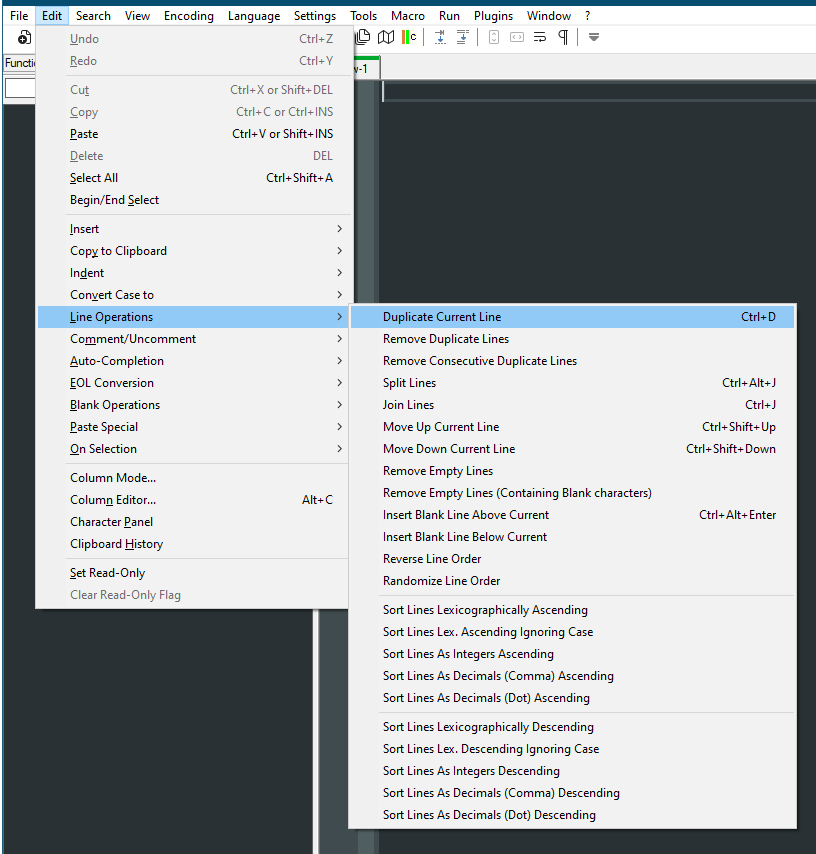
                            0d08a095-46c7-4567-af84-85bd058c1d77-image.png

                            Cheers.

                            Jean-Claude ArbautJ 1 Reply Last reply Reply Quote 1
                            • npp_respecterN Offline
                              npp_respecter @donho
                              last edited by

                              @donho

                              I get a .NET Runtime Error 0xc0000005 on clicking in edit area:

                              <System>
                                <Provider Name="Application Error" /> 
                                <EventID Qualifiers="0">1000</EventID> 
                                <Version>0</Version> 
                                <Level>2</Level> 
                                <Task>100</Task> 
                                <Opcode>0</Opcode> 
                                <Keywords>0x80000000000000</Keywords> 
                                <TimeCreated SystemTime="2022-02-20T10:17:44.4538563Z" /> 
                                <EventRecordID>536128</EventRecordID> 
                                <Correlation /> 
                                <Execution ProcessID="0" ThreadID="0" /> 
                                <Channel>Application</Channel> 
                                <Computer>xxxxxxxx</Computer> 
                                <Security /> 
                                </System>
                              - <EventData>
                                <Data>notepad++.exe</Data> 
                                <Data>8.3.1.0</Data> 
                                <Data>6209198e</Data> 
                                <Data>notepad++.exe</Data> 
                                <Data>8.3.1.0</Data> 
                                <Data>6209198e</Data> 
                                <Data>c0000005</Data> 
                                <Data>000000000003f08f</Data> 
                                </EventData>
                                </Event>
                              
                              EkopalypseE 1 Reply Last reply Reply Quote 0
                              • EkopalypseE Offline
                                Ekopalypse @npp_respecter
                                last edited by Ekopalypse

                                @npp_respecter

                                means that one of your .net-based plugins is facing the problem of the recent API changes.

                                npp_respecterN 1 Reply Last reply Reply Quote 2
                                • npp_respecterN Offline
                                  npp_respecter @Ekopalypse
                                  last edited by

                                  @ekopalypse

                                  Thanks, updating XML Tools did fix it.

                                  1 Reply Last reply Reply Quote 1
                                  • Jean-Claude ArbautJ Offline
                                    Jean-Claude Arbaut @Michael Vincent
                                    last edited by

                                    @michael-vincent

                                    Good to know, thank you !

                                    1 Reply Last reply Reply Quote 2
                                    • who whatW Offline
                                      who what
                                      last edited by who what

                                      I am having an issue with the UDL. I made a UDL for RenPy. It uses Python as it’s base coding language so I based if off your Python language file.

                                      Using # for comment line style doesn’t work. The way I have it set up is that the # is also an operator in 8.3 comments are green and as an operator it is red. I have it set that way because # is also used when setting a text color like this: “{color=#0f0} Some Text”.

                                      In 8.3.1 it doesn’t recognize the comment line so all # are red. Also when I import my UDL it resets the comment line style and there is no # in the comment line style open slot. I then type it back in but nothing happens when I do all the hash tags stay red.

                                      It is like it is completely ignoring the comment line style I even went back and forth between the two versions to see if I could get it to work and I couldn’t. I was using the installer version and it auto updated to 8.3.1 so now I am using the portable version so I didn’t have to keep installing and uninstalling it to see if I could get it to work.

                                      PeterJonesP 1 Reply Last reply Reply Quote 1
                                      • PeterJonesP Offline
                                        PeterJones @who what
                                        last edited by

                                        @who-what said in Notepad++ v8.3.1 release:

                                        Using # for comment line style doesn’t work.

                                        No. Using # for comment line style doesn’t work if you also define # as an operator. There is a difference. And it’s nothing new in or specific to v8.3.1 release… so if you really want to discuss a multi-purpose # (which somehow works as an operator and a comment-start character), you can start a new discussion in the Help Wanted section of the Forum.

                                        Please leave this “Notepad++ v8.3.1 release” topic for discussion of issues directly caused by this version of Notepad++.

                                        who whatW 1 Reply Last reply Reply Quote 0
                                        • who whatW Offline
                                          who what @PeterJones
                                          last edited by who what

                                          @peterjones

                                          Thats not true I’m doing it right now in 8.3 and it is working fine my comment lines are green and when inside of say {} it is red. Then when I update to 8.3.1 it stops working.

                                          Also even if I remove the # from the operators list it still does not turn green therefore comment line style is not working properly.

                                          PeterJonesP 1 Reply Last reply Reply Quote 0
                                          • PeterJonesP Offline
                                            PeterJones @who what
                                            last edited by

                                            @who-what ,

                                            Sorry, I misread and thus misunderstood.

                                            This might be related to whatever caused the bug here as well.

                                            It would help the developers if you could supply example text (use the </> button on the forum toolbar to mark your text in a black box – you will see it in the PREVIEW as you are entering your post), along with a screenshot showing the difference in behavior between v8.3 and v8.3.1. Also, if you could paste in your UDL settings file (open the XML where the UDL is stored, and copy/paste that into a separate black box in your post) – that way, they can have something to replicate the problem.

                                            PeterJonesP 1 Reply Last reply Reply Quote 0

                                            Hello! It looks like you're interested in this conversation, but you don't have an account yet.

                                            Getting fed up of having to scroll through the same posts each visit? When you register for an account, you'll always come back to exactly where you were before, and choose to be notified of new replies (either via email, or push notification). You'll also be able to save bookmarks and upvote posts to show your appreciation to other community members.

                                            With your input, this post could be even better 💗

                                            Register Login
                                            • First post
                                              Last post
                                            The Community of users of the Notepad++ text editor.
                                            Powered by NodeBB | Contributors
