Flashing Box Whilst Typing
-
With the latest version, whilst typing, a box flashes below the typed text. There is a gif of this phenomena at GIFYU at image/SpC6F I would provide the link however whenever I attempt Submit a box appears stating this post is flagged as spam and I am assuming it is the presence of the link which causes this. - Best
-
@bernard ,
FYI: To imbed an external image in the forum, you can use the markdown
:
That “flashing box” is normally the auto-complete box. But with no other words in the active file, I am not sure why it would be triggered word completion – because word completion requires previous words, and at
abcorabcdewhere it triggered, there weren’t any previous words.Here is that auto-complete box, trying to word-autocomplete on a word that is previously in my document:
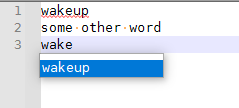
And based on the lack of syntax highlighting, I am assuming no lexer is enabled, so it shouldn’t be trying function completion. Maybe you have a plugin that is trying to add extra auto-completion. Sharing your ?-menu’s Debug Info would be helpful.
-
@peterjones ,
Just an FYI, I noticed that strange behavior when developing my Autocomplete when I had some error in it. Nothing would show, but the box would come up and go down…like it was trying to figure out my list. Once I got all the stuff properly setup, it worked just fine. That’s just one possible explanation, but that also makes it user error. :) -
This seems like the same issue reported with Notepad++ v7.9.2 (64-bit):
#9433 Autocomplete makes notepad++ unable to keep up with typing.
an empty (context menu?) box flash for a second
I have submitted a Pull Request to fix:


Hello! It looks like you're interested in this conversation, but you don't have an account yet.
Getting fed up of having to scroll through the same posts each visit? When you register for an account, you'll always come back to exactly where you were before, and choose to be notified of new replies (either via email, or push notification). You'll also be able to save bookmarks and upvote posts to show your appreciation to other community members.
With your input, this post could be even better 💗
Register Login