Community
    • Login

    Find replace with itiration

    Scheduled Pinned Locked Moved Help wanted · · · – – – · · ·
    13 Posts 2 Posters 1.1k Views 2 Watching
    Loading More Posts
    • Oldest to Newest
    • Newest to Oldest
    • Most Votes
    Reply
    • Reply as topic
    Log in to reply
    This topic has been deleted. Only users with topic management privileges can see it.
    • Neil SchipperN Offline
      Neil Schipper @NAGARAJGOUDA PATIL
      last edited by

      @nagarajgouda-patil Do you know how to perform the text concatenate operation in Excel?

      If you do, what would be the advantage of doing a F&R in Npp when you can construct the needed text in Excel?

      If you don’t, it’s worth your while to learn it.

      In OpenOffice, this cell formula creates text by joining three pieces, two specified in the command and one drawn from another cell:

      =CONCATENATE("Some canned text";A1;"Other canned text")

      (As I recall it’s the same in Excel but if not it will be close.)

      One way I can imagine being wrong is if your original data has the leading numbers as you’ve shown, like 3.state_hey and you need to strip each one off, and only use state_hey in the newly built text. In that case, it could be justified to first transfer the column to an Npp text doc. This is easy but I won’t guess if it’s your actual need.

      NAGARAJGOUDA PATILN 2 Replies Last reply Reply Quote 1
      • NAGARAJGOUDA PATILN Offline
        NAGARAJGOUDA PATIL @Neil Schipper
        last edited by

        @neil-schipper
        data in excel is
        state1
        state2
        state_hey
        state_4

        i need both find and repalce

        1 Reply Last reply Reply Quote 0
        • NAGARAJGOUDA PATILN Offline
          NAGARAJGOUDA PATIL @Neil Schipper
          last edited by

          @neil-schipper
          =CONCATENATE is for joining nly

          Neil SchipperN 1 Reply Last reply Reply Quote 0
          • Neil SchipperN Offline
            Neil Schipper @NAGARAJGOUDA PATIL
            last edited by Neil Schipper

            @nagarajgouda-patil
            Are you not joining

            <EA Na=“ + state_1 + #Start” VL=“ + state_1 + ” O=“R”/>

            ??

            Neil SchipperN NAGARAJGOUDA PATILN 2 Replies Last reply Reply Quote 0
            • Neil SchipperN Offline
              Neil Schipper @Neil Schipper
              last edited by

              @neil-schipper Are you literally needing to convert state to sate (which I assumed was a typo)?

              1 Reply Last reply Reply Quote 0
              • NAGARAJGOUDA PATILN Offline
                NAGARAJGOUDA PATIL @Neil Schipper
                last edited by NAGARAJGOUDA PATIL

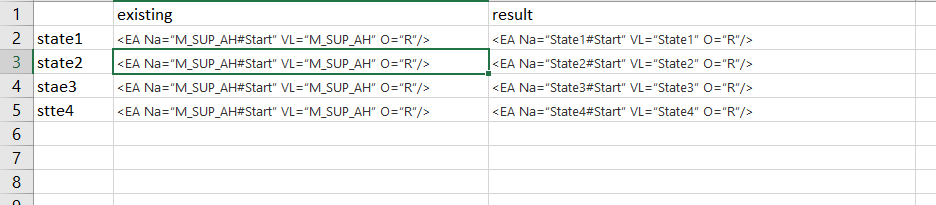
                Screenshot (49).png

                NAGARAJGOUDA PATILN Neil SchipperN 2 Replies Last reply Reply Quote 0
                • NAGARAJGOUDA PATILN Offline
                  NAGARAJGOUDA PATIL @NAGARAJGOUDA PATIL
                  last edited by

                  @nagarajgouda-patil here i did find - and replace but individually i need formula

                  Neil SchipperN 1 Reply Last reply Reply Quote 0
                  • Neil SchipperN Offline
                    Neil Schipper @NAGARAJGOUDA PATIL
                    last edited by

                    @nagarajgouda-patil So your need is complete;y fulfilled, right?

                    NAGARAJGOUDA PATILN 1 Reply Last reply Reply Quote 0
                    • NAGARAJGOUDA PATILN Offline
                      NAGARAJGOUDA PATIL @Neil Schipper
                      last edited by

                      @neil-schipper
                      i need formaula
                      what i did in uploaded excel is manual find and replace
                      i have 100s of data like this

                      1 Reply Last reply Reply Quote 0
                      • Neil SchipperN Offline
                        Neil Schipper @NAGARAJGOUDA PATIL
                        last edited by

                        You dumped an image with no explanation. Is the result column hand-crafted by you to demonstrate needed output, or did you use a formula (with concatenate command)?

                        but individually i need formula

                        I’m not sure what you mean. Do you know how to look through Excel’s help documentation for formula commands?

                        NAGARAJGOUDA PATILN 1 Reply Last reply Reply Quote 0
                        • NAGARAJGOUDA PATILN Offline
                          NAGARAJGOUDA PATIL @Neil Schipper
                          last edited by

                          @neil-schipper
                          thanks for your help

                          1 Reply Last reply Reply Quote 0

                          Hello! It looks like you're interested in this conversation, but you don't have an account yet.

                          Getting fed up of having to scroll through the same posts each visit? When you register for an account, you'll always come back to exactly where you were before, and choose to be notified of new replies (either via email, or push notification). You'll also be able to save bookmarks and upvote posts to show your appreciation to other community members.

                          With your input, this post could be even better 💗

                          Register Login
                          • First post
                            Last post
                          The Community of users of the Notepad++ text editor.
                          Powered by NodeBB | Contributors