Notepad++ v8.4.2 Release Candidate 2
-
Notepad++ v8.4.2 Release Candidate 2:
http://download.notepad-plus-plus.org/repository/8.x/8.4.2.RC2/v8.4.3 RC2 fixes a regression of v8.4.2 RC that Plugin Admin isn’t displayed on menu:
https://github.com/notepad-plus-plus/notepad-plus-plus/issues/11742Notepad++ v8.4.2 crash-fixes, bug-fixes & new enhancement:
- Fix crash on “Copy Binary Content” command without selection on edit zone. (Fix #11639, #11671)
- Fix crashes by re-invoking with command line argument “-udl”. (Fix #11633)
- Make toolbar icons customizable. (Fix #9913)
- Make fold/unfold current level commands toggleable. (Fix #11529, #9196)
- Add command line argument for plugin, a related notification and an API. (Fix #11576)
- Fix horizontal scrolling with scroll wheel on Logitech MX issue. (Fix #10490)
- Enhance dark mode. (Fix #11642, #11693, #11683, #11530, #10159)
- Add encoding context menu via right/double click on status bar. (Fix #9998, #400, #756)
- Add gui4cli keywords and fix its style IDs in stylers.model.xml.
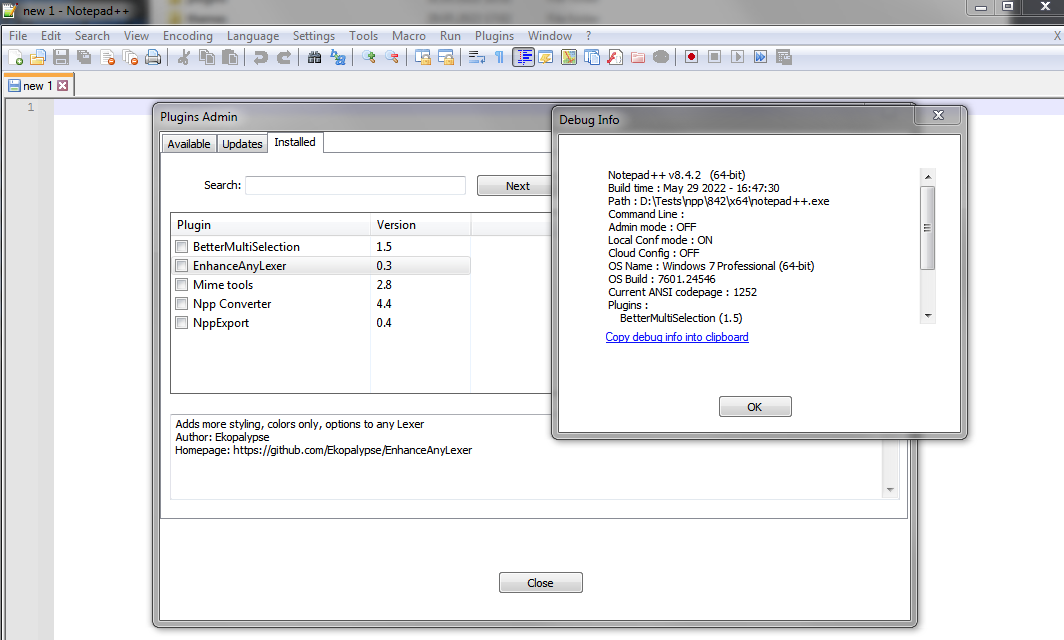
- Display installed plugin versions in Debug Info dialog. (Fix #11284)
The release will be available in 5-7 days if no critical issue found.
Thank you in advance for your testing and your reporting! -
-
@donho please put notepad++ in ms store. i helped me so much in office. thank you very much!
-
I can’t update or install any plugins, through the plugin manager.
Downloading and unpacking without problems, but installation does not occur.
Even after turning off the antivirus. ((( -
-
Now I also found out that he does not remove the installed plugins.
But before that everything worked (old version).Notepad++ v8.4.2 (64-bit) Build time : May 29 2022 - 16:47:30 Path : C:\Program Files\Notepad++\notepad++.exe Command Line : $COMMAND_LINE_PLACEHOLDER$ Admin mode : ON Local Conf mode : OFF Cloud Config : OFF OS Name : Windows 10 Pro (64-bit) OS Version : 21H1 OS Build : 19043.1645 Current ANSI codepage : 1251 Plugins : ComparePlugin (2.0.2) DSpellCheck (1.4.24) NavigateTo (1.12.4.1) NppDocShare (0.1) NppQrCode64 (0.0.0.1) PlanetCNCNpp64 (3001.21.1123.1) SelectToClipboard (1.0.2) zoomdisabler_x64 (1.2) _CustomizeToolbar (5.3) -
I can remove/install the plugins without any problem.
Notepad++ v8.4.2   (64-bit)
Build time : May 29 2022 - 16:47:30
Path : C:\Program Files\Notepad++\notepad++.exe
Command Line : $COMMAND_LINE_PLACEHOLDER$
Admin mode : OFF
Local Conf mode : OFF
Cloud Config : OFF
OS Name : Windows 11 (64-bit)
OS Version : 21H2
OS Build : 22000.675
Current ANSI codepage : 1252
Plugins :
    DSpellCheck (1.4.24)
    mimeTools (2.8)
    NppConverter (4.4)
Can anyone-else reproduce this issue?
-
It’s strange to see:
Command Line : $COMMAND_LINE_PLACEHOLDER$in the DebugInfo strings in two posts. One is on Windows 10. The 2nd one is on Windows 11. This is a bug and it should not be happening.
But I am unable to replicate this in a full install (64-bit) as well as portable installs for both 32-bit & 64-bit. Anyone else?
-
OK. I 've found the path.
- That placeholder string is not visible in the DebugInfo dialog.
- It is also not in the copied text when you press CTRL+C to copy the string.
But it is there in the copied text only when you click the Copy debug info into clipboard hyperlink in the dialog. That needs to be fixed.
-
-
Just to clarify, since I didn’t say it before, for me, on Windows 7 x64 with the portable version, PluginsAdmin works as expected.
-
D donho unpinned this topic on
-





Hello! It looks like you're interested in this conversation, but you don't have an account yet.
Getting fed up of having to scroll through the same posts each visit? When you register for an account, you'll always come back to exactly where you were before, and choose to be notified of new replies (either via email, or push notification). You'll also be able to save bookmarks and upvote posts to show your appreciation to other community members.
With your input, this post could be even better 💗
Register Login