free space at the bottom
-
Hi,
I use Windows 7 Home Premium SP1 x64
At the bottom of notepad I have lot of free space which is pretty frustrating and I don’t know how to get rid of it. I’m experience this issue since last few notepad++ version so I guess its something related to my OS but other OS (exactly same 7 version) doesn’t have this “issue”
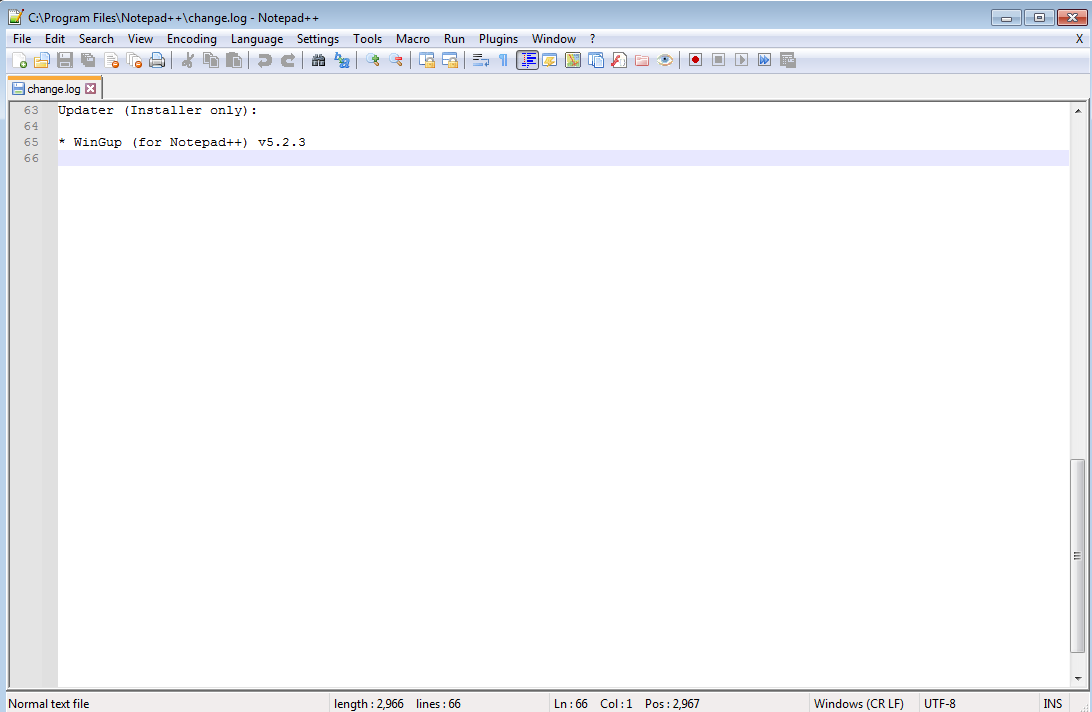
Any idea? Thank you
-
You currently have Settings > Preferences > Editing > ☑ Enable scrolling beyond last line enabled, which allows you to scroll beyond the last line. If you turn that off, it will no longer scroll down that far.
-
@peterjones Thank you! Not sure why this settings was set as default. It happened first time once I installed notepad on fresh OS. I tried reinstall (I removed all previous settings and files from C/users/ and program) but it setting was still enabled by default. Anyway thanks again
-
@daniel-0 said in free space at the bottom:
tried reinstall (I removed all previous settings and files from C/users/ and program) but it setting was still enabled
You probably didn’t nuke where the settings are really stored.
E.g., %appdata%\Notepad++ (see HERE). -
This post is deleted!



Hello! It looks like you're interested in this conversation, but you don't have an account yet.
Getting fed up of having to scroll through the same posts each visit? When you register for an account, you'll always come back to exactly where you were before, and choose to be notified of new replies (either via email, or push notification). You'll also be able to save bookmarks and upvote posts to show your appreciation to other community members.
With your input, this post could be even better 💗
Register Login