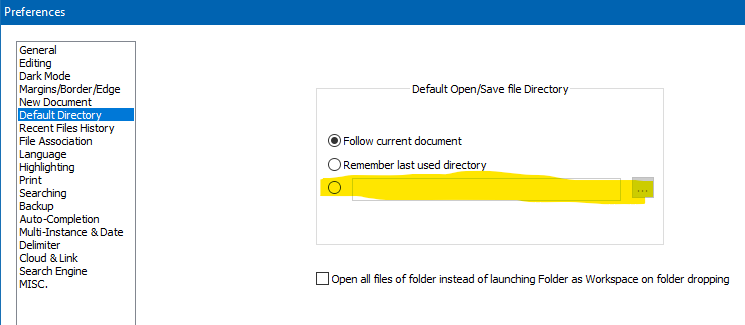
Can I set the default save location?
-
When I create a new file and hit Ctrl-S to save, the default location is “C:\Users\Public\Documents.” Is there any way to change this, perhaps with the command line? (I’ve already tried editing the shortcut’s “Start In” location, but no joy.)
Thanks for any suggestions!
-
-
@alan-kilborn Works for me! I had it on Follow current document, but if NPP wasn’t open already, it still defaulted to Public Documents. (Odd, because I never use Public Documents for anything.)
Thank you for helping — I figured it would be something simple that I overlooked.


Hello! It looks like you're interested in this conversation, but you don't have an account yet.
Getting fed up of having to scroll through the same posts each visit? When you register for an account, you'll always come back to exactly where you were before, and choose to be notified of new replies (either via email, or push notification). You'll also be able to save bookmarks and upvote posts to show your appreciation to other community members.
With your input, this post could be even better 💗
Register Login