Community
    • Login

    Horizontal line question

    Scheduled Pinned Locked Moved Help wanted · · · – – – · · ·
    38 Posts 6 Posters 26.2k Views 3 Watching
    Loading More Posts
    • Oldest to Newest
    • Newest to Oldest
    • Most Votes
    Reply
    • Reply as topic
    Log in to reply
    This topic has been deleted. Only users with topic management privileges can see it.
    • Neil SchipperN Offline
      Neil Schipper @JillPlaysMC
      last edited by Neil Schipper

      @jillplaysmc
      First you should get clarity on the difference between

      • text with line wraps currently visible onscreen
      • text with line breaks that persist across file re-openings

      Eko’s comments pertain to the former. With Word wrap on, you can adjust the width of the NP++ window (not maximized) to temporarily make the width of lines as you like. You’d only need the plug-in if this interfered with how you may wish to view other tabs.

      If you wish to actually split lines in a persistent way, you can make the window adjustments described above, then select the lines of interest and issue Edit -> Line Operations -> Split lines (default Ctrl + i)

      EkopalypseE 1 Reply Last reply Reply Quote 1
      • JillPlaysMCJ Offline
        JillPlaysMC @Ekopalypse
        last edited by

        @ekopalypse Ok so I got the plugin, what do I do now?

        EkopalypseE 1 Reply Last reply Reply Quote 0
        • EkopalypseE Offline
          Ekopalypse @Neil Schipper
          last edited by

          I meant a real insertion of a line break, not just the visual break. Sorry if that didn’t come across clearly.

          JillPlaysMCJ 1 Reply Last reply Reply Quote 0
          • JillPlaysMCJ Offline
            JillPlaysMC @Ekopalypse
            last edited by

            @ekopalypse So I’m confused now, so I know the other thing makes a line that is only visual but doesn’t actually change the line but how do I make it actually change the line?

            Neil SchipperN 1 Reply Last reply Reply Quote 0
            • EkopalypseE Offline
              Ekopalypse @JillPlaysMC
              last edited by

              @jillplaysmc

              How should this work?
              For all files you edit? Only for certain ones?
              Where do you want it to wrap? Before the word that reaches the border, after it, or at that exact column?

              1 Reply Last reply Reply Quote 0
              • Neil SchipperN Offline
                Neil Schipper @JillPlaysMC
                last edited by

                @jillplaysmc said in Horizontal line question:

                how do I make it actually change the line?

                I believe I answered that.

                EkopalypseE JillPlaysMCJ 2 Replies Last reply Reply Quote 0
                • EkopalypseE Offline
                  Ekopalypse @Neil Schipper
                  last edited by

                  @neil-schipper

                  but this does not do it automatically when you edit text.

                  Neil SchipperN 1 Reply Last reply Reply Quote 0
                  • JillPlaysMCJ Offline
                    JillPlaysMC @Neil Schipper
                    last edited by

                    @neil-schipper I’m just confused on what you mean. I know a good amount of tech stuff but I’m not a wizard and what you told me, I’m a little confused on it

                    Neil SchipperN 1 Reply Last reply Reply Quote 0
                    • Neil SchipperN Offline
                      Neil Schipper @JillPlaysMC
                      last edited by Neil Schipper

                      @jillplaysmc said in Horizontal line question:

                      I’m just confused on what you mean.

                      Me too!

                      Which of these are causing difficulty?

                      • turning Word wrap on and off
                      • adjusting the overall application window width
                      • selecting some or all lines
                      • issuing Split Lines command

                      Play around for ten minutes and then report back.

                      JillPlaysMCJ 2 Replies Last reply Reply Quote 0
                      • JillPlaysMCJ Offline
                        JillPlaysMC @Neil Schipper
                        last edited by

                        @neil-schipper Ok so I just found out that turning on warp wrap and making the window smaller does what I want. But how do I keep it like this when I put it back on maxed window mode?

                        Neil SchipperN 1 Reply Last reply Reply Quote 0
                        • Neil SchipperN Offline
                          Neil Schipper @JillPlaysMC
                          last edited by

                          @jillplaysmc
                          So you’ve executed 2 out of 4 steps, but you don’t want to continue with the instructions to see if it meets your need?

                          You also haven’t stated whether you want to control the appearance “for now” vs. change the file so it persistently has the shorter lines.

                          1 Reply Last reply Reply Quote 0
                          • Neil SchipperN Offline
                            Neil Schipper @Ekopalypse
                            last edited by

                            @ekopalypse said in Horizontal line question:

                            but this does not do it automatically when you edit text

                            Right. Maybe Jill will clarify that aspect of what she wants.

                            1 Reply Last reply Reply Quote 1
                            • JillPlaysMCJ Offline
                              JillPlaysMC @Neil Schipper
                              last edited by

                              @neil-schipper As for steps 3 and 4, what do you mean by select some or all lines, and what does split lines do?

                              Neil SchipperN 1 Reply Last reply Reply Quote 0
                              • Neil SchipperN Offline
                                Neil Schipper @JillPlaysMC
                                last edited by

                                @jillplaysmc
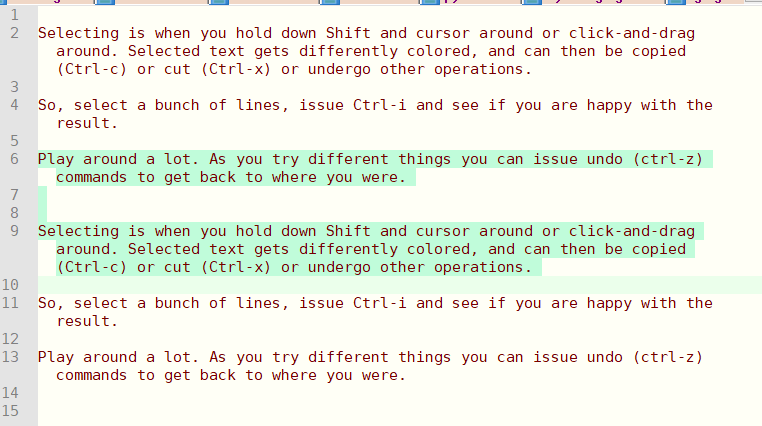
                                Selecting is when you hold down Shift and cursor around or click-and-drag around. Selected text gets differently colored, and can then be copied (Ctrl-c) or cut (Ctrl-x) or undergo other operations.

                                So, select a bunch of lines, issue Ctrl-i and see if you are happy with the result.

                                Play around a lot. As you try different things you can issue undo (ctrl-z) commands to get back to where you were.

                                JillPlaysMCJ 1 Reply Last reply Reply Quote 0
                                • JillPlaysMCJ Offline
                                  JillPlaysMC @Neil Schipper
                                  last edited by

                                  @neil-schipper When I try Ctrl + I nothing happens

                                  Neil SchipperN 1 Reply Last reply Reply Quote 0
                                  • Neil SchipperN Offline
                                    Neil Schipper @JillPlaysMC
                                    last edited by

                                    @jillplaysmc

                                    Here’s a “before” shot. Notice that lines 6 to 10 are selected:
                                    2ab74e0f-803b-4bfa-bfaa-936212c1a2af-image.png

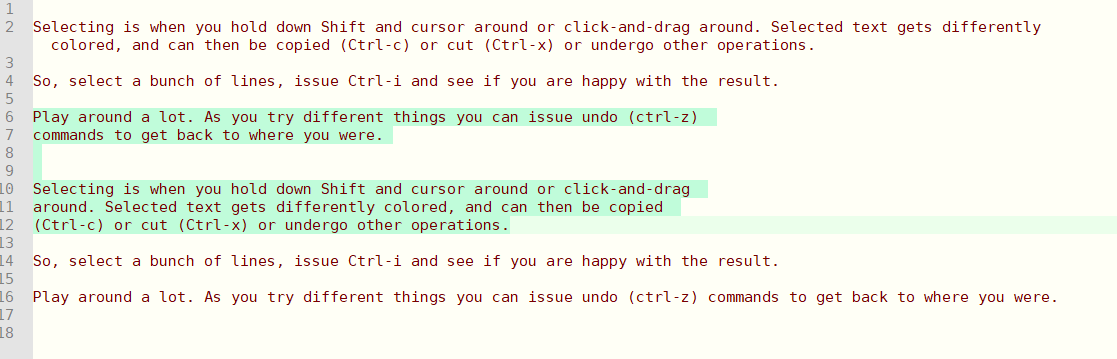
                                    Here’s what we get after Ctrl + i and then widening the window. Notice that the old line 6 is now 2 lines 6 & 7, and, old line 9 is now 3 lines 10, 11 & 12.
                                    ef9643d5-438c-4ab5-b39e-4bf0e21a1417-image.png

                                    Neil SchipperN PeterJonesP 2 Replies Last reply Reply Quote 0
                                    • Neil SchipperN Offline
                                      Neil Schipper @Neil Schipper
                                      last edited by

                                      @neil-schipper said in Horizontal line question:

                                      and, old line 9 is now 3 lines 10, 11 & 12.

                                      … and please notice that the widening did not effect the wrap point of lines 6 - 12.

                                      1 Reply Last reply Reply Quote 0
                                      • PeterJonesP Online
                                        PeterJones @Neil Schipper
                                        last edited by

                                        @neil-schipper & @JillPlaysMC ,

                                        You can also set Settings > Preferences > Margins/Borders/Edge > Vertical Edge Settings = 129, which will draw a colored line at character 129, and when you do the Ctrl+I to split the lines, it will split the selected text at that exact location instead of however wide the window happens to be.

                                        Snabel42S 1 Reply Last reply Reply Quote 2
                                        • Snabel42S Offline
                                          Snabel42 @PeterJones
                                          last edited by

                                          @peterjones how would you ‘split’ at a certain character position without using this setting?

                                          I normally do a regular expression for it, but maybe there’s a quicker/simpler way with the split command?

                                          Alan KilbornA PeterJonesP 2 Replies Last reply Reply Quote 0
                                          • Alan KilbornA Offline
                                            Alan Kilborn @Snabel42
                                            last edited by Alan Kilborn

                                            @snabel42 said in Horizontal line question:

                                            how would you ‘split’ at a certain character position without using this setting?

                                            You can’t (well, you can do it with regex but you already know this); it’s all in the USER MANUAL.


                                            Snabel42S 1 Reply Last reply Reply Quote 1

                                            Hello! It looks like you're interested in this conversation, but you don't have an account yet.

                                            Getting fed up of having to scroll through the same posts each visit? When you register for an account, you'll always come back to exactly where you were before, and choose to be notified of new replies (either via email, or push notification). You'll also be able to save bookmarks and upvote posts to show your appreciation to other community members.

                                            With your input, this post could be even better 💗

                                            Register Login
                                            • First post
                                              Last post
                                            The Community of users of the Notepad++ text editor.
                                            Powered by NodeBB | Contributors
