Install Plugins without Admin Rights and Internet Connection - Manual Way doesn't work.
-
@alan-kilborn
For example HTML Tag OR XML Tools
This website: https://sourceforge.net/projects/npp-plugins/files/HTMLTag/HTMLTag plugin v1.0.0/
It is not the newest version of the plugin.Yes on this way I tried it.
First time in the Program Files Path and on the second time with an path where the user has the rights to write.I get always the result message --> It was successfull please restart notepad++ - but after the restart there is no plugin.
-
@p-fue said in Install Plugins without Admin Rights and Internet Connection - Manual Way doesn't work.:
I get always the result message --> It was successfull please restart notepad++
You wouldn’t get this message if trying my suggestion of manually copying the file into the appropriate place, so I can’t tell if you are actually trying that or not. Maybe it is a language barrier.
-
Further information:
Notepad++ creates an folder called HTML Tag with includes the dll file.But in notepad++ there is nothing shown.
-
@alan-kilborn
I read, that sometimes the message can come or not.
This is my manual: https://okidk.de/notepad-plugins-konnen-unter-windows-10-nicht-installiert-werden/
I do Method 5.This message I get:
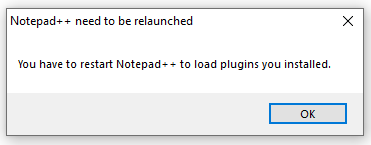
-
@p-fue said in Install Plugins without Admin Rights and Internet Connection - Manual Way doesn't work.:
This website: https://sourceforge.net/projects/npp-plugins/files/HTMLTag/HTMLTag plugin v1.0.0/
I looked at that.
That version is really old.
It might just be that that version is incompatible with a more modern (e.g. 8.4.2) Notepad++.
If it were me, I would not try to use that version of the plugin. -
@p-fue ,
If you want to do a manual installation of HTML Tag plugin:
- Note that the Plugins Admin lists the now-official home of HTML Tag as https://bitbucket.org/rdipardo/htmltag/ , not that ancient sourceforge link; and that points to https://bitbucket.org/rdipardo/htmltag/downloads/ as the downloads location
- Download the zip file for the 64bit plugin
- unzip the plugin to a temporary location
- Do not use the Settings > Import > Import plugin(s). Exit Notepad++.
- Create a new folder
...<notepad++install-location>\Plugins\HTMLTag\ - Copy all the files from the temporary location to
...<notepad++install-location>\Plugins\HTMLTag\ - Restart Notepad++
- The plugin will be in the Plugins menu if you have followed these correctly
The only time that Settings > Import > Import plugin(s) works is if your plugin only has a DLL and no other files; the HTMLTag has other files, so Settings > Import DLL will not work, because it will not put the other files in the right place.
-
@peterjones
Great - it works!Do you have other download-links for these plugins?
- Compare
- HEX-Editor
- Npp Xml Treeview
- XML Tools
Thanks for your help.
-
@p-fue said in Install Plugins without Admin Rights and Internet Connection - Manual Way doesn't work.:
Do you have other download-links for these plugins?
You can find download links embedded in the data here:
-
This post is deleted! -
Off-topic, but worth pointing out to future visitors of this thread. When @inmizi-miz quoted Peter’s reply, the link to the plugin repository was mangled so that, bizarrely, the
/downloadspath segment redirects to a commercial website selling light fixtures (*):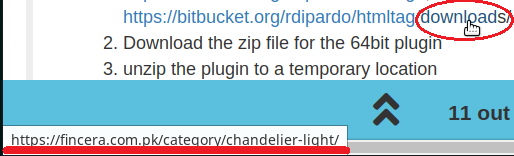
Rest assured the link text is correct; just make sure to paste it into your browser’s address bar.
(*) Looks like someone’s clipboard history got pasted into an accidentally summoned “Edit Hyperlink” pop-up window
-
 R rdipardo referenced this topic on
-
It’s actually a new form of spam that I noticed in a few other posts – by that same user, and a couple others. The posts have been removed, and the posters flagged. (I hadn’t noticed at the time that it was the same user or that links had been edited)




Hello! It looks like you're interested in this conversation, but you don't have an account yet.
Getting fed up of having to scroll through the same posts each visit? When you register for an account, you'll always come back to exactly where you were before, and choose to be notified of new replies (either via email, or push notification). You'll also be able to save bookmarks and upvote posts to show your appreciation to other community members.
With your input, this post could be even better 💗
Register Login