imported 3 UDL for AHK removed 2 still 3 entries
-
Hi Everybody,
pretty new to using NPP. I want to use npp for editing Autohotkey-scripts. So I searched for a dark theme for AHK.
I found 2 files and imported them but they were not for a dark theme.
So I searched again and found this one
https://www.autohotkey.com/boards/viewtopic.php?t=72424
I installed this file to into subfolder
C:\Users\choic\AppData\Roaming\Notepad++\userDefineLangs
then I deleted the two other filesStill npp shows me 3 entries and only one (the wrong one) is choosable
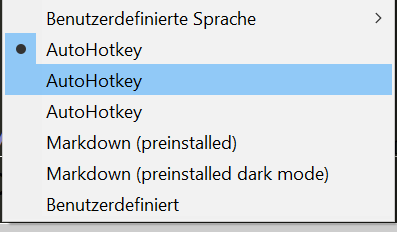
What do I have to do to remove the 2 wrong entries in the menu to enable the right one?
thank you very much in advance for assistance
cheers from Peer
-
Did you exit Notepad++ and re-start it after removing the old files?
If that doesn’t work, go into the User Defined Language dialog, select each of the “AutoHotkey” languages and click Remove. Restart notepad++ and make sure they are all gone. Then re-save the dark-mode-AHK into the userDefineLangs folder, exit Notepad++ and restart. There should only be one now.
(If you put the XML into the userDefineLangs folder, you do not ever have to use the Import button in the User Defined Language dialog)


Hello! It looks like you're interested in this conversation, but you don't have an account yet.
Getting fed up of having to scroll through the same posts each visit? When you register for an account, you'll always come back to exactly where you were before, and choose to be notified of new replies (either via email, or push notification). You'll also be able to save bookmarks and upvote posts to show your appreciation to other community members.
With your input, this post could be even better 💗
Register Login