Plugin or UDL to color whole lines by regexp?
-
I’m looking for either a Notepad++ plugin, or a User-Defined Language, that will allow me to color lines in a file by regexp.
E.g. a line containing “ERROR” (anywhere in the line) should be red, and a line containing “code [0-9]+” should be green (the whole line, not just the regexp).This appears quite simple (is it though?) yet I haven’t been able to locate any solution. “AnalysePlugin” comes close, but it doesn’t color the file itself but rather displays the lines in a separate window. I want the coloring to be like syntax highlighting.
Does such a thing exist?
Thanks in advance! -
If by “color lines” you mean you want to change the foreground color, then you could probably use the EnhanceAnyLexer plugin:
Assuming it’s a Normal text file, you would use Plugins > EnhanceAnyLexer > Enhance Current Language, and the plugin will add a section to its
.inifile called[normal text]with an example pair of color (on the left of the equal) and regex (on the right of the equal).If you were to enter
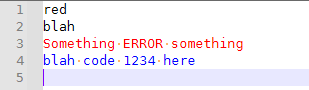
0x0000FF = ^.*ERROR.*$
0xFF0000 = ^.*code [0-9]+.*$
in the
.inifile it opens, then when you switch to your text file, the textred blah Something ERROR something blah code 1234 herewould look like
-
@PeterJones Thank you! That is exactly what I needed.


Hello! It looks like you're interested in this conversation, but you don't have an account yet.
Getting fed up of having to scroll through the same posts each visit? When you register for an account, you'll always come back to exactly where you were before, and choose to be notified of new replies (either via email, or push notification). You'll also be able to save bookmarks and upvote posts to show your appreciation to other community members.
With your input, this post could be even better 💗
Register Login