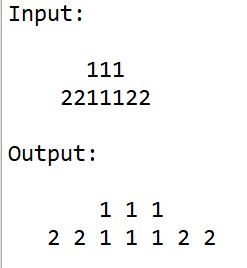
Given this input, how to have this output?
-
How to do this in notepad++
-
to explain further, the output just add one space without losing the column alignment between the first line and 2nd line (e.g. 111 in first line is still aligned with 111 in the second line after adding a space)
-
@Pixels-Pics said in Given this input, how to have this output?:
to explain further, the output just add one space without losing the column alignment between the first line and 2nd line (e.g. 111 in first line is still aligned with 111 in the second line after adding a space)
This seems to be achievable using regular expressions (regex). For every character we find, we add a space to it. So using the Replace function we have:
Find What:(?-s).
Replace With:\x20${0}
Set the search mode to “Regular expression”. The \x20 is code for a space, or you can just type a space in that position. I used the \x20 so you can see there is a character there.Using both your example and another with 2 more spaces in front of each line we get the 2 lines spaced out but still in alignment with each other.
I haven’t completed any other tests, your work is in seeing if it solves your problem on real data. However if your data included tabs then it will NOT work.
Terry
-
@Terry-R Your regex works on my real-world data. As you pointed out, my data don’t have tabs. Thank you very much for your timely solution and reply.

Hello! It looks like you're interested in this conversation, but you don't have an account yet.
Getting fed up of having to scroll through the same posts each visit? When you register for an account, you'll always come back to exactly where you were before, and choose to be notified of new replies (either via email, or push notification). You'll also be able to save bookmarks and upvote posts to show your appreciation to other community members.
With your input, this post could be even better 💗
Register Login