Ctrl + e and ctrl + shift + alt not working
-
When I press ctrl + e a character like ENQ appears in a rectangle, instead of autocompleting a tag.
And just when I press ctrl + shift + alt nothing happens -
@123698741 said in Ctrl + e and ctrl + shift + alt not working:
When I press ctrl + e a character like ENQ appears in a rectangle, instead of autocompleting a tag.
What key-combination is the “autocompleting a tag” command set to in the Shortcut Mapper ?
What is command is “ctrl+e” set to in the Shortcut Mapper ? (I suspect nothing because otherwise a black-boxed ENQ would NOT appear.)
and just when I press ctrl + shift + alt nothing happens
You mean only those 3 keys? If so, then you’re right, nothing happens (because nothing is supposed to).
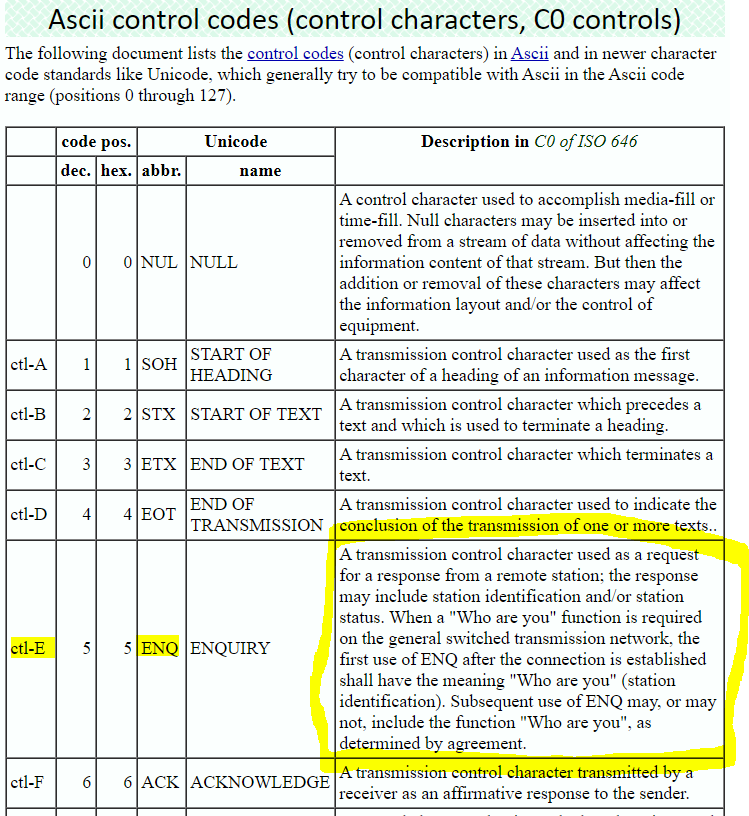
BTW, if you want to know more about ctrl+e, here’s some light reading for you:
-
Hi @Alan-Kilborn,
Thank you very much for your great answer.
I would prefer ifCtrl+Eprinted nothing (like notepad). PressingShift+Ctrl+Ealso prints ENQ andShift+Ctrl+Bprints STX. At least the combinations with Shift should not cause to trigger these control characters. What do you think about it? -
would prefer if Ctrl+E printed nothing. Pressing Shift+Ctrl+E also prints ENQ and Shift+Ctrl+B prints STX. At least the combinations with Shift should not cause to trigger these control characters. What do you think about it?
Well, I basically agree with that, and I’ve long had a script that filters control characters out in case I “fat finger” one that isn’t assigned to a shortcut keycombo in Notepad++.
It seems like this topic has been discussed in the Community before, but it was so long ago I can’t find the reference.
But anyway, you can achieve your desire if you are willing to use the PythonScript plugin and set up the following simple script:
# -*- coding: utf-8 -*-
from Npp import *

def modified_callback(args):
    if args['modificationType'] == MODIFICATIONFLAGS.INSERTCHECK:
        t = args['text']
        if len(t) > 1: return
        if ord(t) in range(0, 0x1F + 1) and t not in '\t\n\r':
            editor.changeInsertion('')

editor.callbackSync(modified_callback, [SCINTILLANOTIFICATION.MODIFIED])  # must be callbackSync!
Some notes on PythonScript are found HERE.
-
@datatraveller1 said:
Shift+Ctrl+B prints STX
Note that in Notepad++ 8.5 and later, Shift+Ctrl+B is the default keycombo for Begin/End Select :
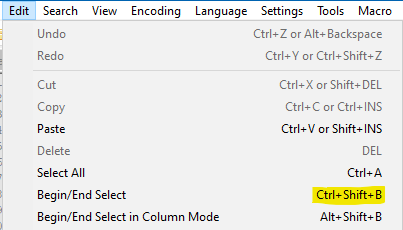
So this keycombo will no longer insert a
STXcharacter into documents when typed. -
 A Alan Kilborn referenced this topic on


Hello! It looks like you're interested in this conversation, but you don't have an account yet.
Getting fed up of having to scroll through the same posts each visit? When you register for an account, you'll always come back to exactly where you were before, and choose to be notified of new replies (either via email, or push notification). You'll also be able to save bookmarks and upvote posts to show your appreciation to other community members.
With your input, this post could be even better 💗
Register Login