Using sets to find A-Za-z plus the # and - chars ..?
-
@IanSunlun said in Using sets to find A-Za-z plus the # and - chars ..?:
http://mysitename.net/index.php/New_Video#column-one"Um, no it shouldn’t.
New_Video#column-oneis more than one character.[A-Za-z%#_-]only matches one character.I think what you want is
http://mysitename.net/index.php/[A-Za-z%#_-]+", which wants one or more charaters from that set.Also, I hope you don’t have a URL like
http://mysitename.net/index.php/one1#column2Or
http://school.edu/~username/o.n.e.#2, which is something I might have had back in my university homepage days, lo those two-and-a-half decades ago.Maybe use
http://mysitename.net/index.php/[\w%#.~-]+", since\wencompases the[A-Za-z0-9_]portion, and it adds in the URL-safe characters of . and ~, as well as the # separator and %-encoding-start. -
@IanSunlun
Hello :) Try this in Npp: (Just to easily verify that it matches)Find: [.#\-%]Inside a character class [set]:
The character # is literal
The character % is literal
The.It is literal (remember that outside equals any character.)
\-The only one that needs an escape sequence using\.So:
[A-Za-z#\-%.]
The second hyphen is inside in an escape sequence (preceded by \ ).Another character that needs escape is ^ because of its negation meaning within the brackets
[\^]. -
@PeterJones Ah, thats seems to work thanks.
Does[\w%#.~-]+put whatever it matches into ${1} ? -
This post is deleted! -
This post is deleted! -
@IanSunlun said in Using sets to find A-Za-z plus the # and - chars ..?:
Does [\w%#.~-]+ put whatever it matches into ${1} ?
Sorry, when I answered, I had forgotten that you previously said,
(So I need to store pagename in ${1} and bookmark in ${2}.)
Putting the
#into either match is not what you want, either. You really need two groups, one before the # and one after.FIND =
http://mysitename.net/index.php/([\w%.~-]+)#([\w%.~-]+)"
will only match if there is a bookmark, and the # will not be inside the ${2} group. If you want the # to be included in ${2}, usehttp://mysitename.net/index.php/([\w%.~-]+)(#[\w%.~-]+)" -
@PeterJones said in Using sets to find A-Za-z plus the # and - chars ..?:
FIND = http://mysitename.net/index.php/([\w%.~-]+)#([\w%.~-]+)"
With the period
.inbetween the%and the~it did not find:
http://mysitename.net/index.php/New_Video#column-one"
But taking the period out, it did find it.
Whats the thinking behind the period in this context ? -
Except for
-, order doesn’t matter inside the[]character class. The period is there becauseNew.Video#column-oneis also a valid URLenderend-string.FIND =
http://mysitename.net/index.php/([\w%.~-]+)#([\w%.~-]+)"
does matchhttp://mysitename.net/index.php/New_Video#column-one":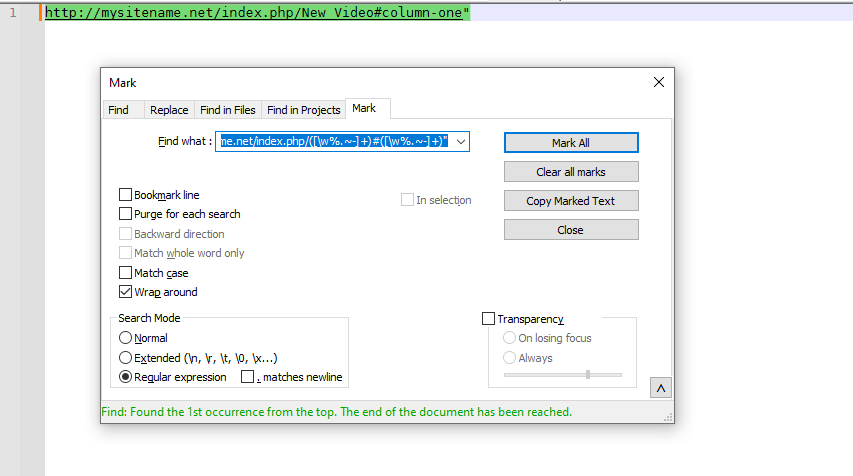
-
@PeterJones said in Using sets to find A-Za-z plus the # and - chars ..?:
FIND = http://mysitename.net/index.php/([\w%.~-]+)#([\w%.~-]+)"
Is it worth pointing out that the first two periods here really aren’t periods but rather “match any char”, because they aren’t escaped? Sure, an unescaped
.will match a literal period, but it will match other things as well (obviously).IMO, OP here needs to stop asking forum questions and go off and study regex.
-
Hello, @peterjones,
In the post below, Peter :
https://community.notepad-plus-plus.org/post/81643
You said :
Actually, it’s not documented in our character classes section. I will remedy that.
Then, regarding the
Character Classfeature, may be, this part could be added to theOfficial Notepad++ Documentation ::If we consider the following CHARACTER CLASS structure : [.......] 123456789 The POSSIBLE location(s), in order to find the LITERAL character below, are : LITERAL Character [ : POSSIBLE at any position, BETWEEN 2 to 8 POSSIBLE at any position, BETWEEN 2 to 8, if PRECEDED with an ANTI-SLASH character LITERAL Character ] : POSSIBLE at position 2 ONLY POSSIBLE at any position, BETWEEN 2 to 8, if PRECEDED with an ANTI-SLASH character LITERAL Character - : POSSIBLE at position 2 POSSIBLE at position 8 POSSIBLE at any position, BETWEEN 2 to 8, if PRECEDED with an ANTI-SLASH character LITERAL Character \ : POSSIBLE at any position, BETWEEN 2 to 8, if PRECEDED with an ANTI-SLASH character
Of course, change this layout as you like !
Best Regards,
guy038
-
It is rather awkward to express, but I like your idea.
My idea for expression:
-
To use a “literal
[” in a character class: Use it directly like any other character, e.g.[ab[c]; “escaping” is not necessary (but is permissible), e.g.[ab\\[c] -
To use a “literal
]” in a character class: Directly right after the opening[of the class notation, e.g.[]abc], OR “escaped” at any position, e.g.[\\]abc]or[a\\]bc] -
To use a “literal
-” in a character class: Directly as the first or last character in the enclosing class notation, e.g.[-abc]or[abc-], OR “escaped” at any position, e.g.[\-abc]or[a\-bc] -
To use a “literal
\” in a character class: Must be doubled (i.e.,\\) inside the enclosing class notation, e.g.[ab\\c]
-
-
@Alan-Kilborn & @guy038 ,
I like those suggestions, especially the way Alan rephrased it: it works much better than my clunky first attempt in the manual, that only included
-and was not not very readable.Thanks.
-
Maybe my first-of-4 bullet points previously should be moved to be the last-of-4, and changed to:
- To use any other literal character in a character class, just use it directly, i.e., no “escaping” needed
Maybe it works well as a 2 column 4 row table, headers:
- Character
- To use it literally in a character class
With those headers, the “cell contents” for column 2 could be appropriately shortened to remove redundant verbiage.
-
Hi, @peterjones,
BTW, Peter, do you intend to include, in some way, the end part of this post, regarding the
Free-spacemode, which is in the Notes section ?https://community.notepad-plus-plus.org/post/81368
Also, did you correctly receive, by e-mail, my attached text file, regarding the
TextFXfeatures ?Please, I do not want to stress you, unnecessarily ! Just go at your own pace !
Best Regards
guy038
-
@guy038 said in Using sets to find A-Za-z plus the # and - chars ..?:
do you intend to include, in some way, the end part of this post, regarding the Free-space mode
He already did, see HERE.
-
@Alan-Kilborn I really admire you guys for figuring out Regular Expressions; I bet you never get lost in real life when you can keep track of the patterns/positions so well, aka good spatial awareness :)
Oh and I like the trick of having - as last character before ]
-
@Andrew-McP said in Using sets to find A-Za-z plus the # and - chars ..?:
I really admire you guys for figuring out Regular Expressions
So if someone says they have “figured out regular expressions”, I pity them. Because it just means they are ripe for an upcoming whipping when a regex misunderstanding of theirs really embarrasses them. :-)
It pays to always be humble when discussing regular expressions with others. :-)
I bet you never get lost
GPS!
I like the trick of having - as last character before ]
Not so much a trick, as a logical place to put it when you realize that anywhere except the first or last position it must form some sort of “range”.
-
@Alan-Kilborn hahahah yes no way would I bet my house on any regular expression I recommend covering all, no matter how perverse, eventualities…
-
Hello, @peterjones,
In my previous post, I forgot to mention the
^character, which has a special meaning within aCharacter class!So, here is an updated version of my previous post :
If we consider the following CHARACTER CLASS structure :

[.......]
123456789

The POSSIBLE location(s), in order to find the LITERAL character below, are :

LITERAL Character [    :     POSSIBLE at any position, BETWEEN 2 to 8
                             POSSIBLE at any position, BETWEEN 2 to 8, if PRECEDED with an ANTI-SLASH character

LITERAL Character ]    :     POSSIBLE at position 2 ONLY
                             POSSIBLE at any position, BETWEEN 2 to 8, if PRECEDED with an ANTI-SLASH character

LITERAL Character -    :     POSSIBLE at position 2
                             POSSIBLE at position 8
                             POSSIBLE at any position, BETWEEN 2 to 8, if PRECEDED with an ANTI-SLASH character

LITERAL character ^    :     POSSIBLE at any position, BETWEEN 3 and 8
                             POSSIBLE at any position, BETWEEN 2 to 8, if PRECEDED with an ANTI-SLASH character


LITERAL Character \    :     POSSIBLE at any position, BETWEEN 2 to 8, if PRECEDED with an ANTI-SLASH character
And I suppose that @alan-kilborn could add :
To use a “literal
^” in a character class: Use it directly like any other character, e.g.[ab^c], but right after the opening[of the class notation ; “escaping” is not necessary (but is permissible), e.g.[ab\^c]Best Regards,
guy038





Hello! It looks like you're interested in this conversation, but you don't have an account yet.
Getting fed up of having to scroll through the same posts each visit? When you register for an account, you'll always come back to exactly where you were before, and choose to be notified of new replies (either via email, or push notification). You'll also be able to save bookmarks and upvote posts to show your appreciation to other community members.
With your input, this post could be even better 💗
Register Login