find function
-
I am trying to use the find tool and it used to tell me where it found a particular string on a new line for each find but I seem to have lost that feature did it go away or is it a setting that I can bring back.
-
If I am understanding correctly, you are looking for a panel or subwindow that shows all the results at once, rather than having to Find Next for each new match. If this is correct, then you want to hit the Find All in Current File, which will open or focus that panel/sub-window (called “Search results”), which shows all the results.
The menu operation Search > Search Results Window (
F7default) toggles that window (as long as there are results in the window; if no find-all has been run, it won’t appear when you choose that).I believe that’s what you want.
-
yes find all is what i am running and it used to show each find as a new line but does not do that any more
-
@Richard-Bruce said:
find all … it used to show each find as a new line
Uncheck this setting:
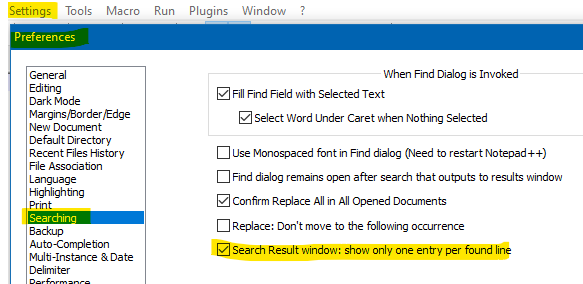
User manual reference is HERE.
-
@Alan-Kilborn perfect thank you



Hello! It looks like you're interested in this conversation, but you don't have an account yet.
Getting fed up of having to scroll through the same posts each visit? When you register for an account, you'll always come back to exactly where you were before, and choose to be notified of new replies (either via email, or push notification). You'll also be able to save bookmarks and upvote posts to show your appreciation to other community members.
With your input, this post could be even better 💗
Register Login