Community
    • Login

    Notepad ++ not responding when saving XML file

    Scheduled Pinned Locked Moved Help wanted · · · – – – · · ·
    18 Posts 11 Posters 8.1k Views 1 Watching
    Loading More Posts
    • Oldest to Newest
    • Newest to Oldest
    • Most Votes
    Reply
    • Reply as topic
    Log in to reply
    This topic has been deleted. Only users with topic management privileges can see it.
    • Luc VerhoevenL Offline
      Luc Verhoeven @Michael Vincent
      last edited by

      @michael-vincent
      Yes, I can confirm that it is the XML-tools lugin that causes the problem. When I remove it, it will save in seconds (it is a very big XSLT file), if I reinstall the plugin (via de plugin admin) the behaviour is back. Saving the same XSLT (under a new name) makes notepad++ “not responding”

      What I now notice as well, is that when I crash the not responding notepad++ and restart it, it will save the file without problem, when I do save as again to another filename, it is back to not responding…

      I will submit a bug report on the XML-Tools on github. Thanks.

      Luc VerhoevenL 1 Reply Last reply Reply Quote 3
      • Luc VerhoevenL Offline
        Luc Verhoeven @Luc Verhoeven
        last edited by

        @luc-verhoeven
        https://github.com/morbac/xmltools/issues/154

        Bruce HansenB 1 Reply Last reply Reply Quote 2
        • Bruce HansenB Offline
          Bruce Hansen @Luc Verhoeven
          last edited by

          I’m seeing similar issues when saving a large-ish (651k) XML file.
          Notepad++ “hangs” for easily a minute or so before finally completing the save.
          I do have XML Tools enabled, and (re)installed the latest v3.1.1.12 immediately after updating Notepad++.

          Michael VincentM 1 Reply Last reply Reply Quote 0
          • Michael VincentM Offline
            Michael Vincent @Bruce Hansen
            last edited by Michael Vincent

            @bruce-hansen said in Notepad ++ not responding when saving XML file:

            do have XML Tools enabled, and (re)installed the latest v3.1.1.12

            Then follow the issue that @Luc-Verhoeven linked above. There’s already a potential solution there.

            Cheers.

            Luc VerhoevenL 1 Reply Last reply Reply Quote 2
            • Luc VerhoevenL Offline
              Luc Verhoeven @Michael Vincent
              last edited by

              @michael-vincent and all,

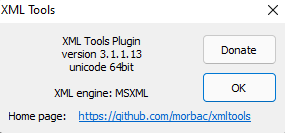
              Version d5b96276-0d40-4a72-8722-6599d8b04304-image.png is available on github and does solve my problem.

              I do not know when the new version will be available in the plugin Admin, so I installed the dll manually in the folder plugins\XmlTools\

              Joel RodriguezJ 1 Reply Last reply Reply Quote 6
              • Joel RodriguezJ Offline
                Joel Rodriguez @Luc Verhoeven
                last edited by

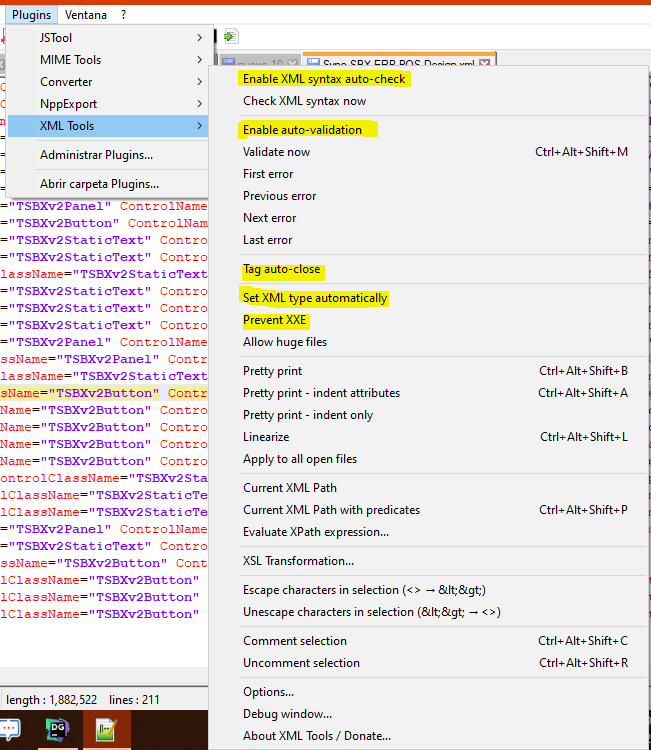
                @luc-verhoeven Hello, i fixed s
                disabling these options
                8290e5ec-a39d-4fa4-8e83-57527d1ffbdf-imagen.png

                now i can save all my XML faster i hope this works for you

                ? NMC1992N 2 Replies Last reply Reply Quote 2
                • ? Offline
                  A Former User @Joel Rodriguez
                  last edited by

                  @joel-rodriguez Thank you!

                  This is what worked for me

                  1 Reply Last reply Reply Quote 0
                  • NMC1992N Offline
                    NMC1992 @Joel Rodriguez
                    last edited by

                    @joel-rodriguez Thank you so much! I’ve been having this for a while, so a work-around is much appreciated! :)

                    1 Reply Last reply Reply Quote 0
                    • Nicholas JamesN Offline
                      Nicholas James
                      last edited by

                      FYI, I just installed the July 15, 2022 build (v8.4.4) and the bug is back. Following the advice of @joel-rodriguez I was able to save my files without locking up.
                      Thanks,
                      Nick

                      1 Reply Last reply Reply Quote 0
                      • Graham CollinsG Offline
                        Graham Collins
                        last edited by

                        This happened to me on 8.4.7. Disabling the options mentioned by @joel-rodriguez worked for me

                        1 Reply Last reply Reply Quote 0
                        • guy038G guy038 referenced this topic on

                        Hello! It looks like you're interested in this conversation, but you don't have an account yet.

                        Getting fed up of having to scroll through the same posts each visit? When you register for an account, you'll always come back to exactly where you were before, and choose to be notified of new replies (either via email, or push notification). You'll also be able to save bookmarks and upvote posts to show your appreciation to other community members.

                        With your input, this post could be even better 💗

                        Register Login
                        • First post
                          Last post
                        The Community of users of the Notepad++ text editor.
                        Powered by NodeBB | Contributors