Community
    • Login

    Notepad++ v8.4.7 Release

    Scheduled Pinned Locked Moved Announcements
    31 Posts 10 Posters 30.3k Views 5 Watching
    Loading More Posts
    • Oldest to Newest
    • Newest to Oldest
    • Most Votes
    Reply
    • Reply as topic
    Log in to reply
    This topic has been deleted. Only users with topic management privileges can see it.
    • Professor AndreyP Offline
      Professor Andrey
      last edited by

      I have a small (bag)

      Please add Notepad++ on windows 11 context menu !

      PeterJonesP 1 Reply Last reply Reply Quote 0
      • PeterJonesP Online
        PeterJones @Professor Andrey
        last edited by PeterJones

        @Professor-Andrey said in Notepad++ v8.4.7 Release:

        I have a small (bag)

        Please add Notepad++ on windows 11 context menu !

        Windows 11 has intentionally hidden that away, to steer users into a single Open With application. You can see the old-style menu by using Show More Options in the Right-click menu, or using Shift+F10 instead of Right clicking.

        …
        Or see the user manual section on the right -click for Windows 11 on this page: https://npp-user-manual.org/docs/other-resources/

        1 Reply Last reply Reply Quote 1
        • TroshinDVT Offline
          TroshinDV
          last edited by

          Notepad++ v8.4.7 (64-bit)
          Build time : Nov 1 2022 - 23:31:11
          Path : C:_ProgramF\Notepad++_portable\npp.8.4.7.portable.x64\notepad++.exe
          Command Line :
          Admin mode : ON
          Local Conf mode : ON
          Cloud Config : OFF
          OS Name : Windows 7 Ultimate (64-bit)
          OS Build : 7601.24511
          Current ANSI codepage : 1251
          Plugins :
          Explorer (1.9.5)
          mimeTools (2.9)
          NppConverter (4.5)
          NppExport (0.4)
          Screenshot_232.png

          Screenshot_233.png

          PeterJonesP 1 Reply Last reply Reply Quote 0
          • PeterJonesP Online
            PeterJones @TroshinDV
            last edited by

            @TroshinDV ,

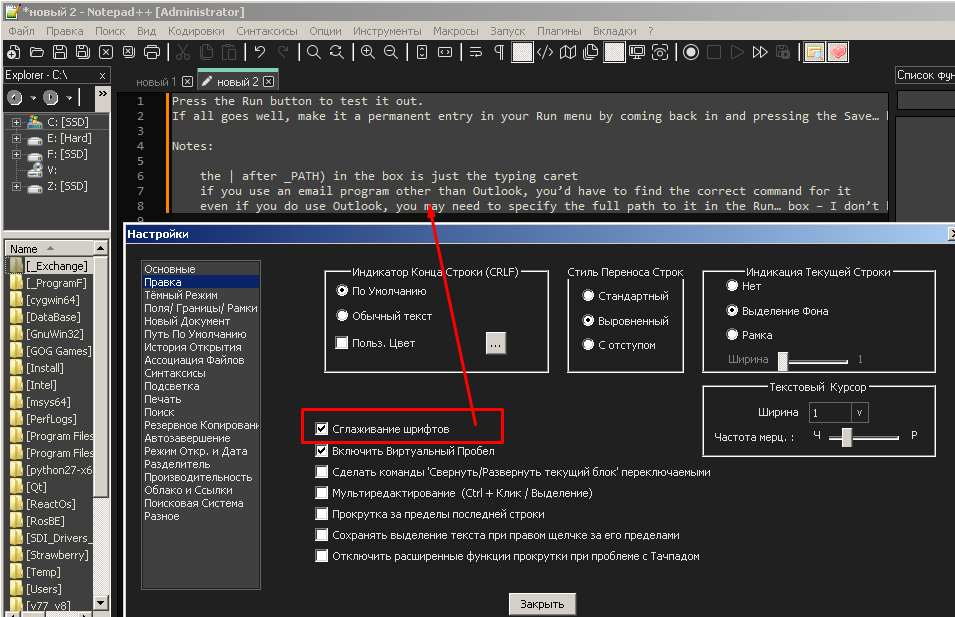
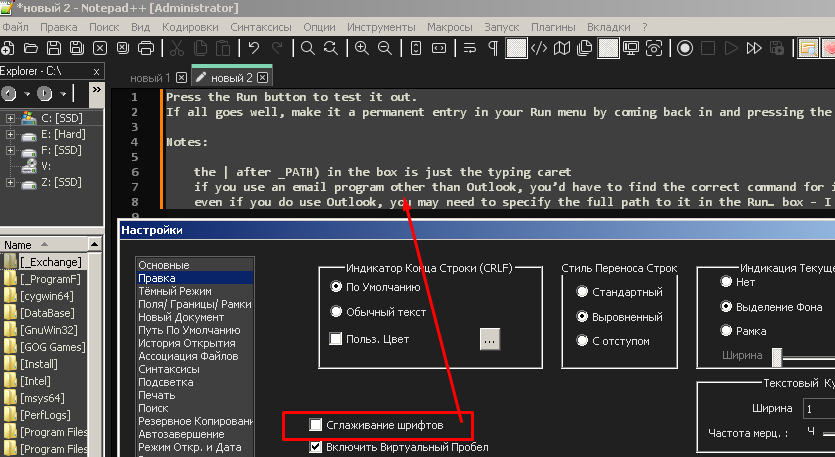
            Yes, “enable smooth font” slightly changes how the font appears. this isn’t specific to v8.4.7, and is rather the point of the option.

            1 Reply Last reply Reply Quote 0
            • Mike7OM Offline
              Mike7O
              last edited by Mike7O

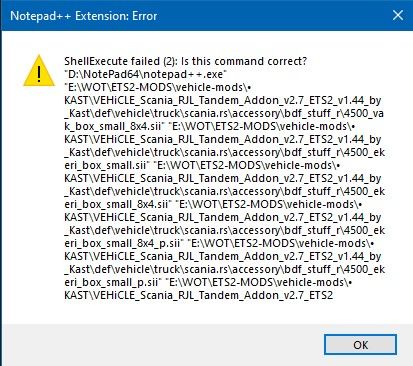
              v8.4.7 this happens / worked in 8.4.6
              trying to open/edit multiple files …didn’t find any solution for it, however a lot of old reports showing the same errors
              Skärmbild 2022-12-12 195604.jpg

              PeterJonesP 1 Reply Last reply Reply Quote 0
              • PeterJonesP Online
                PeterJones @Mike7O
                last edited by

                @Mike7O ,

                Windows ShellExecute is limited in the number of characters it will accept; this was true in v8.4.6 and is still true in v8.4.7, because it’s part of the Microsoft Windows win32-api definition for maximum command length.

                You might consider not opening so many files from the same right-click from Explorer; then you can select the second half, and unless you have done something like telling Notepad++ to always open files in multisession, it will add the files to the existing Notepad++ window. Or just open the folder as a workspace from inside Notepad++.

                Mike7OM 1 Reply Last reply Reply Quote 1
                • Mike7OM Offline
                  Mike7O @PeterJones
                  last edited by

                  @PeterJones nice, haven’t explored that many features so anything that makes my work easier is appreciated 🤩

                  Mike7OM 1 Reply Last reply Reply Quote 0
                  • Mike7OM Offline
                    Mike7O @Mike7O
                    last edited by

                    @Mike7O
                    still I was able to do it in previous versions … well now I know alternative ways …
                    googled and this was the solution

                    https://community.notepad-plus-plus.org/topic/10945/shellexecute-failed-2-is-this-command-correct-fix

                    so run as admin which some settings-changes required I will only do when I need 😎

                    1 Reply Last reply Reply Quote 0
                    • DomOBUD Offline
                      DomOBU
                      last edited by DomOBU

                      Some times I find that the source is badly managed by notepad++.
                      As now I know that this can happen, when I find that the program has an inadequate behavior I delete the line and I retype it.
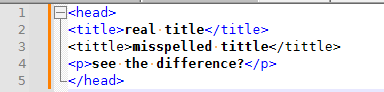
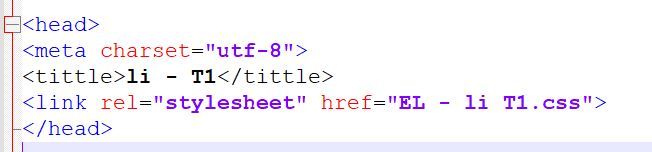
                      Example in the attached file, tittle should be in blue like the other keywords. I had to delete the line and reenter it.
                      This problem is unfortunately not reproducible.
                      Capture.JPG

                      PeterJonesP 1 Reply Last reply Reply Quote 0
                      • PeterJonesP Online
                        PeterJones @DomOBU
                        last edited by

                        @DomOBU ,

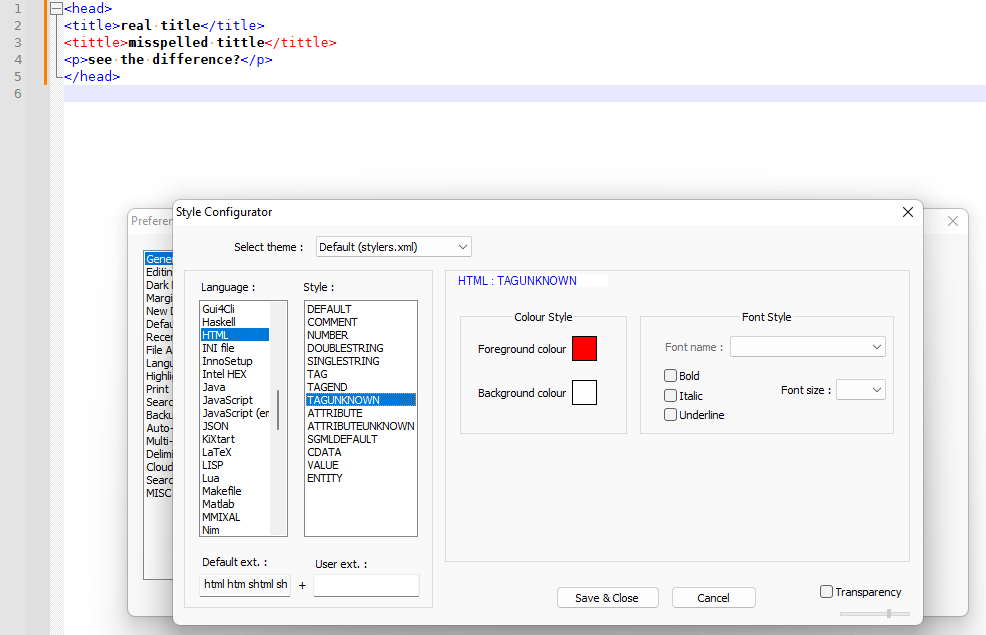
                        <tittle> is not an HTML tag, so it will not be styled as an HTML tag. The correct tag <title> would be properly styled.

                        f0c67ee4-6583-4f4f-9a1a-0935279d9098-image.png

                        If you want to make it more obvious that you’ve got an error in your HTML, you can go to Settings > Style Configurator > HTML > TAGUNKNOWN and change the foreground colour from black to red
                        e4a05f7f-5acd-4f02-ac2b-aa9c5c10f48f-image.png

                        This is not a regresion in Notepad++: it has always been like this. This is not a bug in Notepad++: it was intended to style invalid/unknown HTML tags differently than valid/known tags. This is intended behavior.

                        1 Reply Last reply Reply Quote 1
                        • DomOBUD Offline
                          DomOBU
                          last edited by

                          @PeterJones said in Notepad++ v8.4.7 Release:

                          Style Configurato

                          Thank you for your answer. You are right.

                          I didn’t know this “Style Configurator” feature which is very useful.

                          1 Reply Last reply Reply Quote 0
                          • DomOBUD Offline
                            DomOBU
                            last edited by

                            It seems that the word “download” is not recognized in the HTML files.
                            Is this an oversight?

                            PeterJonesP 1 Reply Last reply Reply Quote 0
                            • PeterJonesP Online
                              PeterJones @DomOBU
                              last edited by

                              @DomOBU ,

                              <DOWNLOAD> isn’t an HTML tag that I’m aware of. download might be a keyword in one of the web scripting languages (javascript, ASP, or similar), but I don’t know for sure.

                              But it’s not a regression in v8.4.7, and that’s the focus of this topic. If you have generic Notepad++ questions that aren’t specific to breaking-changes in v8.4.7, please create a new topic in “Help Wanted”

                              DomOBUD 1 Reply Last reply Reply Quote 0
                              • DomOBUD Offline
                                DomOBU @PeterJones
                                last edited by

                                @PeterJones
                                Thank you for your reply.
                                I have tried in “Help wanted” but my post is considered as spam.

                                The context is as follows:
                                <a href=“the URL of the file to download”
                                download=“the name you want to give to the downloaded file”>
                                </a>

                                PeterJonesP 1 Reply Last reply Reply Quote 0
                                • PeterJonesP Online
                                  PeterJones @DomOBU
                                  last edited by PeterJones

                                  @DomOBU ,

                                  You should be able to post elsewhere… probably just too high a percentage of your post was HTML without being inside the ``` markdown (using the </> button on the toolbar) so the forum thought you were trying to build HTML to spam us.

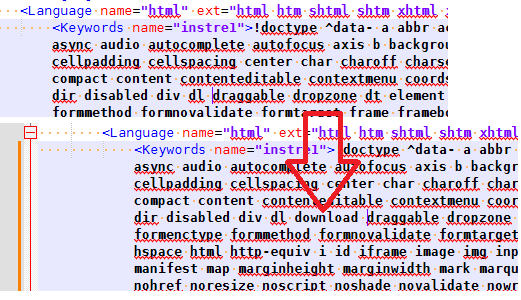
                                  But to simply answer your question: edit %AppData%\Notepad++\langs.xml, find the <Language name="html" section. In the <Keywords name="instre1"> element (which has href in the text), put download between dl draggable (so that it’s in alphabetical order) => dl download draggable, save, and reload Notepad++.
                                  6fa2b428-8388-4390-9eae-19ea8b72595e-image.png

                                  From there on out, your copy of Notepad++ will know the download attribute for HTML files.

                                  Further discussion on this should be in a separate topic.

                                  1 Reply Last reply Reply Quote 0
                                  • DomOBUD Offline
                                    DomOBU
                                    last edited by

                                    Thanks again.
                                    It’s a great tool.

                                    donhoD 1 Reply Last reply Reply Quote 0
                                    • donhoD Offline
                                      donho @DomOBU
                                      last edited by

                                      @DomOBU

                                      This thread is for the regression or critical bugs for the new release.
                                      For the bug report please do it in “General Discussion” or “Help wanted”.

                                      Alan KilbornA 1 Reply Last reply Reply Quote 0
                                      • Alan KilbornA Offline
                                        Alan Kilborn @donho
                                        last edited by

                                        @donho said in Notepad++ v8.4.7 Release:

                                        For the bug report please do it in “General Discussion” or “Help wanted”.

                                        If it is a REAL bug report, report it HERE.
                                        If you want to discuss it first before filing an actual report, then yes, “General Discussion” or “Help wanted” is fine.

                                        1 Reply Last reply Reply Quote 0
                                        • donhoD donho unpinned this topic on
                                        • xomxX xomx referenced this topic on
                                        • PeterJonesP PeterJones locked this topic on

                                        Hello! It looks like you're interested in this conversation, but you don't have an account yet.

                                        Getting fed up of having to scroll through the same posts each visit? When you register for an account, you'll always come back to exactly where you were before, and choose to be notified of new replies (either via email, or push notification). You'll also be able to save bookmarks and upvote posts to show your appreciation to other community members.

                                        With your input, this post could be even better 💗

                                        Register Login
                                        • First post
                                          Last post
                                        The Community of users of the Notepad++ text editor.
                                        Powered by NodeBB | Contributors