Notepad++ v8.4.7 Release
-
@PeterJones nice, haven’t explored that many features so anything that makes my work easier is appreciated 🤩
-
@Mike7O
still I was able to do it in previous versions … well now I know alternative ways …
googled and this was the solutionso run as admin which some settings-changes required I will only do when I need 😎
-
Some times I find that the source is badly managed by notepad++.
As now I know that this can happen, when I find that the program has an inadequate behavior I delete the line and I retype it.
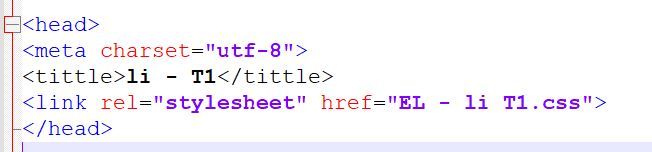
Example in the attached file, tittle should be in blue like the other keywords. I had to delete the line and reenter it.
This problem is unfortunately not reproducible.
-
@DomOBU ,
<tittle>is not an HTML tag, so it will not be styled as an HTML tag. The correct tag<title>would be properly styled.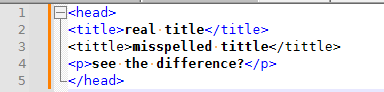
If you want to make it more obvious that you’ve got an error in your HTML, you can go to Settings > Style Configurator > HTML > TAGUNKNOWN and change the foreground colour from black to red
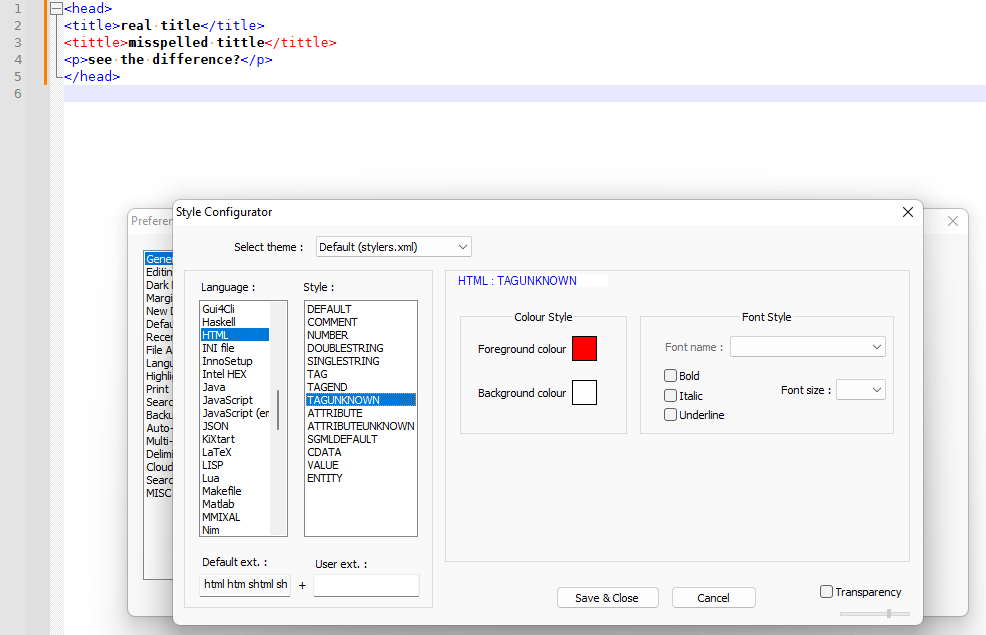
This is not a regresion in Notepad++: it has always been like this. This is not a bug in Notepad++: it was intended to style invalid/unknown HTML tags differently than valid/known tags. This is intended behavior.
-
@PeterJones said in Notepad++ v8.4.7 Release:
Style Configurato
Thank you for your answer. You are right.
I didn’t know this “Style Configurator” feature which is very useful.
-
It seems that the word “download” is not recognized in the HTML files.
Is this an oversight? -
@DomOBU ,
<DOWNLOAD>isn’t an HTML tag that I’m aware of.downloadmight be a keyword in one of the web scripting languages (javascript, ASP, or similar), but I don’t know for sure.But it’s not a regression in v8.4.7, and that’s the focus of this topic. If you have generic Notepad++ questions that aren’t specific to breaking-changes in v8.4.7, please create a new topic in “Help Wanted”
-
@PeterJones
Thank you for your reply.
I have tried in “Help wanted” but my post is considered as spam.The context is as follows:
<a href=“the URL of the file to download”
download=“the name you want to give to the downloaded file”>
</a> -
@DomOBU ,
You should be able to post elsewhere… probably just too high a percentage of your post was HTML without being inside the ``` markdown (using the
</>button on the toolbar) so the forum thought you were trying to build HTML to spam us.But to simply answer your question: edit
%AppData%\Notepad++\langs.xml, find the<Language name="html"section. In the<Keywords name="instre1">element (which hashrefin the text), putdownloadbetweendl draggable(so that it’s in alphabetical order) =>dl download draggable, save, and reload Notepad++.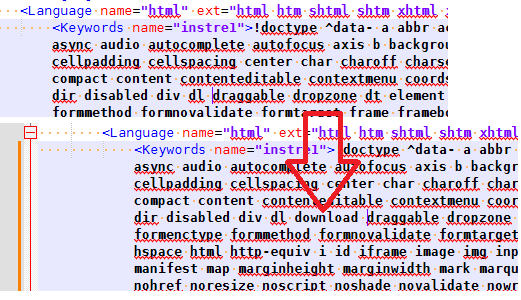
From there on out, your copy of Notepad++ will know the
downloadattribute for HTML files.Further discussion on this should be in a separate topic.
-
Thanks again.
It’s a great tool. -
This thread is for the regression or critical bugs for the new release.
For the bug report please do it in “General Discussion” or “Help wanted”. -
@donho said in Notepad++ v8.4.7 Release:
For the bug report please do it in “General Discussion” or “Help wanted”.
If it is a REAL bug report, report it HERE.
If you want to discuss it first before filing an actual report, then yes, “General Discussion” or “Help wanted” is fine. -
D donho unpinned this topic on
-
 X xomx referenced this topic on
-
P PeterJones locked this topic on



Hello! It looks like you're interested in this conversation, but you don't have an account yet.
Getting fed up of having to scroll through the same posts each visit? When you register for an account, you'll always come back to exactly where you were before, and choose to be notified of new replies (either via email, or push notification). You'll also be able to save bookmarks and upvote posts to show your appreciation to other community members.
With your input, this post could be even better 💗
Register Login