PythonScript detect saved/unsaved file state at startup
-
I’m having trouble detecting the saved/unsaved state of the filetabs at Notepad++ 8.4.7 startup using a script. Specifically, I’m being told that I have no unsaved tabs, when I do have some:
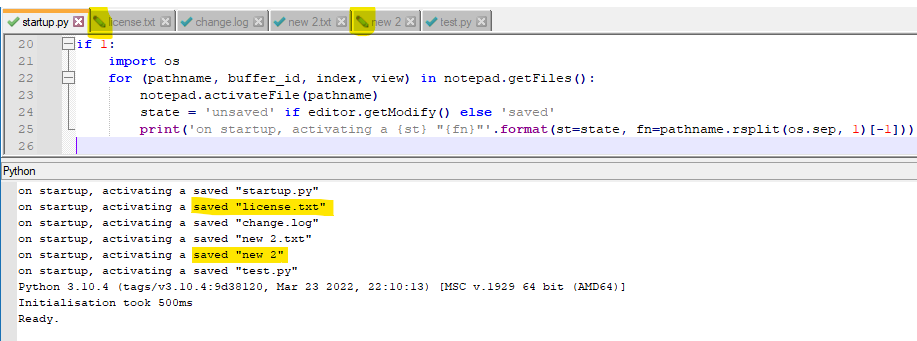
Here’s the code as text:
if 1:
    import os
    for (pathname, buffer_id, index, view) in notepad.getFiles():
        notepad.activateFile(pathname)
        state = 'unsaved' if editor.getModify() else 'saved'
        print('on startup, activating a {st} "{fn}"'.format(st=state, fn=pathname.rsplit(os.sep, 1)[-1]))
Can anyone that’s inclined to, try and duplicate this?
Also, if there are any ideas for successful retrieval of the saved/unsaved state of the tabs at startup, I’d like to hear them. I have some “wild” ideas, but I lack simple solutions (the kind I like).
-
@Alan-Kilborn said in PythonScript detect saved/unsaved file state at startup:
Can anyone that’s inclined to, try and duplicate this?

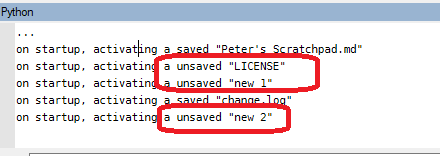
It gives the values I expect: new1 was unsaved but no changes (no content yet), LICENSE was changed and unsaved, new2 was unsaved with changes. And the script output agreed.
Actually, I ran that from the console instead of a script. Run it again from a saved script:
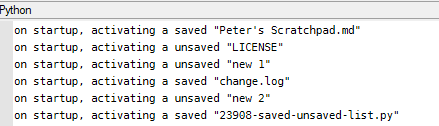
Still works for me.
Maybe it’s a timing issue for you. Try putting a quarter or half-second sleep between the
activateFileand thegetModify– I know that some of my scripts, I have to give Notepad++ enough time to switch active files and potentially re-lex the document (especially if it’s big) -
@PeterJones said in PythonScript detect saved/unsaved file state at startup:
Maybe it’s a timing issue for you. Try putting a quarter or half-second sleep
I have never before found this kind of “sleep” to be necessary, in PythonScripting.
But…I tried it, using a full 2 seconds of sleep.
No change for me. :-(Then I thought maybe I should try it with PS 2.0, because, from my earlier output one can see that I was using PS 3. No change for me from that test either (file still all present “saved”).
I’m stumped. :-(
new1 was unsaved but no changes (no content yet)
This tab would be empty of content, correct?
When I try having such a tab, Notepad++ won’t even “bring it back” after a restart – the tab is eliminated. I suppose that makes sense: if you’ve created a “scratch” tab, but haven’t put anything in it, why should N++ keep it around? But…this is not your experience, so…(I don’t know what to make of that).Thanks for doing some experimentation on my behalf, Peter Jones.
-
Sorry, that wasn’t at startup; that was just “live”.
When I did enable periodic-backup and made sure that I had toggled through all the files so it made the 7sec backup for the edited ones, then restarted Notepad++, you are right: it didn’t bring back
new 1, and all the files claimed to be saved, even though they are properly shown as edited/unsaved in the tabbar list.on startup, activating a saved "Peter's Scratchpad.md" on startup, activating a saved "LICENSE" on startup, activating a saved "change.log" on startup, activating a saved "new 2" on startup, activating a saved "23908-saved-unsaved-list.py" on startup, activating a saved "startup.py"
So at startup, the answer is wrong. And if I rerun the script manually without making new changes, it still shows them as all being saved.
So yes, I concur that getModify() apparently returns whether it’s been changed since the load, rather than whether it’s been changed from the “saved” state.
-
I think the safest way is something like this…
# python3 editor.getText() == open(WHAT_EVER_FILE, 'rb').read().decode() -
Yes. Before when I said I have some “wild” ideas…, yours was one of them. I didn’t want to go that far to solve it. :-)
Maybe I’m attempting to solve something that isn’t really a problem for me, anyway, because I don’t operate with a setup that permits unsaved files when exiting Notepad++ (and thus there is no possibility to have unsaved files when N++ starts up).
However, I was working on a script for posting that I was trying to make work in all modes…
-
Another “wild” idea is to read the N++ “backup” folder for files present there.
Example: If these files are there:
change.log@2022-12-28_064818
new 2@2022-12-26_075922
One can infer that the
change.logandnew 2filetabs have unsaved changes. -
After long delay, I made an official Notepad++ issue out of this:
https://github.com/notepad-plus-plus/notepad-plus-plus/issues/16514
In the issue, I switched to using NppExec to reproduce, rather than PythonScript, lest it be interpreted as a PS bug and not a N++ bug.



Hello! It looks like you're interested in this conversation, but you don't have an account yet.
Getting fed up of having to scroll through the same posts each visit? When you register for an account, you'll always come back to exactly where you were before, and choose to be notified of new replies (either via email, or push notification). You'll also be able to save bookmarks and upvote posts to show your appreciation to other community members.
With your input, this post could be even better 💗
Register Login