How to bookmark group of selected line
-
@Alan-Kilborn said in ow to bookmark group of selected line:
(?-s).*Actually,
(?-s).*won’t bookmark any empty lines in the selected region.Try an even simpler
\Ras the Find what expression.This has the added bonus of NOT redmarking anything.
(I still don’t see a great reason for bookmarking a consecutive number of lines… Hmm, maybe if there’s going to be a sort and all of the marked lines would move to vastly different locations. I wish the OP would chime in an give a really good rationale for this)
-
@Alan-Kilborn yes, there is usefulness to make a to-do list or keeping track of things, but i didnt understand how to make macro from that
-
@Shekhar-Singh said in How to bookmark group of selected line:
yes, there is usefulness to make a to-do list or keeping track of things
I’d hoped for a better explanation than that… :-(
-
@Shekhar-Singh said in How to bookmark group of selected line:
i didnt understand how to make macro from that
- set up the operation in the Mark window
- start macro recording
- press the Mark All button
- end macro recording
- save and name macro
-
@Alan-Kilborn one more thing , i wish it could work without selection as well for bookmarking a single line . like cntrl + f2 wrks , if possible. thanks for replying.
-
@Shekhar-Singh said in How to bookmark group of selected line:
one more thing , i wish it could work without selection as well for bookmarking a single line . like cntrl + f2 wrks
So just add Toggle Bookmark to the macro?
(When running with selection, don’t select the last intended line fully.) -
@Alan-Kilborn what does oggle bookmark mean .
-
@Shekhar-Singh said:
what does oggle bookmark mean
Please try to do basic proofreading on the posts you are composing before hitting Submit.
-
@Alan-Kilborn adding toggle bookmark mean ?
you saying to select half line ? -
- set up the operation in the Mark window:
Find what:\R
Bookmark line: checked
In selection: checked
Search mode: Regular expression - start macro recording
- press the Mark All button
- press Ctrl+F2 (which is Toggle Bookmark)
- end macro recording
- save and name macro
With selection:
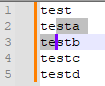
Run macro to get:
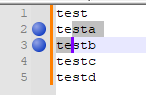
Without selection:
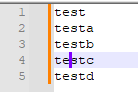
Run macro to get:
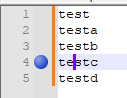
- set up the operation in the Mark window:


Hello! It looks like you're interested in this conversation, but you don't have an account yet.
Getting fed up of having to scroll through the same posts each visit? When you register for an account, you'll always come back to exactly where you were before, and choose to be notified of new replies (either via email, or push notification). You'll also be able to save bookmarks and upvote posts to show your appreciation to other community members.
With your input, this post could be even better 💗
Register Login