all files are one line?
-
hello every file that i open in my computer has only one line and i want it to be like other people files i download if you know how to make the 2nd file like the first pls tell me
-
@Vap
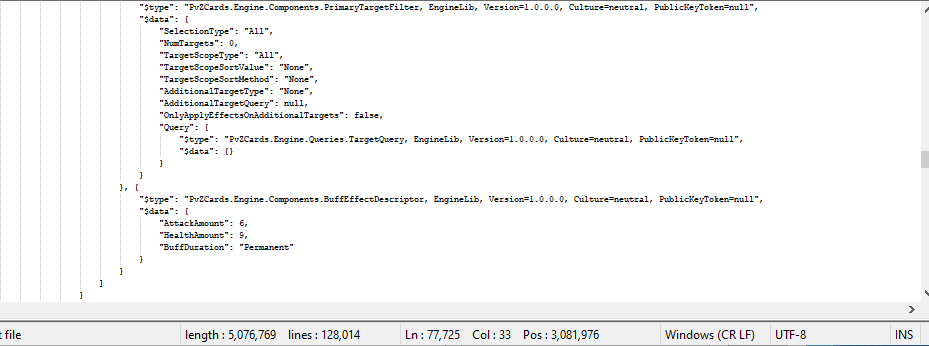
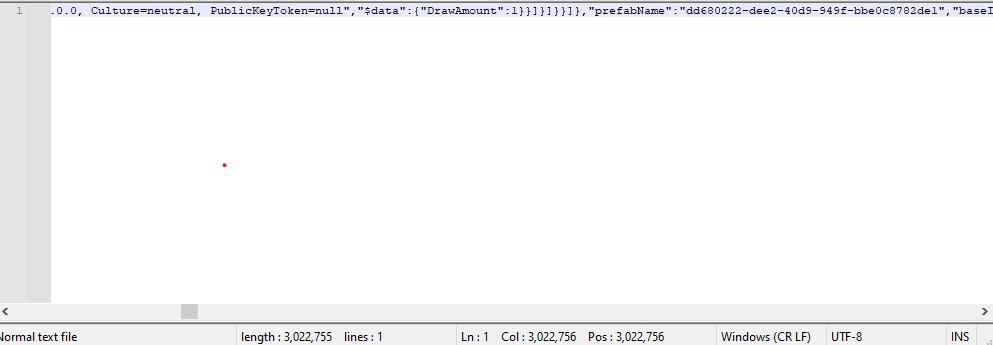
Notepad++ is displaying the file exactly as it should. At the bottom of the window it shows “normal text file” and “lines: 1”, that’s because the file only has 1 line. You will also see that it says “Windows (CR LF)”, so it determines a line ends with CR and LF (carriage return and line feed).If you were to open a new tab, then type some characters, press enter key and type some more characters it should show that as 2 lines. If it does not then there may be something wrong with your installation.
Terry
-
Your file looks as if it might be a json file, but perhaps you have some sort of non-standard extension on it that doesn’t let N++ know what it is (I can tell that is maybe the case because your status bar shows
Normal text file).
There are some plugins for Notepad++ that make working with such single-line files easier.
However, I don’t use them, so you’ll either have to experiment, or wait for someone with such knowledge to possibly comment here. -
@Vap
Yeah, this is either JSON or something infuriatingly close to JSON that taunts the user by having a few strategically placed syntax errors.
In either case, JsonTools and JSMinNPP are both fine choices. In the case of JsonTools, once you have the plugin,Pretty-print JSONwill get you where you want to go.



Hello! It looks like you're interested in this conversation, but you don't have an account yet.
Getting fed up of having to scroll through the same posts each visit? When you register for an account, you'll always come back to exactly where you were before, and choose to be notified of new replies (either via email, or push notification). You'll also be able to save bookmarks and upvote posts to show your appreciation to other community members.
With your input, this post could be even better 💗
Register Login