Community
    • Login

    Error on type anything

    Scheduled Pinned Locked Moved Help wanted · · · – – – · · ·
    12 Posts 8 Posters 4.1k Views 2 Watching
    Loading More Posts
    • Oldest to Newest
    • Newest to Oldest
    • Most Votes
    Reply
    • Reply as topic
    Log in to reply
    This topic has been deleted. Only users with topic management privileges can see it.
    • Alan KilbornA Offline
      Alan Kilborn @SRRepswal
      last edited by

      @SRRepswal

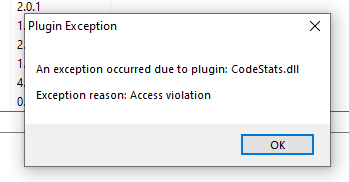
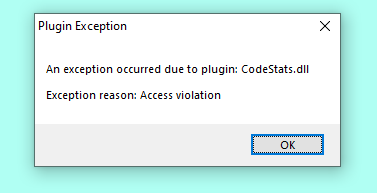
      You probably want to remove the CodeStats plugin. Just a wild guess, though.

      1 Reply Last reply Reply Quote 3
      • Michael VincentM Offline
        Michael Vincent @SRRepswal
        last edited by

        @SRRepswal said in Error on type anything:

        It is a bug or something else

        Suggest removing the plugin as @Alan-Kilborn suggests and also open an issue at https://github.com/p0358/notepadpp-CodeStats/issues

        Cheers.

        1 Reply Last reply Reply Quote 1
        • SRRepswalS Offline
          SRRepswal
          last edited by

          I am not able to remove it

          NP2.PNG

          Alan KilbornA Michael VincentM 2 Replies Last reply Reply Quote 0
          • Alan KilbornA Offline
            Alan Kilborn @SRRepswal
            last edited by

            @SRRepswal

            How did you try to remove it?
            Can you just find the file and rename it?

            You need to exit Notepad++, then find the file on your system.
            If you rename it to zCodeStats.dll (or whatever), it won’t be found when Notepad++ next starts up.

            1 Reply Last reply Reply Quote 2
            • Michael VincentM Offline
              Michael Vincent @SRRepswal
              last edited by

              @SRRepswal said in Error on type anything:

              I am not able to remove it

              Please paste your debug info. Notepad++ menu “?”=>“Debug Info…”

              Cheers.

              1 Reply Last reply Reply Quote 0
              • Tebi SaT Offline
                Tebi Sa @SRRepswal
                last edited by

                @SRRepswal said in Error on type anything:

                While I am typing anything on Notepad++, it is giving attached error. It is a bug or something elseNotepad.PNG

                If you’re encountering an error while typing in Notepad++, here are a few steps you can try to resolve the problem:

                Update Notepad++: Ensure that you’re using the latest version of Notepad++. Sometimes, bugs or compatibility issues are addressed in newer releases, so updating to the latest version might resolve the problem.

                Mark OlsonM 1 Reply Last reply Reply Quote -3
                • Mark OlsonM Offline
                  Mark Olson @Tebi Sa
                  last edited by

                  @Tebi-Sa
                  I’m getting ChatGPT vibes from your answer. Strongly suggest not using AI tools to answer questions in this forum, or any other forum for that matter.

                  PeterJonesP 1 Reply Last reply Reply Quote 1
                  • Mark OlsonM Offline
                    Mark Olson
                    last edited by Mark Olson

                    Usually plugins are in the plugins subdirectory of your Notepad++ installation, and deleting the CodeStats subdirectory (or a directory with a similar name) from this folder will solve your problem.

                    Note that you can’t delete this directory while Notepad++ is open because Notepad++ won’t let you.

                    1 Reply Last reply Reply Quote 0
                    • PeterJonesP Offline
                      PeterJones @Mark Olson
                      last edited by

                      @Mark-Olson said in Error on type anything:

                      @Tebi-Sa
                      I’m getting ChatGPT vibes from your answer. Strongly suggest not using AI tools to answer questions in this forum

                      It’s not just a strong suggestion: it is one of the rules of the forum:

                      To maintain a high quality of posts, accounts which post spam and accounts which post significant technical nonsense may be banned, at the moderators’/administrators’ discretion. (Being wrong is not grounds for banning; but persisting in posting misleading or confusingly-wrong posts, or persisting in using Generative AI (like ChatGPT) or similar programs to create posts, is grounds for banning.)
                      - _https://community.notepad-plus-plus.org/topic/21965/please-read-this-before-posting_
                      1 Reply Last reply Reply Quote 4
                      • MichalM Offline
                        Michal
                        last edited by

                        This post is deleted!
                        1 Reply Last reply Reply Quote -1
                        • unity tabU Offline
                          unity tab
                          last edited by

                          This post is deleted!
                          1 Reply Last reply Reply Quote -1
                          • PeterJonesP PeterJones locked this topic on

                          Hello! It looks like you're interested in this conversation, but you don't have an account yet.

                          Getting fed up of having to scroll through the same posts each visit? When you register for an account, you'll always come back to exactly where you were before, and choose to be notified of new replies (either via email, or push notification). You'll also be able to save bookmarks and upvote posts to show your appreciation to other community members.

                          With your input, this post could be even better 💗

                          Register Login
                          • First post
                            Last post
                          The Community of users of the Notepad++ text editor.
                          Powered by NodeBB | Contributors