PythonScript/NppExec question
-
Yep, that time has come when I’m asking about NppExec :)
I searched the forum and found this topic that is still relevant:
https://community.notepad-plus-plus.org/topic/16798/nppexec-can-t-call-python-script-through-shortcut/6
In short, if I have PythonScript and NppExec plugins installed, and create e.g. the following python script via Python Script:def main(): console.write('Hello World!\n') main()and then save this python script as “helloworld.py” and then create the following NppExec’s script:
npp_console ?
npp_save
npp_menucommand Plugins\Python Script\Scripts\helloworld
then the following happens:
- I open Python Script’s console via Plugins -> Python Script -> Show Console
- I run NppExec’s Execute dialog with the NppExec’s script mentioned above - as the result, the menu item “Python Script -> Scripts -> helloworld” is invoked and “Hello World!” is printed in Python Script’s console.
- Now, if I press Ctrl+F6 (that corresponds to Execute Previous NppExec Script), I do see that the menu item "Scripts -> helloworld " is found and NppExec sends the corresponding message to Notepad++:
m_pNppExec->SendNppMsg(NPPM_MENUCOMMAND, 0, menuItemId);but “Hello World!” is not printed in Python Script’s console!
I experimented withSendMessage,SendNotifyMessageandPostMessage- the result is still the same.
Is there anyone who may shed some light to this mystery?
-
The very same happens if I change the NppExec’s script to this:
npp_console ?
npp_save
npp_sendmsg NPPM_MENUCOMMAND 0 23035
In my case, 23035 is the menu item id of the “Plugins -> Python Script -> Scripts -> helloworld” item.
-
Hello Vitalii, I hope you are well.
This is just a quick note as I’m just on my way out of work.
I was not able to replicate the behavior with my default NPP setup, so I installed the latest portable version and PS and NppExec and got the same result - then I changed the shortcut to Ctrl+Shift+f6 and it started to work (!!??) -
If
Ctrlkey is pressed while clicking at the menu entry of a PythonScript plugin script, the script is loaded into Notepad++. This is documented infile:///<Npp-path>/plugins/PythonScript/doc/usage.html#usage. Thus, ifCtrl+F6is pressed to trigger NppExec’sExeute Previous Script, PythonScript’s click handler forPlugins\Python Script\Scripts\helloworldfindsCtrlkey pressed and loads the script into Notepad++ instead of executing it.Beyond that, it seems that PythonScript’s click handler tests exactly for “
Ctrlkey is pressed”, so this test fails ifCtrl+Shiftis pressed. Presumably that’s the reason why execution of the script worked, when @Ekopalypse changed the keyboard shortcut of NppExec’sExeute Previous Script. -
OK, you gave me an idea of what might be the reason - I checked it, and indeed the reason was in any shortcut that contains only Ctrl as a modifier.
For example, if I save the NppExec’s script above as e.g. “py-helloworld”, then create a menu item for this script using NppExec’s Advanced Options and then assign e.g. Alt+F12 as a shortcut key for this new menu item, everything works.
If I change the shortcut key to e.g. Ctrl+Alt+F12 or Ctrl+Shift+F12, everything works.
If I change the shortcut key to Ctrl+F12, it stops working.
The very same happens with e.g. Ctrl+Shift+8 vs. Ctrl+8.
To sum up, looks like Python Script somehow intercepts the Ctrl modifier and thus a shortcut key that uses it does not work as expected.P.S. Ah, OK, I see the confirmation of this in the answer above!
-
@Vitalii-Dovgan said in PythonScript/NppExec question:
If I change the shortcut key to Ctrl+F12, it stops working.
Presumably, if your script isn’t in the active tab when you do this shortcut, or if it is closed, the script .py file gets activated/opened.
But…I have many PythonScripts that are simple Ctrl+(fill in the blank), and they execute the script just fine…
-
@dinkumoil said in PythonScript/NppExec question:
Thus, if Ctrl+F6 is pressed to trigger NppExec’s Exeute Previous Script, PythonScript’s click handler for Plugins\Python Script\Scripts\helloworld finds Ctrlkey pressed and loads the script into Notepad++ instead of executing it.
THIS! I had no idea why
CTRL-F6kept opening my ‘helloworld.py’ script.I was going to do some more testing before posting my findings, but seems you’ve solved my “anomaly”.
Cheers.
-
This is still a little strange to me. I have, like @Alan-Kilborn ,
many scripts using the key combinationctrl+whatever_letter
and they work without problems and I am aware of the
possibility to use ctrl to edit a script. Both,
using a key combination or using sendmessage(nppm_menu_command…),
take the same route to call the function.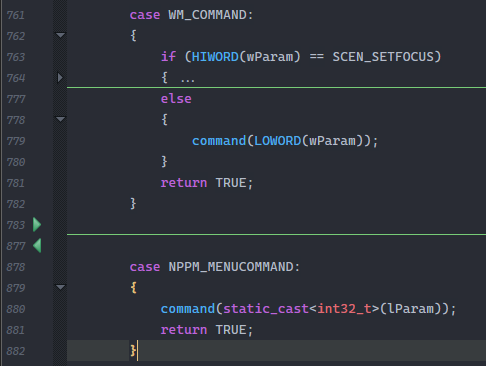
There’s something I’m still missing.
-
@Ekopalypse , @Alan-Kilborn , and others,
I think the difference is that in the situation called, there are two layers: there’s the NppExec script, which is being called by the shortcut; then the NppExec is using SendMessage to activate the PythonScript menu from a “click the menu equivalent”.
So while the shortcut is associated with the NppExec script, it’s keys are still “active” when the menu is “clicked”, so the PS check of “am I being Ctrl+Clicked” sees the Ctrl from the NppExec shortcut and the click from the NppExec SendMessage.
Whereas, when you just run a PythonScript with a keyboard shortcut, it isn’t also getting the “clicked” attribute.
At least, that’s what I’ve gathered from the evidence given in this dicsussion; I could easily be wrong.






Hello! It looks like you're interested in this conversation, but you don't have an account yet.
Getting fed up of having to scroll through the same posts each visit? When you register for an account, you'll always come back to exactly where you were before, and choose to be notified of new replies (either via email, or push notification). You'll also be able to save bookmarks and upvote posts to show your appreciation to other community members.
With your input, this post could be even better 💗
Register Login