Search failing
-
Search quit working for the “^” symbol. So I upgraded to the latest version and it still doesn’t work. Search “backword” and search “Match whole word only” are greyed out too. That has never happened before. Since reinstalling didn’t help, how do I reset to something that works?
Notepad++ v8.5.6 (64-bit)
Build time : Aug 15 2023 - 15:29:28
Path : C:\Program Files\Notepad++\notepad++.exe
Command Line : “C:\Program Files\Notepad++\change.log”
Admin mode : OFF
Local Conf mode : OFF
Cloud Config : OFF
OS Name : Windows 10 Enterprise (64-bit)
OS Version : 21H1
OS Build : 19043.2364
Current ANSI codepage : 1252
Plugins :
mimeTools (2.9)
NppConverter (4.5)
NppExport (0.4) -
@Peter-Hudson said in Search failing:
Search quit working for the “^” symbol.
What is your search mode? The
^symbol is called a meta character in regular expression mode, it refers to the zero width position right at the start of a line. If in this mode you need to enter\^to get the search engine to recognise it as a normal character.Terry
PS how about a screen image of your issue, maybe with some sample text showing the search failing. There may well be other info we can glean from an image that will help identify the issue. You can just paste it directly into your next post.
-
@Peter-Hudson said in Search failing:
Search “backword” and search “Match whole word only” are greyed out
… then @Terry-R’s guess of you being in Regular Expression mode is right, because that’s the only search mode that greys those out.
So, you will either need to escape the
^like\^in your search,
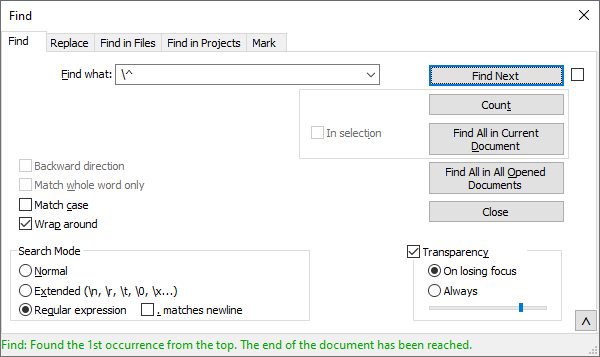
or change back to Normal search mode lile:
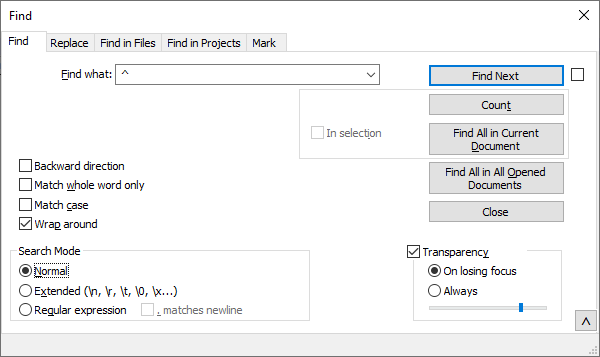
-
@Terry-R
Okay, you’re right that explains it. Somehow I had clicked “Regular Expression” accidentally. When I changed back to “Normal” it started working without having to put the escape character in front of it. And that’s also what caused the top 2 search choices to be grayed out.Thanks,
Peter -
FYI, see here for more on characters that will need to be escaped in Regular Expressions mode.



Hello! It looks like you're interested in this conversation, but you don't have an account yet.
Getting fed up of having to scroll through the same posts each visit? When you register for an account, you'll always come back to exactly where you were before, and choose to be notified of new replies (either via email, or push notification). You'll also be able to save bookmarks and upvote posts to show your appreciation to other community members.
With your input, this post could be even better 💗
Register Login