Cannot add shortcut for "Duplicate Current Line"
-
If I go to Run/Modify shortcut and try to assign a shortcut key to the command “Duplicate Current Line” that command does not appear though it can be found in the Menu.
-
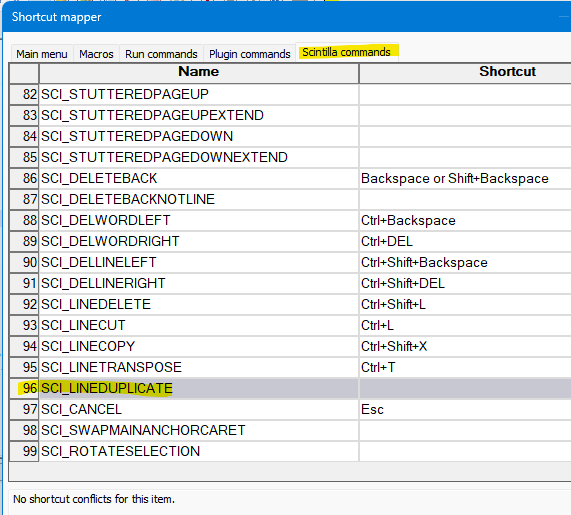
In Notepad++ 8.6.1 (current as of this writing), you’ll find the menu-equivalent command for:
Edit menu > Line Operations > Duplicate Current Line
in the Settings menu > Shortcut Mapper… > Scintilla commands area:
-
Thanks so much. I got it to work.
-
I see I inadvertently joined with my name as username. Can I ask you to edit?
-
It looks like you figured out how to change the name listed.
-
It still shows in the first response.
-
@revrari100 said in Cannot add shortcut for "Duplicate Current Line":
It still shows in the first response.
Oh, I see. It’s too late for Alan to fix it himself, but I used my moderator power to edit it.
-
Thank you!


Hello! It looks like you're interested in this conversation, but you don't have an account yet.
Getting fed up of having to scroll through the same posts each visit? When you register for an account, you'll always come back to exactly where you were before, and choose to be notified of new replies (either via email, or push notification). You'll also be able to save bookmarks and upvote posts to show your appreciation to other community members.
With your input, this post could be even better 💗
Register Login