How to Insert/Import Text from a Separate File
-
Hello All,
I have been using Notepad++ for several years but have never identified a fast way to do this (measured against the same functionality in other apps).
I would like to be able to insert text from another file into an open file by:
- Place the cursor in the target location
- Select the command to insert all text from a chosen file on disk (not open in Notepad++) at the target location.
I have used other editing tools that vary in how one chooses the file to insert using this method.
- Vi/Vim uses the command
:r <filename>to read in the contents of another text file (and achieving the same thing as an insert/import of the text) - MS Word uses its NON-WORD PROCESSING command reached by
Insert - Object - Text From Fileto bring up the file picker so one can select the text file to insert at the target location.
Does Notepad++ have an easier way to make this text file insertion into the current file - without executing something similar to
Open (source file), Select all (source file); Copy; Select target location (receiving file); Paste; Close (source file)?Thanks for the help!
-
@AcmeNuclear said in How to Insert/Import Text from a Separate File:
Does Notepad++ have an easier way to make this text file insertion into the current file - without executing something similar to Open (source file), Select all (source file); Copy; Select target location (receiving file); Paste; Close (source file)?
Not really.
But if you’re willing to use a scripting plugin, a simple script can be written:from Npp import * import os f = notepad.prompt('Enter file name:', '', '') if f and os.path.isfile(f): notepad.open(f) editor.selectAll() editor.copy() notepad.close() editor.paste()The script assumes you have the “MRU” setting selected (otherwise when the script closes the file tab it opens, you won’t be returned to the correct file tab):
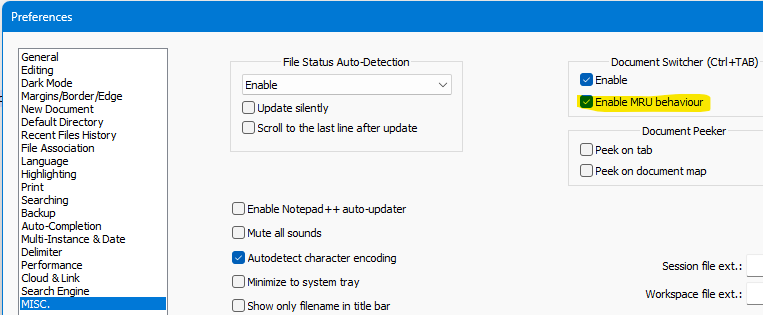
And, yes, this script is very simple. It intentionally loads the file into Notepad++ (instead of just reading the file with Python) to avoid making non-Notepad++ assumptions about the encoding of the file, it expects you to know the name of the file you want (instead of a “picker”), it will close the to-be-inserted-file if that file happens to be open in N++ when the script is run, etc.). Many things could be done to make the script more well-rounded.
For the basics of scripting, see HERE.


Hello! It looks like you're interested in this conversation, but you don't have an account yet.
Getting fed up of having to scroll through the same posts each visit? When you register for an account, you'll always come back to exactly where you were before, and choose to be notified of new replies (either via email, or push notification). You'll also be able to save bookmarks and upvote posts to show your appreciation to other community members.
With your input, this post could be even better 💗
Register Login