Where to set SC_TECHNOLOGY_DEFAULT
-
I’m using the Column Tools plugin and when NPP starts I receive the following message:
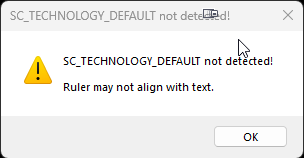
Where/How do I set SC_TECHNOLOGY_DEFAULT?
Thanks in advance!
-
@Paul-Baker said in Where to set SC_TECHNOLOGY_DEFAULT:
I’m using the Column Tools plugin
Where/How do I set SC_TECHNOLOGY_DEFAULT?
As an end user, you don’t. Notepad++ will set SCI_SETTECHNOLOGY to SC_TECHNOLOGY_DIRECTWRITE if you have Settings | Preferences… | MISC. | Use DirectWrite (May improve rendering special characters, need to restart Notepad++) checked. Presumably if you don’t have that checked it will be SC_TECHNOLOGY_DEFAULT.
-
@Coises said in Where to set SC_TECHNOLOGY_DEFAULT:
Presumably if you don’t have that checked it will be SC_TECHNOLOGY_DEFAULT.
Correct. Additionally, you can set it to whatever you want with NppExec or PythonScript.
Cheers.
-
@Coises said in Where to set SC_TECHNOLOGY_DEFAULT:
if you have Settings | Preferences… | MISC. | Use DirectWrite (May improve rendering special characters, need to restart Notepad++) checked
Yes, thanks for that. The option, Use DirectWrite (May improve rendering special characters…) was selected. I unchecked and all works fine now…
Thanks again for your help.


Hello! It looks like you're interested in this conversation, but you don't have an account yet.
Getting fed up of having to scroll through the same posts each visit? When you register for an account, you'll always come back to exactly where you were before, and choose to be notified of new replies (either via email, or push notification). You'll also be able to save bookmarks and upvote posts to show your appreciation to other community members.
With your input, this post could be even better 💗
Register Login