sort seems to get confused if you've done a find and replace
-
With 8.6.2 64 bit.
Create a blank document.
Enter
this is a line which i'm going to split and then sort hopefullyctrl-h
replace ’ +’ with ‘\n’ (mode regex). Replace all.
Select all
Then edit->line operations->sort lexicographically ascending.
Nothing happens.
You have to copy the contents to a new blank document and then you can sort.
-
Sorting is done based on a file’s line-ending type as shown in the status bar.
In your example you (probably) haveWindows (CR LF)in the status bar, but you’ve changed line-endings to LF only with the regex replacement.For more information, reference this github ISSUE.
(Note also that it is advisable not to change line-endings via a regex replacement operation.)
-
@Alan-Kilborn Ohh. thanks for pointing that issue to me.
It’s a bit confusing of it to display the things the same though.
Maybe when using windows line ends it should display in teletype mode (so that a cr without a linefeed would overwrite the lines and a lf without cr would just insert a vertical space and not return to start of line). That way it’d be extremely obvious what was going on if half the pair was missing.
-
@ThosRTanner said in sort seems to get confused if you've done a find and replace:
Maybe when using windows line ends it should display in teletype mode (so that a cr without a linefeed would overwrite the lines and a lf without cr would just insert a vertical space and not return to start of line).
I don’t know what to think about that, but that sort of thing is controlled by Scintilla and not Notepad++, …so I won’t end up thinking too hard about it.
If you complained to Scintilla about it, I’m sure they would tell you to just turn on visible line endings. :-)
-
Just to clarify, what @ThosRTanner means by “teletype mode” is the way a terminal editor like Vim displays unaccompanied carriage returns, i.e., by joining the “lines”:
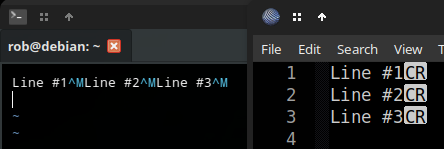
Like any editor, it hides properly formed Windows EOLs unless you enter
:set list(“show whitespace”), followed by:e ++ff=unix(“reload file in Unix EOL mode”):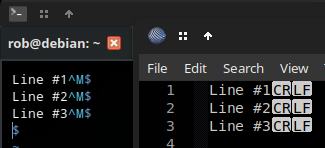
Scinterm is the only terminal editor I know of using Scintilla. To try it, you’ll have to download a source tarball, extract it beside the Scintilla source tree (checked out to a compatible version first), then run the makefile.
-
@ThosRTanner said in sort seems to get confused if you've done a find and replace:
It’s a bit confusing of it to display the things the same though.
It’s a Scintilla thing. Scintilla considers CR alone, LF alone, or CRLF (together) as the end of a line, regardless of the file’s line-ending type as shown in the status bar.
BTW, I think I remember that the line-ending type (determined when a file is loaded) isn’t a complicated algorithm: it’s simply the first line-ending in the file.



Hello! It looks like you're interested in this conversation, but you don't have an account yet.
Getting fed up of having to scroll through the same posts each visit? When you register for an account, you'll always come back to exactly where you were before, and choose to be notified of new replies (either via email, or push notification). You'll also be able to save bookmarks and upvote posts to show your appreciation to other community members.
With your input, this post could be even better 💗
Register Login