Default save location
-
Hey.
I use the portable version and by default it saves the files at the path of its .exe.
Usually at my apps i use the Desktop as Default cause its easy to find the files and work with them.
Is it possible to change the default save location ?
Thanks. -
@th-ch said in Default save location:
Usually at my apps i use the Desktop as Default cause its easy to find the files and work with them.
A sign of a true computer beginner. :-)
Is it possible to change the default save location ?
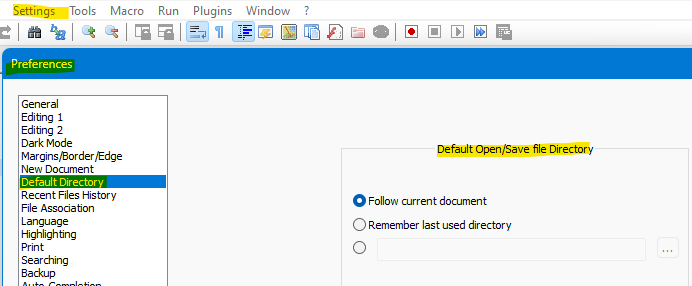
The one I show as selected is the most useful for power users; you might want to select the bottom radio button and then put your desktop path in the box to its right.
-
@Alan-Kilborn
Thanks , solved.
Btw i m not a beginner.😁 -
@th-ch said in Default save location:
Btw i m not a beginner.😁
Neither am I, but I’ve also kept Desktop as the default save location. (I usually have at least two Explorer windows open, and one of them will be focused on the real intended file location, so I can drag the file there after saving (and maybe drag again from there back to N++ to put it in the Recent list). This way I never have to double-check that N++ is really set to the right save folder.



Hello! It looks like you're interested in this conversation, but you don't have an account yet.
Getting fed up of having to scroll through the same posts each visit? When you register for an account, you'll always come back to exactly where you were before, and choose to be notified of new replies (either via email, or push notification). You'll also be able to save bookmarks and upvote posts to show your appreciation to other community members.
With your input, this post could be even better 💗
Register Login