How do I convert(?) the text on notepad to chrome?
-
I have no idea what I’m doing
To sum it up, I need to convert the stuff I wrote in notepad to a chrome version. (The video I watched has a different version of notepad) When I press the “run” button(I’m not working on an english ver of notepad, not sure if I’m calling everything correctly), I press start and get a small window that says “enter the program launch options” with an empty typing window. I type in “chrome” and it just takes me to the main chrome page. What do I do? -
How do I convert(?) the text on notepad to chrome?
This forum is about Notepad++. Calling it “notepad” makes it look like you’re talking about the microsoft windows built-in editor “notepad”. If you are really talking about Notepad++, please do not forget the ++, as it is part of the name. Using the right name helps us make sure you’re actually talking about Notepad++ and are asking in the right place.
I need to convert the stuff I wrote in notepad to a chrome version.
Notepad++ is a text editor. Chrome is a web viewer. If you wrote HTML using Notepad++, you do not need to “convert” anything. You open the file with Chrome to render and view the page.
(The video I watched has a different version of notepad)
We have no clue what video you watched, or what “version of Notepad++” either you or “the video” is using.
When I press the “run” button(I’m not working on an english ver of notepad, not sure if I’m calling everything correctly), I press start and get a small window that says “enter the program launch options” with an empty typing window.
In Notepad++'s default English translation, there is a Run menu with a Run… action,
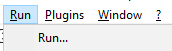
which opens a dialog box that looks like:
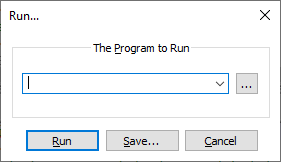
I type in “chrome” and it just takes me to the main chrome page.
Of course it does. The Run… dialog is very similar to typing a command from
cmd.exeor apowershellwindow, or from the windowsWin+Rrun-a-command dialog
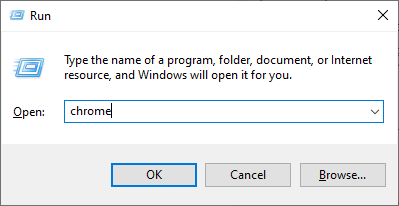
If you don’t give the
chromecommand any command-line argument to tell it what file to launch, it will just open the Chrome application without directing it to open a specific file.But based on everything you told me, my guesses are:
- The video you watched was using a really old version of Notepad++ (older than v7.6.3 from 2019)
- The video you watched showed using Run > Launch In Chrome, which does not exist in your newer copy of Notepad++
- Those commands have been replaced by View > View Current File in > Chrome and similar:
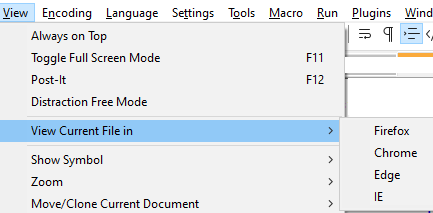
So if you are editing an HTML file, and want to see that HTML file rendered in the Chrome browser, you use View > View Current File in > Chrome


Hello! It looks like you're interested in this conversation, but you don't have an account yet.
Getting fed up of having to scroll through the same posts each visit? When you register for an account, you'll always come back to exactly where you were before, and choose to be notified of new replies (either via email, or push notification). You'll also be able to save bookmarks and upvote posts to show your appreciation to other community members.
With your input, this post could be even better 💗
Register Login