How to enable Plugins Admin when building notepad++?
-
I’ve just successfully cloned the np++ source code from git and built it in VS2022 but when I debug it the Plugins Admin option is missing from the Plugins menu dropdown. Do I have to do something special to enable this?
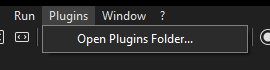
-
I have the same problem for some time with VS2022 and also when building with GCC, where the nppPluginList.dll is also not created. So I would be interested in a solution too.
-
@Justin-Wagner
@CennoxX said in How to enable Plugins Admin when building notepad++?:where the nppPluginList.dll is also not created
I think it’s a separate project that you need to build separately:
https://github.com/notepad-plus-plus/nppPluginList
Cheers.
-
@Michael-Vincent said in How to enable Plugins Admin when building notepad++?:
I think it’s a separate project that you need to build separately
Or, if you aren’t making changes to the plugin list for your custom-built Notepad++, you could just copy the existing nppPluginList.dll from a normal Notepad++ installation or zipfile and put it into the appropriate subdirectory of the build-directory – no need to rebuild it if you aren’t changing that.
-
P PeterJones referenced this topic on
-
@Michael-Vincent said in How to enable Plugins Admin when building notepad++?:
I think it’s a separate project that you need to build separately:
Is there a way to actually combine this build with that of NPP itself, or to put it another way: is there no way to avoid building them separately and copying the plugins dll into NPP afterwards?


Hello! It looks like you're interested in this conversation, but you don't have an account yet.
Getting fed up of having to scroll through the same posts each visit? When you register for an account, you'll always come back to exactly where you were before, and choose to be notified of new replies (either via email, or push notification). You'll also be able to save bookmarks and upvote posts to show your appreciation to other community members.
With your input, this post could be even better 💗
Register Login