selected text color changes between partial word and complete word how to adjust the style to have the color of selected text to be the same for partial words and complete words
-
Hi everybody,
I am using

For easier finding search-hits I changed the color for selected text to pink.
Here are screenshots how it looks like
a partial word is highlighted in pink as I want it
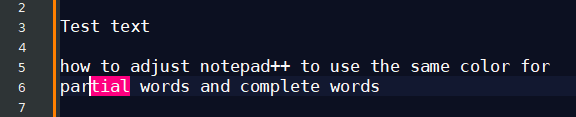
Now If a complete word is marked the color changes to some light brown with pink border huh?
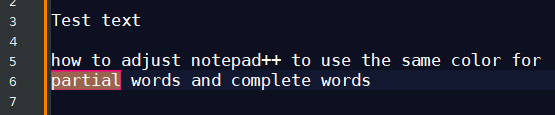
Where do I have to adjust what color-option to have it marked always in pink
I want to use pink for easier finding searched text and I want the highlighted text to be pink always regardless if it is a partial word or a complete word.
-
It’s likely that the Smart Highlighting feature is causing the effect you see; as a first step try turning it off completely. Go to the Settings menu and choose Preferences…, and then uncheckmark this box:
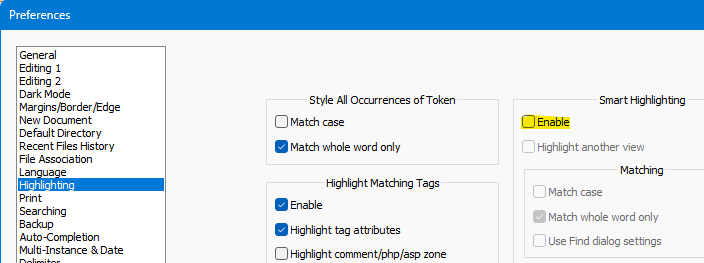
Then test things out…
-
yes that works!
Thank you very much!


Hello! It looks like you're interested in this conversation, but you don't have an account yet.
Getting fed up of having to scroll through the same posts each visit? When you register for an account, you'll always come back to exactly where you were before, and choose to be notified of new replies (either via email, or push notification). You'll also be able to save bookmarks and upvote posts to show your appreciation to other community members.
With your input, this post could be even better 💗
Register Login